







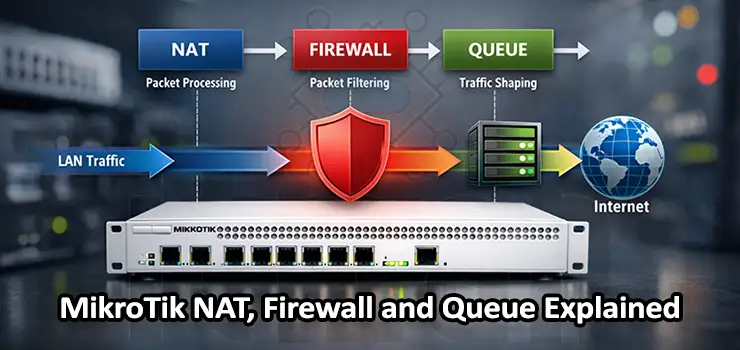
When you work with MikroTik routers in real networks, three subsystems appear again and again in almost every serious configuration: NAT, Firewall, and Queues. Understanding how these components interact is not optional if you want a stable, secure, and well-performing network. This guide is written as a practical, explanatory article rather than a command dump. The goal is to help you understand how MikroTik NAT, Firewall, and Queue actually behave in production environments and how to design them correctly for Google-rank-worthy, real-world usage on MikroTik RouterOS.
Understanding the Packet Flow in MikroTik RouterOS
Before touching NAT, Firewall, or Queue, it is essential to understand how packets move inside RouterOS. Many misconfigurations happen because administrators apply rules without considering packet flow.
In MikroTik, a packet typically passes through these stages:
- Prerouting
- Input or Forward
- Postrouting
NAT rules are evaluated mainly in prerouting and postrouting. Firewall filter rules apply in input and forward chains. Queues can attach to interfaces, global traffic, or specific IP targets, depending on design.
If you ignore this flow, NAT rules may work but firewall rules might fail silently, or queues might shape traffic that should never have reached that stage.
MikroTik NAT Explained in Simple Terms
NAT, or Network Address Translation, is responsible for rewriting IP addresses. In MikroTik NAT is not only about internet access. It is also heavily used for port forwarding, internal redirection, traffic steering, and advanced routing scenarios.
Common NAT Use Cases in MikroTik
The most common MikroTik NAT use cases include:
- Masquerading internal networks to the internet
- Destination NAT (port forwarding)
- Hairpin NAT for internal access via public IP
- Redirecting traffic to local services
Each of these use cases relies on correct chain selection and rule order.
Source NAT and Masquerade in MikroTik
Source NAT modifies the source IP address of packets leaving the router. The most typical example is masquerade for home or office internet access. A typical masquerade rule conceptually does the following:
Internal traffic leaves the router toward WAN, and RouterOS replaces the private IP with the public IP.
Masquerade is dynamic. It automatically adapts to IP changes, which is ideal for PPPoE or DHCP WAN interfaces. However, it has slightly higher CPU cost compared to static src-nat.
In stable environments with fixed public IPs, static src-nat is often preferred for performance and clarity.
Destination NAT and Port Forwarding Logic
Destination MikroTik NAT changes the destination IP or port of incoming traffic. This is how services inside your network become reachable from outside.
A correct destination NAT configuration always includes:
- A dstnat rule to translate the address
- A firewall forward rule to allow the traffic
Many administrators forget the firewall part and wonder why port forwarding does not work.
Another critical point is rule order. Destination MikroTik NAT rules should be placed before general drop rules, otherwise traffic will never reach the NAT stage.
Hairpin NAT and Internal Access via Public IP
Hairpin NAT allows internal users to access internal servers using the public IP address. Without hairpin NAT, internal clients often fail to connect because the router does not rewrite both source and destination properly.
Hairpin NAT usually requires:
- A dstnat rule for public IP access
- A srcnat rule for traffic originating from the internal subnet
This setup is common in office networks where users rely on public DNS names even internally.
MikroTik Firewall Fundamentals
The firewall in MikroTik RouterOS is stateful and very powerful. It is built around chains and connection tracking.
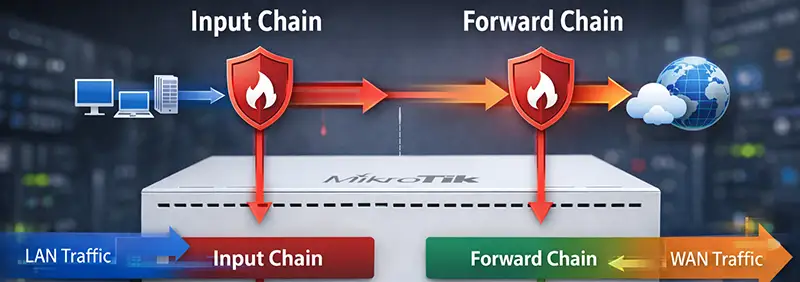
The three most important filter chains are:
- Input: traffic destined for the router itself
- Forward: traffic passing through the router
- Output: traffic generated by the router
Most security mistakes happen in the input chain.
Securing the Input Chain Properly
The input chain protects the router. If you expose management services incorrectly, NAT and queues will not save you.
A secure input chain usually includes:
- Accept established and related connections
- Drop invalid connections
- Allow management access from trusted IPs
- Drop everything else
This simple logic drastically reduces attack surface.
Forward Chain Design for Real Networks
The forward chain controls traffic passing through the router. This includes LAN to WAN, WAN to LAN, and inter-VLAN traffic.
In practice, forward chain rules often handle:
- Allowing established and related traffic
- Blocking unwanted inbound connections
- Restricting inter-VLAN access
- Logging suspicious attempts
Forward chain rules must align with NAT logic. If NAT allows traffic but firewall blocks it, troubleshooting becomes unnecessarily complex.
Connection Tracking and Performance Considerations
MikroTik relies heavily on connection tracking. NAT and firewall both depend on it.
Connection tracking enables:
- Stateful firewall behavior
- NAT translations
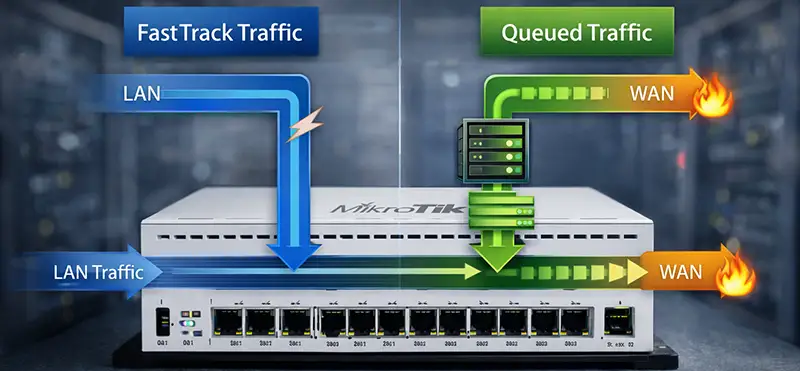
- FastTrack acceleration
However, connection tracking consumes memory and CPU. In high-traffic environments, poor rule design can overload the router.
This is where FastTrack becomes relevant.
FastTrack and Its Impact on Queues
FastTrack allows established connections to bypass most of the firewall and connection tracking logic, significantly improving throughput. However, FastTrack has a major limitation: it bypasses queues. If you rely on queues for bandwidth control, you must either disable FastTrack or carefully exclude specific traffic from it. This trade-off is one of the most important design decisions in MikroTik networks.
MikroTik Queues Explained Clearly
Queues control bandwidth. In MikroTik, queues are not just speed limiters; they are traffic management tools.
There are two main queue types:
- Simple Queues
- Queue Trees
Understanding when to use each is critical.
Simple Queues: Easy but Limited
Simple queues are user-friendly and quick to deploy. They are ideal for:
- Small networks
- Per-user bandwidth limits
- Temporary shaping
Simple queues process traffic sequentially, which means many rules can reduce performance. They are also less flexible for advanced scenarios.
Queue Trees: Powerful and Scalable
Queue trees are more complex but far more powerful. They allow hierarchical bandwidth control and advanced prioritization.
Queue trees are typically used for:
- ISP-like environments
- VLAN-based shaping
- Application-level prioritization
Queue trees usually rely on packet marking, which ties them closely to firewall mangle rules.
Packet Marking and Traffic Classification
Packet marking is the bridge between firewall and queues. Using mangle rules, you can classify traffic based on:
- Source or destination IP
- Protocol or port
- Connection state
- VLAN or interface
Once packets are marked, queue trees can apply precise bandwidth policies.
This separation of classification and shaping leads to cleaner, more maintainable configurations.
Practical Queue Design Example
A common real-world design is:
- Mark traffic per VLAN or user group
- Create parent queues per interface
- Create child queues per service or group
This approach scales well and avoids the performance pitfalls of massive simple queue lists.
Common NAT, Firewall, and Queue Mistakes
Even experienced administrators repeat certain mistakes:
- Overusing masquerade instead of src-nat
- Forgetting firewall rules for port forwarding
- Enabling FastTrack while expecting queues to work
- Mixing simple queues and queue trees without clear logic
- Writing overly broad firewall rules
Avoiding these mistakes alone can dramatically improve network stability.
Performance Tuning Tips for MikroTik Routers
To optimize performance:
- Minimize unnecessary NAT rules
- Keep firewall rule order clean and logical
- Use address lists for readability and efficiency
- Monitor connection tracking usage
- Test queue behavior under real load
Monitoring tools inside RouterOS are your best allies when tuning performance.
NAT, Firewall, and Queue as a Unified System
One of the most important mindset shifts is to stop treating NAT, firewall, and queues as separate features. They form a single traffic control pipeline.
A well-designed MikroTik router:
- Translates addresses logically
- Filters traffic securely
- Shapes bandwidth predictably
When these layers are aligned, troubleshooting becomes easier and performance becomes predictable.
Final Thoughts
This guide focused on explanation and interpretation rather than copy-paste configurations. That approach not only helps your network but also aligns with how search engines evaluate high-quality technical content. By deeply understanding MikroTik NAT , Firewall, and Queue behavior, you can design networks that are secure, performant, and easy to maintain, whether you are managing a small office router or a complex multi-VLAN infrastructure.