







Laptops have become an essential part of everyday life, whether for work, study, or entertainment. We rely on them to be fast, quiet, reliable, and always ready. Yet even the best devices eventually develop issues. Understanding Common Laptop Problems and how they are professionally fixed helps users make smarter decisions, avoid costly mistakes, and know when expert intervention is truly necessary. This article is written to genuinely educate users, not to list quick tips, but to explain what really happens behind the scenes when professionals diagnose and repair laptops.
Understanding Common Laptop Problems Before They Get Worse
Most Common Laptop Problems do not appear overnight. They usually start as small signs that are easy to ignore: a fan that becomes louder, a system that feels slightly slower, or a battery that does not last as long as it used to. Many users try to solve these issues with quick software tweaks or online advice, but without understanding the root cause, these actions often delay proper repair rather than fix the problem. Professional technicians approach laptop issues differently. Instead of treating symptoms, they analyze hardware health, thermal behavior, power delivery, and software integrity together. This holistic approach is what separates temporary fixes from long-term solutions.
Common Laptop Problems Related to Overheating and Performance Drops
One of the most frequent Common Laptop Problems is overheating. Users often notice this when the laptop becomes hot to the touch, slows down under load, or suddenly shuts down. Overheating is rarely caused by a single factor. Dust buildup inside the cooling system, degraded thermal paste, failing fans, or even poor airflow design all contribute over time.
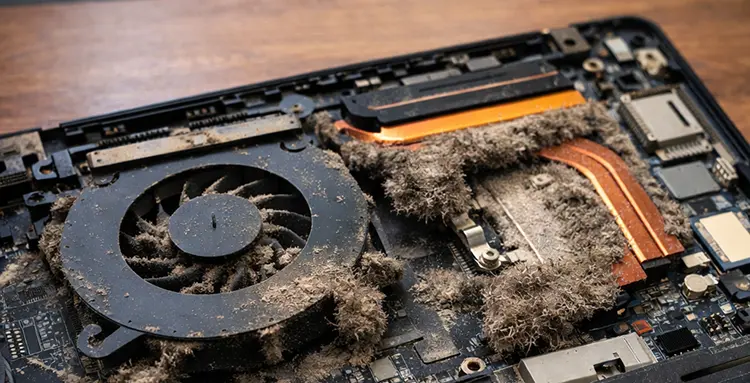
Professionally fixing overheating begins with a full internal inspection. Technicians disassemble the laptop, clean dust from heat sinks and fans, and assess airflow paths. In many cases, replacing old thermal paste with high-quality compounds significantly improves heat transfer. If a fan shows signs of bearing wear or inconsistent rotation, it is replaced rather than ignored. These steps restore stable temperatures and prevent long-term damage to the CPU and GPU.
Slow System Performance as One of the Most Misunderstood Common Laptop Problems
Sluggish performance is often blamed on the operating system, but in reality, this is one of the most misunderstood Common Laptop Problems. While software issues can cause slowdowns, professionals frequently discover hardware limitations or failures behind the scenes. Traditional hard drives degrade mechanically over time, causing long boot times and application freezes. Insufficient RAM leads to constant swapping and system lag. Professionals identify these bottlenecks through diagnostics rather than assumptions.
Replacing a failing hard drive with an SSD or upgrading memory is not guesswork but a data-driven decision based on usage patterns and system compatibility. Equally important is software optimization done correctly. Professionals reinstall operating systems cleanly, update firmware, remove corrupted drivers, and ensure background processes are under control. The result is not just a faster laptop, but a stable one.
Battery Degradation and Power Issues Among Common Laptop Problems
Battery-related issues are another major category of Common Laptop Problems. Users may notice sudden shutdowns, inaccurate charge percentages, or drastically reduced battery life. These symptoms are often misunderstood as charger issues or software bugs. Professionals evaluate battery health using diagnostic tools that measure charge cycles, voltage stability, and capacity loss. In many cases, batteries degrade chemically and must be replaced, even if they appear physically intact. A professional replacement ensures compatibility, proper calibration, and safe charging behavior. Power-related problems also include faulty charging ports or damaged internal power circuits. These are never safe to handle without expertise. Skilled technicians inspect solder joints, power ICs, and connectors under magnification, ensuring reliable and safe power delivery.
Display and Graphics Issues as Common Laptop Problems
Screen flickering, distorted colors, black screens, or random artifacts are Common Laptop Problems that often cause panic. While users may fear GPU failure, professionals understand that display issues can originate from multiple sources. Loose or damaged display cables, failing backlights, or panel degradation are common culprits.
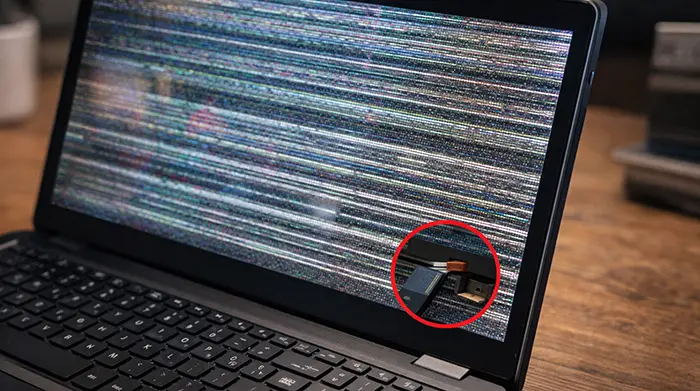
Technicians test external monitors to isolate GPU issues and use known-good components to confirm diagnoses. This method avoids unnecessary motherboard replacements and ensures precise repairs. In cases where the GPU is failing, professionals assess whether reballing, reflow, or full board replacement is appropriate. These decisions are based on thermal history, chipset condition, and cost-effectiveness, not guesswork.
Keyboard, Touchpad, and Input Failures Explained Professionally
Input-related Common Laptop Problems such as unresponsive keyboards, stuck keys, or erratic touchpads are often linked to liquid exposure or wear. Even small spills can cause corrosion beneath the surface long before visible damage appears. Professionals fully disassemble affected areas and inspect connectors, membranes, and control circuits. Cleaning corrosion with specialized solutions and replacing damaged components restores full functionality. In some cases, entire keyboard assemblies must be replaced, but this decision is made after confirming that the fault is not controller-related.
Software Crashes and Boot Failures in Common Laptop Problems
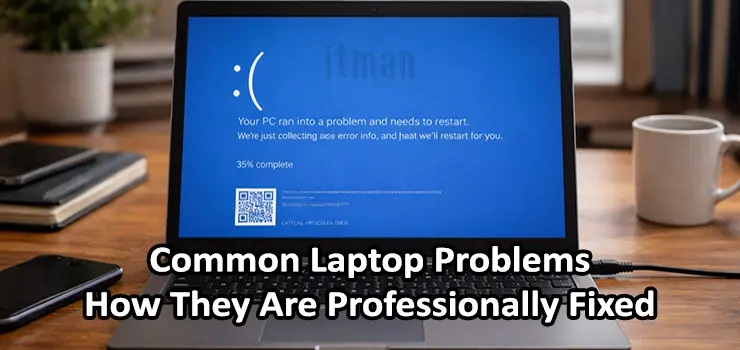
System crashes, blue screens, and boot loops are Common Laptop Problems that are frequently misdiagnosed. While users often reinstall the operating system repeatedly, professionals dig deeper. Memory errors, failing storage devices, corrupted firmware, and incompatible drivers all cause instability. Technicians run stress tests, memory diagnostics, and firmware checks to isolate the true cause. Fixing the problem may involve updating BIOS firmware, replacing faulty RAM, or correcting driver conflicts rather than endlessly reinstalling software.
Network and Connectivity Issues as Common Laptop Problems
Wi-Fi drops, slow connections, or Bluetooth failures are Common Laptop Problems that frustrate users daily. These issues are not always related to the network environment. Internally, damaged antennas, loose connectors, or failing wireless modules are common causes. Professionals test signal strength, inspect antenna routing, and verify driver integrity. When hardware replacement is needed, compatible modules are selected to ensure full performance and regulatory compliance. This level of precision prevents recurring issues and ensures stable connectivity.
Storage Failures and Data Risks in Common Laptop Problems
One of the most critical Common Laptop Problems involves storage failure and potential data loss. Clicking noises, read errors, or disappearing drives are warning signs that should never be ignored. Professionals prioritize data safety before repair. They assess whether drives are mechanically failing or logically corrupted. In cases where data recovery is needed, specialized tools are used to extract information safely before replacement. This professional approach minimizes risk and preserves valuable data.
Why Professional Diagnosis Matters for Common Laptop Problems
Many Common Laptop Problems look similar on the surface but have very different underlying causes. Without proper tools and experience, users often misdiagnose issues, leading to unnecessary expenses or further damage. Professional technicians rely on diagnostics, experience, and systematic testing. They understand how components interact and how one failure can trigger another. This knowledge ensures repairs are accurate, efficient, and long-lasting.
Long-Term Prevention of Common Laptop Problems
Professional repairs do more than fix immediate issues. They also focus on prevention. Proper cleaning schedules, thermal management, firmware updates, and usage recommendations extend laptop lifespan significantly. Technicians often advise users on airflow placement, charging habits, and software maintenance based on real-world failure patterns. These insights help users avoid repeating the same Common Laptop Problems in the future.
Conclusion: Understanding Common Laptop Problems Leads to Smarter Decisions
Common Laptop Problems are an inevitable part of long-term device usage, but how they are handled makes all the difference. Quick fixes and assumptions often lead to repeated failures, while professional diagnosis and repair address the root causes. By understanding how experts approach Common Laptop Problems, users gain clarity, confidence, and realistic expectations. Whether the issue is performance, power, display, or stability, professional solutions are designed not just to repair, but to restore reliability and extend the life of the laptop.