











Fiber internet has changed the way businesses and advanced home networks connect to the internet. With higher bandwidth, lower latency, and better long-distance performance than traditional copper connections, fiber is becoming a common choice for offices, data centers, ISPs, and high-performance networks. However, getting the full benefit of a fiber connection depends on choosing the right router and understanding the difference between SFP, SFP+ and 10G connectivity.
A MikroTik Router for Fiber Internet can be an excellent solution when you need flexible fiber connectivity, VLAN support, advanced routing, and high-speed uplinks without moving to an expensive enterprise platform. But not every MikroTik router supports the same fiber standards, and simply having an SFP port does not automatically mean the router can handle a 10Gbps connection.
What Is a MikroTik Router for Fiber Internet?
A MikroTik Router for Fiber Internet is a MikroTik routing device that can connect directly to a fiber-based network through an SFP or SFP+ interface, depending on the model and network design. Instead of connecting the ISP’s fiber service to a separate media converter and then using Ethernet to connect to the router, a compatible MikroTik router can often use an optical transceiver installed directly in its SFP slot.
This can simplify the network architecture and reduce unnecessary conversion points. A typical connection may look like this:
ISP Fiber → Optical Transceiver → MikroTik SFP/SFP+ Port → LAN Switch → Clients
This setup is particularly useful for businesses receiving fiber internet services such as 1Gbps, 2.5Gbps, 5Gbps, or 10Gbps services. However, the exact configuration depends on the ISP. Some providers supply an ONT/ONU, while others may provide an Ethernet handoff or allow an approved optical module to connect directly to their network.
SFP vs SFP+: What Is the Difference?
One of the most important things to understand before purchasing a MikroTik router for fiber internet is the difference between SFP and SFP+.
SFP
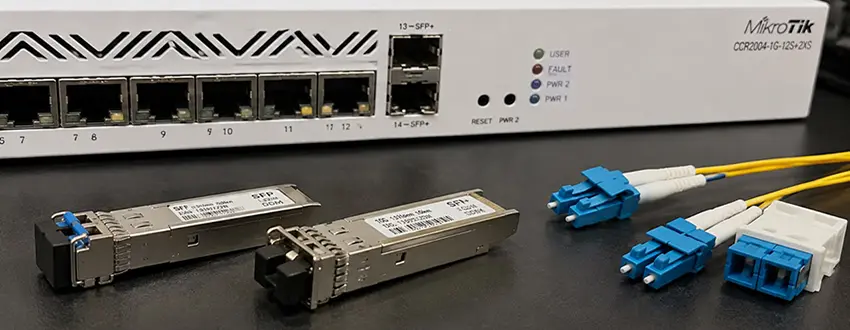
SFP stands for Small Form-factor Pluggable. Standard SFP interfaces are commonly used for connections up to 1Gbps, although the exact supported speeds depend on the hardware and transceiver. A MikroTik router with an SFP port can be suitable for a 1Gbps fiber connection.
For example, if your ISP provides a 500Mbps or 1Gbps fiber service, a Gigabit SFP interface may provide sufficient bandwidth for the WAN connection. The SFP slot also gives you flexibility because you can select an appropriate optical module based on the fiber type and transmission distance.
SFP+
SFP+ is an enhanced version of the SFP form factor designed primarily for 10Gbps connectivity. A MikroTik router with an SFP+ port can therefore be a much better choice when you expect your internet connection or internal network to exceed 1Gbps. For example:
- 1Gbps fiber → Standard SFP may be enough
- 2.5Gbps fiber → Check whether the specific SFP+ port supports the required speed
- 5Gbps fiber → A compatible SFP+ interface may be required
- 10Gbps fiber → SFP+ is normally the appropriate interface
The important point is that SFP and SFP+ describe the interface technology, not the fiber itself.
Does an SFP Port Mean the Router Supports 10Gbps?
No. This is one of the most common mistakes when choosing networking hardware. An SFP port on a router does not automatically mean it supports 10Gbps. A standard SFP interface is generally intended for Gigabit-class connectivity, while SFP+ is designed for higher-speed connections such as 10Gbps. Before purchasing a router, check the manufacturer’s specifications for:
- Supported interface speeds
- SFP or SFP+ designation
- Supported transceiver types
- Maximum throughput
- Hardware offloading capabilities
- RouterOS version and feature support
For example, installing a 10G SFP+ module into hardware that only supports 1Gbps SFP operation will not magically turn the router into a 10Gbps device. The router, interface, transceiver, fiber and ISP handoff must all support the required speed.
Choosing the Right MikroTik Router for Fiber Internet
The correct MikroTik router depends primarily on your internet speed and network requirements.
For 500Mbps to 1Gbps Fiber
If your fiber connection is up to 1Gbps, a MikroTik router with Gigabit Ethernet and an SFP interface can be sufficient. This type of setup works well for:
- Small offices
- Retail stores
- Home offices
- Small businesses
- Basic enterprise networks
However, don’t select a router based solely on port speed. Routing performance is equally important, particularly when using firewall rules, NAT, VPNs, queues, VLANs, or multiple services simultaneously.
For Multi-Gigabit Internet
If your ISP provides 2.5Gbps, 5Gbps or another multi-gigabit service, you should pay much closer attention to the router’s interface capabilities. A router with SFP+ connectivity gives you more headroom and can be a better long-term investment.
For example, a business currently using a 1Gbps connection may upgrade to 5Gbps in the future. Selecting a router with a 10G-capable uplink can prevent an expensive hardware replacement later.
For 10Gbps Fiber Internet
For a 10Gbps fiber connection, look for a MikroTik router with an SFP+ interface and sufficient routing performance. The router must be capable of handling the expected traffic while your configuration is active. A theoretical 10Gbps port does not necessarily mean the router can route 10Gbps of traffic under every configuration. This becomes particularly important when using:
- Stateful firewall rules
- NAT
- VPN encryption
- Queues
- Traffic inspection
- Multiple VLANs
- Complex routing policies
Fiber Type Matters: Single-Mode vs Multimode
Choosing the router is only one part of the installation. The optical transceiver must also match the fiber infrastructure.
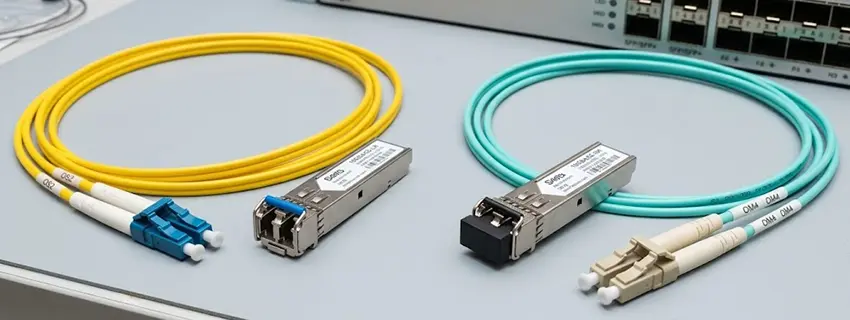
Single-Mode Fiber
Single-mode fiber is commonly used for longer-distance connections and ISP infrastructure. Typical single-mode applications include:
- ISP fiber connections
- Building-to-building links
- Data center interconnections
- Long-distance network uplinks
Single-mode SFP and SFP+ modules are available in different wavelengths and distance ratings.
Multimode Fiber
Multimode fiber is generally used for shorter-distance network connections, particularly inside buildings and data centers. It can be a practical choice for:
- Server rooms
- Data centers
- Switch-to-switch uplinks
- Short fiber runs
The transceiver must match the installed fiber type. For example, a multimode optical module should not simply be installed into a single-mode fiber link and expected to operate correctly.
What Is an SFP Transceiver?
An SFP transceiver is the optical or electrical module installed inside the router’s SFP or SFP+ port. For fiber networking, the module converts electrical signals from the networking device into optical signals transmitted through the fiber. Different modules can have different characteristics, including:
- Data rate
- Fiber type
- Wavelength
- Transmission distance
- Connector type
- Operating temperature
- Compatibility requirements
For example, a 1G single-mode SFP designed for a long-distance connection is very different from a 10G multimode SFP+ module intended for a short data-center connection. This is why buying the router first and choosing the transceiver afterward without checking compatibility can create problems.
Can MikroTik Connect Directly to an ISP Fiber Line?
Sometimes, but not always. This depends on how the ISP delivers the service. Some fiber providers terminate the connection on an ONT/ONU, which converts the optical signal into Ethernet. In that case, the MikroTik router usually connects to the ONT using Ethernet. Other providers may support direct optical connectivity through a compatible SFP/SFP+ module. Before attempting a direct fiber connection, ask the ISP for the required technical information, such as:
- Optical module specifications
- VLAN ID
- Authentication method
- PPPoE credentials
- IP addressing
- Required ONT/ONU
- Speed and duplex requirements
- Whether third-party SFP modules are supported
This information is often more important than simply knowing that the internet service is “10Gbps fiber.”
Using VLANs with a MikroTik Fiber WAN
Many business fiber services use VLAN tagging. For example, an ISP may require the internet connection to operate through a specific VLAN ID. MikroTik RouterOS can create VLAN interfaces and use them for WAN connectivity. A simplified topology could look like:
Fiber → SFP+ → VLAN Interface → PPPoE/IPoE → Firewall/NAT → LAN
This gives network administrators considerable flexibility. For businesses, VLAN configuration can also be used to separate:
- Internet traffic
- VoIP
- IPTV
- Management traffic
- Guest networks
- Internal departments
However, the exact VLAN requirements are ISP-specific, so you should obtain the provider’s configuration details before changing the router.
10G Connectivity: When Do You Actually Need It?
Not every network needs 10Gbps. If your office has a 500Mbps internet connection and most users work with cloud applications, email, web applications, and standard business software, moving to 10G may provide little practical benefit. 10G becomes much more useful when you have:
- High-speed NAS storage
- Large file transfers
- Video production workloads
- Virtualization infrastructure
- Multiple high-bandwidth servers
- Data-center applications
- Multi-gigabit internet
- High-speed switch uplinks
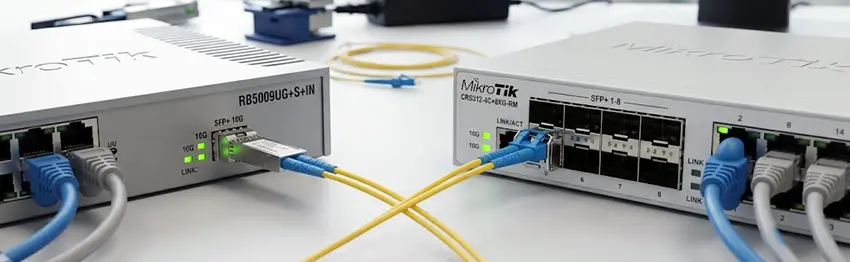
There is also an important distinction between 10G internet and a 10G LAN. You may have a 1Gbps internet connection but still benefit from 10G connectivity between your servers and switches.
A Practical Example: Small Business Fiber Network
Consider a business with a 2.5Gbps fiber internet connection, 30 employees, several IP cameras, Wi-Fi access points, and a NAS server. A practical architecture could be:
ISP Fiber → MikroTik SFP+ → MikroTik RouterOS → 10G Switch → Access Switches → Users/APs
The SFP+ uplink gives the router enough interface capacity for the multi-gigabit WAN connection, while the 10G connection to the switch prevents the router-to-switch link from becoming a bottleneck.
The network can then use VLANs to separate users, cameras, guest Wi-Fi and management traffic. This is where selecting the right MikroTik Router for Fiber Internet becomes more important than simply buying the cheapest router with an SFP slot.
Common Mistakes When Buying a MikroTik Fiber Router
1. Assuming every SFP port is 10G
Always verify whether the port is SFP or SFP+.
2. Ignoring the ISP’s requirements
The optical module and router configuration must match the ISP’s service.
3. Choosing based only on port speed
A 10G interface does not guarantee 10Gbps routing performance under every workload.
4. Using the wrong optical module
Fiber type, wavelength, speed and transmission distance must be compatible.
5. Forgetting the LAN side
A 10Gbps WAN connection is not very useful if the router connects to the rest of the network through a 1Gbps bottleneck.
6. Buying more bandwidth than necessary
10G hardware can be unnecessary for a small network that only needs 500Mbps or 1Gbps.
SFP or SFP+: Which One Should You Choose?
The simplest way to decide is to start with your current and expected internet speed.
| Internet Connection | Recommended Interface |
|---|---|
| Up to 1Gbps | SFP / Gigabit Ethernet |
| 1–2.5Gbps | SFP+ or compatible multi-gig interface |
| 2.5–5Gbps | SFP+ recommended |
| 10Gbps | SFP+ |
| Future 10G upgrade | SFP+ is preferable |
The actual choice should also consider routing performance, available Ethernet ports, VPN requirements, VLANs, firewall rules, and your expected network growth.
Final Thoughts
Choosing a MikroTik Router for Fiber Internet is not simply a matter of finding a router with an SFP port. You need to consider the fiber service, interface speed, optical transceiver, ISP requirements, routing performance and the rest of your network infrastructure. For standard Gigabit fiber, an SFP-equipped MikroTik router may be more than sufficient. For multi-gigabit and 10Gbps services, an SFP+ model provides significantly more flexibility and bandwidth.
The most important rule is to look at the entire connection path: ISP → optical module → router → switch → clients. Every component needs to support the required speed and technology. With the right combination, MikroTik RouterOS provides a powerful and flexible platform for fiber-based business and enterprise networks.
Frequently Asked Questions
Can I use an SFP+ module in a MikroTik SFP port?
Not necessarily. Physical compatibility does not guarantee that the router supports the module or its operating speed. Always check the specific MikroTik model’s supported interfaces and transceivers.
Is SFP+ required for 10Gbps internet?
In MikroTik environments, SFP+ is one of the most common interfaces for 10Gbps fiber connectivity. The router, transceiver and ISP handoff must all support 10Gbps.
Can a MikroTik router connect directly to fiber?
Yes, on compatible models and services. However, some ISPs require an ONT/ONU, so direct SFP/SFP+ connectivity depends on the provider’s network architecture and requirements.
Is 10G worth it for a small business?
It depends on the workload. If the business has multi-gigabit internet, high-speed storage, virtualization, large file transfers or significant internal traffic, 10G can be valuable. For a basic 500Mbps or 1Gbps connection, it may not be necessary.


















