





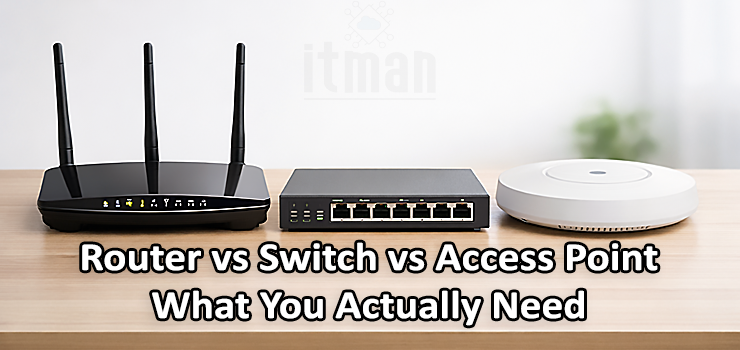
If you’re planning a home network, setting up a small office, or upgrading a growing business environment, you’ll quickly run into three key devices: router, switch, and access point. Many people think they all “do the same thing” because they all involve internet and cables, but the truth is each one has a very specific job. Choosing the right one (or the right combination) can save you money, improve your internet speed, and make your network more stable and secure.
In this guide, we’ll break down Router vs Switch vs Access Point in a practical and SEO-friendly way, using real scenarios, common mistakes, and clear recommendations so you can decide what you actually need—not what looks good in advertisements.
What Is a Router and What Does It Actually Do?
A router is the device that connects your local network (your home or office devices) to the internet. It’s basically the “traffic manager” between your internal network and the outside world. If you have an ISP connection (Etisalat, du, or any other provider), the router is usually the first device in your network that handles your public IP address and distributes access to your laptops, phones, smart TVs, and other devices.
A router does more than just “give Wi-Fi.” In fact, Wi-Fi is only a feature of many routers, but the router’s main job is routing traffic between different networks. Without a router, you might have devices connected by cables, but they won’t have internet access (unless you’re dealing with a very special enterprise setup).
A typical router handles important network features such as:
- NAT (Network Address Translation) so multiple devices can share one public IP
- DHCP so devices automatically receive an IP address
- Basic firewall and security rules
- Internet connection management and routing decisions
- Sometimes VPN, bandwidth control, and parental controls
So if you’re asking “Do I need a router?” the answer is almost always yes, because it’s the central gateway to the internet.
What Is a Switch and Why Is It Needed in Many Networks?
A switch is a device used to expand the number of wired connections on your network. Think of it like a smart splitter for Ethernet. Routers usually have a limited number of LAN ports—often 1 to 4 ports. But in real life, homes and offices often have far more devices that benefit from wired connections: PCs, CCTV NVRs, IP cameras, VoIP phones, printers, and servers.
A switch connects multiple devices within the same local network and allows them to communicate efficiently. Unlike old hubs that simply broadcast everything, a switch intelligently sends traffic only to the specific port that needs it. This leads to better performance, higher reliability, and fewer network bottlenecks.
Switches are especially important when:
- You have many wired devices
- You need stable speed for workstations
- You want reliable connections for CCTV systems
- You’re building structured cabling in an office
- You plan to use VLANs to separate departments or networks
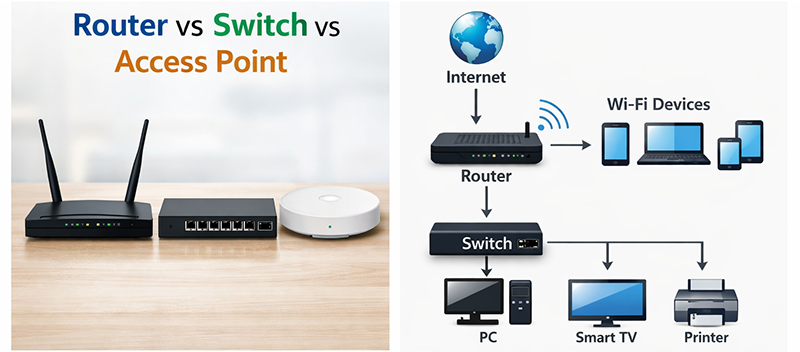
In many professional setups, the router connects to a switch, and the switch connects to everything else. This is one of the most common and scalable network architectures.
What Is an Access Point and Why It’s Not the Same as a Router
An access point (AP) is a device that provides Wi-Fi coverage. It takes a wired network connection and broadcasts it wirelessly so phones, laptops, and tablets can connect. The main idea is simple: if your router is far from your workspace, or if you have a large space where one Wi-Fi device can’t cover everything, you add access points.
People often confuse access points with routers, mostly because many routers have Wi-Fi built-in. But a true access point has one job: wireless connectivity. It doesn’t replace routing functions like NAT or firewalling, unless it’s a special enterprise model with routing capabilities (which is not the usual case).
An access point becomes essential in these situations:
- Large villas and multi-floor houses
- Offices with many rooms and walls
- Warehouses and retail spaces
- Locations with heavy Wi-Fi usage (employees + clients)
- Places where you need fast roaming between zones
If you’re serious about stable Wi-Fi, using a dedicated access point system is usually better than relying only on a standard router’s Wi-Fi.
Router vs Switch vs Access Point: The Real Difference in One Line
If you want the simplest way to understand Router vs Switch vs Access Point, here it is:
- Router connects your network to the internet.
- Switch connects more wired devices to your network.
- Access Point connects wireless devices to your network.
Each device solves a different problem. The confusion happens when people try to use one device to do the job of another, which leads to weak Wi-Fi, slow speeds, random disconnections, or cable limitations.
When You Only Need a Router (Simple Setup)
In a small apartment or a small office with a few devices, you may only need a router. If the router is placed in a good central location and you don’t have too many users, the built-in Wi-Fi might be enough.
You likely only need a router if:
- Your home is under 80–100 sqm
- You have fewer than 8–10 devices active at the same time
- You don’t use wired connections much
- You don’t have CCTV cameras or network storage
- You don’t have coverage issues in bedrooms or far rooms
In this case, a good router with dual-band or tri-band Wi-Fi and decent antennas may solve everything.
But many people underestimate how quickly a “simple setup” becomes more complex once you add smart devices, cameras, or work-from-home requirements.
When You Need a Router + Switch (Wired Devices Priority)
A router + switch setup is ideal when you need more Ethernet ports and want better wired performance. This is extremely common in Dubai office networks, retail environments, and even villas that have CCTV systems and structured cabling.
You will need a switch if you have:
- IP cameras + an NVR system
- Multiple desktop PCs
- Smart TV + gaming console + streaming devices
- Printers, scanners, POS systems
- Servers, NAS storage, or backup devices
Wired connections still win when it comes to:
- Stability
- Speed consistency
- Low latency for gaming or VoIP
- No interference issues like Wi-Fi channels
For businesses, a switch is not “optional.” It’s often the backbone of daily operations.
When You Need a Router + Access Point (Best Wi-Fi Coverage)
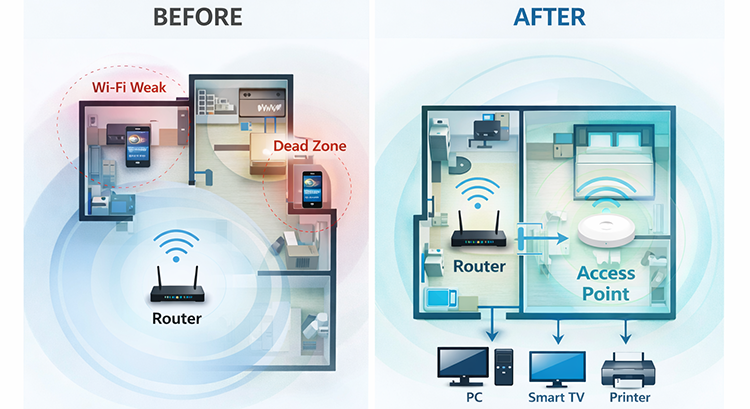
If your biggest complaint is weak Wi-Fi or dead zones, then you don’t need a stronger internet package—you need better Wi-Fi design. This is where access points come in.
You’ll benefit from access points if:
- Your Wi-Fi signal drops in bedrooms or meeting rooms
- Your speed is good near the router but weak far away
- You have thick walls, glass, or long corridors
- You want seamless roaming while walking around
- You have multiple employees or guests connecting all day
A dedicated access point gives you:
- Better Wi-Fi range and penetration
- Better handling of many devices
- More stable performance under load
- Cleaner network management when using professional systems
The correct solution is usually one or more access points connected back to the router via Ethernet.
When You Need Router + Switch + Access Point (Professional Network Setup)
For the majority of modern offices, clinics, warehouses, coffee shops, and even medium-to-large villas, the best setup is Router + Switch + Access Points.
This design makes your network scalable. You can add more devices anytime without replacing everything. It also keeps Wi-Fi stable because access points are built for wireless performance, while the router focuses on internet routing, and the switch handles wired expansion.
A professional network setup is recommended if:
- You have more than 15–20 active devices
- You have CCTV cameras
- You have employees working on cloud software
- You need VLAN separation (staff vs guests vs cameras)
- You need PoE to power access points or IP phones
- You want maximum uptime and fewer support issues
This combination is exactly what many businesses need for long-term stability.
Common Mistakes People Make When Choosing Router vs Switch vs Access Point
Many network problems come from wrong device selection. Here are the most common mistakes:
1) Buying a powerful router to fix Wi-Fi dead zones
A powerful router might help a little, but it cannot change physics. Walls, distance, and interference will still block signal. Adding access points is usually the correct solution.
2) Using Wi-Fi extenders instead of access points
Extenders can be okay for very basic use, but they often reduce speed and increase latency. Access points are cleaner, faster, and more reliable for serious setups.
3) Not using a switch and relying only on router ports
This becomes a limitation quickly. For CCTV and office cabling, switch ports matter more than people realize.
4) Not separating CCTV from office traffic
Without VLANs or planning, cameras can overload the network. Managed switches help prevent this issue.
5) Placing Wi-Fi devices in wrong locations
Even the best access point will perform poorly if installed inside a closed cabinet or behind thick walls. Placement matters as much as device quality.
Managed Switch vs Unmanaged Switch: Which One Is Better?
When you decide to buy a switch, you’ll usually choose between unmanaged and managed.
An unmanaged switch is plug-and-play. It works immediately with no configuration. It’s best for:
- Homes
- Very small offices
- Simple wired expansion without VLAN needs
A managed switch allows configuration and advanced network control. It’s best for:
- Businesses and offices
- VLAN segmentation
- Better security and monitoring
- CCTV networks that need isolation
- Advanced troubleshooting
If you want a network that can grow and stay stable long-term, a managed switch is usually the better investment.
PoE Switch and Why It’s a Game-Changer for CCTV and Wi-Fi
One of the most practical upgrades in a real network is a PoE switch. PoE means Power over Ethernet. It allows you to power devices such as access points and IP cameras using the Ethernet cable itself, without requiring a separate power adapter.
A PoE switch is helpful when:
- You install access points on ceilings
- You have multiple IP cameras around the building
- You want a cleaner installation with fewer power outlets
- You want centralized power control and less cable mess
In Dubai, PoE switches are extremely common in villas and businesses because they simplify professional installations.
How to Choose the Right Device Based on Your Real Need
Let’s make it practical. Here’s a clear guide to what you should buy depending on your goal.
- If your issue is “I don’t have internet” You need a router or proper ISP configuration.
- If your issue is “I don’t have enough LAN ports” You need a switch.
- If your issue is “Wi-Fi is weak in some rooms” You need access points (not just a new router).
- If your issue is “I have CCTV and devices keep disconnecting” You likely need a switch (possibly PoE) and a more structured network layout.
- If your issue is “I want a network for my business that never fails” You need router + managed switch + professional access points, with proper configuration and cabling.
Quick Comparison Table: Router vs Switch vs Access Point
| Device | Main Job | Connects To | Best For | Common Mistake |
|---|---|---|---|---|
| Router | Connects LAN to Internet | ISP + Local Network | Homes & offices needing internet access | Thinking it replaces a switch or access point |
| Switch | Expands wired connections | Router + wired devices | CCTV, offices, desktops, NAS | Buying too few ports or wrong type |
| Access Point | Adds Wi-Fi coverage | Switch/router via Ethernet | Better Wi-Fi, roaming, many users | Using extenders instead of access points |
Real-World Examples (Dubai Homes and Offices)
In Dubai, network needs are often more demanding than people expect. Many homes have:
- Large villas with multiple floors
- Strong concrete walls
- Outdoor areas that need Wi-Fi
- CCTV systems
- Smart home devices
And many offices rely heavily on:
- Cloud systems
- VoIP calls
- POS systems
- Continuous connectivity
That’s why the best approach is planning your network instead of randomly buying devices. A stable network is not about one expensive device—it’s about the right design.
Final Recommendation: What You Actually Need
So in the Router vs Switch vs Access Point debate, there is no “winner.” Each one solves a different problem. Most people don’t need to choose one device forever—they need the correct combination.
- Choose a router because you need internet connectivity, firewalling, and network control.
- Add a switch when you need more wired devices, more ports, and stable internal connections.
- Add access points when you need strong, reliable Wi-Fi coverage in multiple areas.
If you want a modern, reliable setup, especially for a business or a large villa, the best long-term solution is usually: Router + Switch + Access Points.
Network Installation and Setup Services in Dubai
If you want your network to be fast, stable, and professionally installed—especially for offices, shops, villas, warehouses, or CCTV setups—it’s important to design it correctly from day one.
In Dubai, we provide full network installation and setup services, including:
- Router configuration and internet setup
- Switch installation (managed and unmanaged)
- PoE switch setup for CCTV and access points
- Professional access point installation for full Wi-Fi coverage
- Structured cabling, network troubleshooting, and optimization
If you’re building a new network or upgrading an existing one, we can help you choose the right devices and implement the best setup for your space and usage.