






One of the most common questions in Wi-Fi design sounds deceptively simple: How Many Access Points Do You Need?
People usually expect a fast, fixed number as an answer. One access point for a small apartment, two for a villa, maybe five for an office. In reality, Wi-Fi does not work like that. Coverage, performance, and stability depend on several interacting variables, and ignoring even one of them often leads to slow speeds, random disconnections, or dead zones that never seem to go away.
This article explains How Many Access Points Do You Need using a practical, real-world approach. You will learn a quick way to estimate the number, then understand the deeper technical factors that refine that estimate. The goal is not theory, but a Wi-Fi network that actually works under daily load.
Understanding the real meaning of Wi-Fi coverage
Before calculating anything, it is important to redefine what “coverage” means. Many people assume that if a device shows Wi-Fi signal bars, coverage exists. In practice, Wi-Fi coverage means stable throughput, acceptable latency, and consistent performance while multiple devices are connected.
An access point can often broadcast a signal far beyond the area where it can deliver usable speed. This creates the illusion that fewer devices are sufficient. Users then experience buffering, packet loss, or slow uploads even though the signal appears strong. When asking How Many Access Points Do You Need, the real question is how many are required to provide usable service everywhere, not just visible signal.
The quick calculation most people start with
A commonly used baseline is to assume that one properly placed access point can reliably serve about 90 to 120 square meters of open indoor space. This estimate assumes standard residential construction, moderate device density, and ceiling or wall mounting at an appropriate height. Using this approach, the quick calculation works like this: take the total usable area and divide it by roughly 100 square meters. The result gives a starting number.
A 300 square meter home would initially suggest three access points. An 800 square meter office would suggest around eight. This calculation is useful only as a first approximation. It answers How Many Access Points Do You Need at the most superficial level. From here, real-world conditions begin to change the answer significantly.
Why walls and building materials change everything
Wi-Fi signals weaken as they pass through obstacles. Drywall reduces signal slightly, while concrete, brick, stone, and metal-reinforced walls can reduce it dramatically. Glass with metallic coating, elevator shafts, and structural columns are especially problematic. In many modern buildings, the number of walls matters more than total area. A long apartment with many rooms in a row often needs more access points than an open plan space of the same size.
Each wall reduces signal strength and increases retransmissions, which lowers effective speed. This is one of the main reasons people underestimate How Many Access Points Do You Need. They count square meters but forget that Wi-Fi is not a straight-line technology. It reflects, diffracts, and attenuates unpredictably depending on the environment.
The role of user density and connected devices
Coverage alone does not define access point requirements. Capacity is just as important. Every connected device shares airtime with others on the same access point. Smartphones, laptops, smart TVs, cameras, and IoT devices all compete for transmission time, even when idle. A single access point may cover a large area but struggle when many devices are active simultaneously. Video calls, cloud backups, IPTV, and gaming increase airtime consumption rapidly.
In offices and homes with many users, performance issues appear long before coverage becomes a problem. When calculating How Many Access Points Do You Need, device count often forces you to increase the number beyond what coverage alone would require. Adding access points reduces the number of devices per radio, improving stability and throughput.
Why one powerful access point is rarely the solution
A common mistake is trying to solve Wi-Fi problems by installing one high-power access point. While transmit power may increase range slightly, client devices usually transmit at much lower power. This creates an asymmetric link where the client can hear the access point, but the access point struggles to hear the client clearly.
This asymmetry leads to retries, reduced modulation rates, and unstable connections. Multiple correctly placed access points with moderate power almost always outperform a single powerful device. This principle directly affects How Many Access Points Do You Need, because adding more smaller cells improves both coverage and quality.
Placement matters more than raw quantity
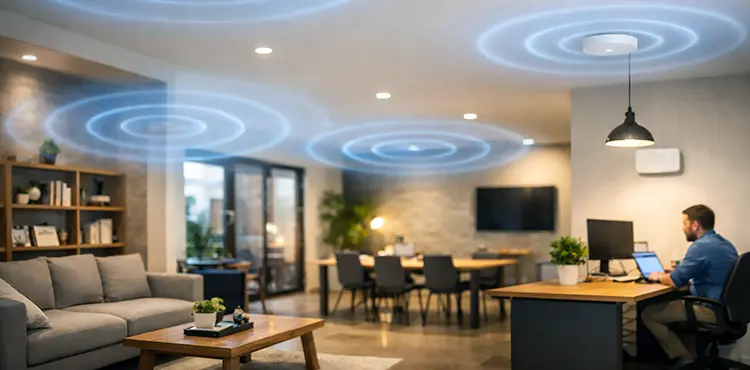
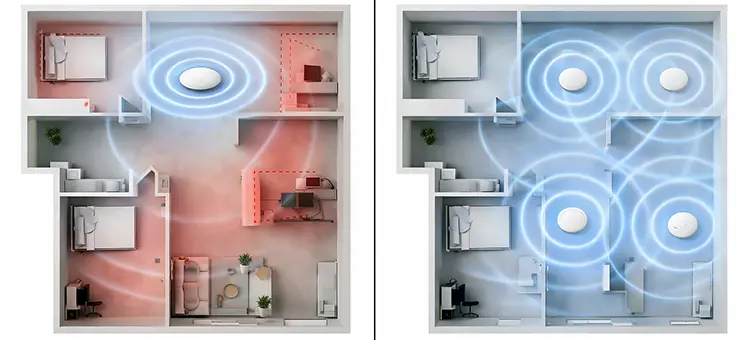
Two networks with the same number of access points can perform very differently depending on placement. Mounting height, distance between devices, and line of sight all influence performance. Ceiling-mounted access points generally provide more uniform coverage than devices placed on shelves or inside cabinets. Placing access points too close together can cause excessive overlap and interference.
Placing them too far apart creates weak areas that clients cling to instead of roaming properly. Correct spacing allows devices to transition smoothly between access points without noticeable drops. Understanding placement refines the answer to How Many Access Points Do You Need. Sometimes better placement reduces the number required. In other cases, poor placement forces you to add more devices just to compensate.
Roaming behavior and why fewer access points can hurt
Many users believe fewer access points simplify roaming. In reality, well-designed multi-AP networks improve roaming when signal cells are clearly defined. When one access point covers too much area, devices tend to stay connected even when performance degrades, because they do not see a better alternative.
Multiple access points with overlapping but controlled coverage encourage clients to switch at the right time. This is especially important in offices, hotels, and large homes where people move while using Wi-Fi. When evaluating How Many Access Points Do You Need, roaming quality should be considered part of performance, not an optional feature.
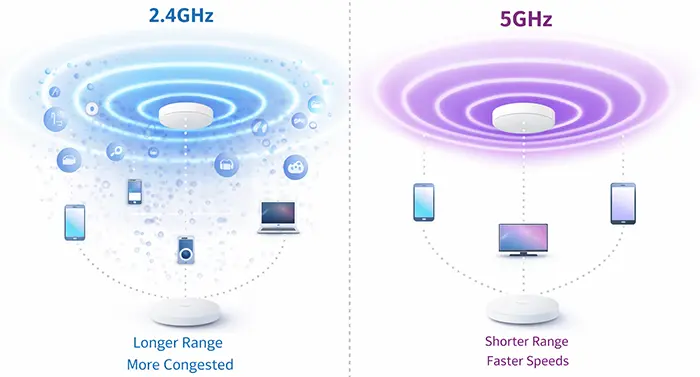
Frequency bands and their impact on coverage planning
The 2.4 GHz band travels farther but offers limited bandwidth and is often congested. The 5 GHz band provides higher speeds but has shorter range and poorer wall penetration. Modern networks rely heavily on 5 GHz for performance, which naturally increases the number of access points required.
If you design purely for 2.4 GHz coverage, you may think fewer devices are enough. Designing for real-world performance means ensuring strong 5 GHz coverage throughout the space. This almost always increases the answer to How Many Access Points Do You Need compared to older Wi-Fi designs.
Homes versus offices: different answers to the same question
In residential environments, usage patterns vary throughout the day. Streaming, gaming, and remote work often happen simultaneously, but overall device density is usually moderate. In offices, even when users appear idle, background traffic from cloud services, updates, and collaboration tools keeps airtime busy. An office with the same size as a house often requires more access points to maintain consistent performance.
Meeting rooms, shared spaces, and open offices create traffic bursts that residential planning rarely accounts for. Asking How Many Access Points Do You Need without specifying the environment leads to incorrect assumptions. Usage profile matters as much as physical layout.
The hidden effect of ceilings and floors
Multi-story buildings introduce vertical signal behavior. Wi-Fi often travels surprisingly well between floors, but this can cause interference rather than usable coverage. Relying on one access point to serve multiple floors usually results in weak performance everywhere. Each floor typically benefits from its own access point placement, even if signal appears adequate without it. This improves capacity and reduces interference between floors. Vertical planning is a common oversight when estimating How Many Access Points Do You Need.
When adding more access points actually improves stability
Some users worry that adding access points creates more interference. While poorly configured networks can suffer from this, properly designed systems use channel planning and power control to minimize overlap. Modern access points also support features that manage airtime more efficiently. In practice, adding access points often reduces contention and improves stability, especially in busy networks. The key is coordination, not limitation. This perspective changes how How Many Access Points Do You Need should be answered, focusing on balance rather than minimalism.
A realistic way to finalize your number
After considering area, walls, device count, usage type, and frequency bands, the final number usually ends up higher than the initial quick calculation. This is normal. Wi-Fi design favors redundancy and smaller cells over sparse coverage. A good rule is to start with the baseline calculation, then add access points for heavy walls, high device density, and multi-floor layouts. This approach produces a network that feels stable rather than barely sufficient.
Why professional surveys still matter
Even with careful planning, predictive estimates cannot replace real measurements. Signal reflections, interference from neighboring networks, and building quirks often reveal themselves only during a site survey. Professionals use heatmaps and spectrum analysis to validate assumptions. While not always mandatory for small environments, surveys provide confidence in large or performance-critical deployments. They answer How Many Access Points Do You Need with data rather than guesswork.
Professional Wi-Fi Planning and Installation in Dubai
For projects in Dubai, we offer professional on-site Wi-Fi planning and installation through our experienced technical team. Our technicians evaluate the real environment, including layout, wall materials, user density, and expected usage, before deciding how many access points are truly required. From structured cabling and access point placement to live signal testing and final optimization, every step is handled on-site to ensure reliable coverage, smooth roaming, and long-term network stability rather than guesswork or trial-and-error setups.
Final thoughts on designing Wi-Fi that actually works
The question How Many Access Points Do You Need does not have a universal answer, but it does have a correct approach. Quick calculations give a starting point, but real performance comes from understanding how Wi-Fi behaves in physical spaces with real users. If you design for coverage alone, you will likely under-deploy. If you design for performance, roaming, and capacity, you will usually end up with more access points and a far better experience. In Wi-Fi design, a network that feels effortless is almost always the result of careful planning, not minimal hardware.