











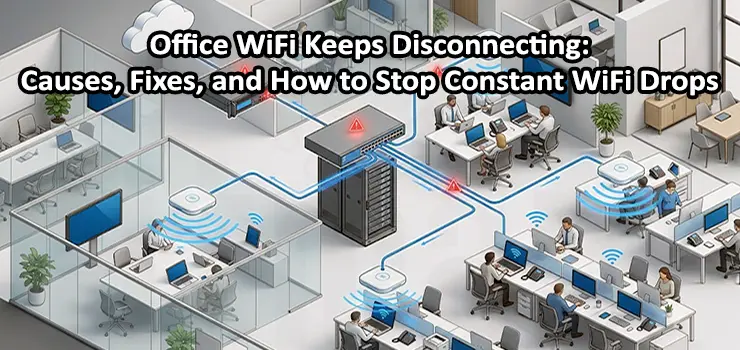
Few things are more frustrating in a workplace than unreliable WiFi. One moment you’re presenting in a Zoom meeting, uploading files to the cloud, or accessing your company’s ERP system, and the next moment the connection drops without warning. If your Office WiFi Keeps Disconnecting, the problem is more than just an inconvenience—it directly impacts productivity, customer service, and employee satisfaction.
Many business owners assume the internet provider is to blame whenever the wireless network becomes unstable. While ISP issues do happen, they’re actually far less common than problems inside the office itself. Poor WiFi design, overloaded access points, interference, and incorrect network configuration are often the real reasons employees keep losing their connection.
The good news is that most Office WiFi problems leave clues. Once you understand what those clues mean, it’s much easier to identify the root cause instead of repeatedly restarting the router and hoping the problem disappears.
Why Does Office WiFi Keep Disconnecting Even When the Internet Is Working?
One of the most confusing situations is when some employees complain that the Office WiFi disconnects while others continue working without any issues. In many cases, the internet connection itself is perfectly healthy. The issue lies in how wireless devices communicate with the access points inside the office.
Unlike a wired Ethernet connection, Office WiFi depends on radio signals. Those signals constantly compete with walls, neighboring wireless networks, electronic devices, and even the growing number of smartphones, laptops, printers, and IoT devices connected throughout the office. As more devices share the same wireless space, maintaining a stable connection becomes increasingly difficult if the network wasn’t designed to handle the demand.
This is why two offices with the same internet speed can have completely different user experiences. A well-designed network with properly placed business-grade access points can easily outperform a faster internet connection running on poorly installed equipment.
The Biggest Mistake We See in Office WiFi Networks
One of the most common misconceptions is that stronger Office WiFi simply means buying a more expensive router. We’ve visited offices where companies invested in high-speed internet packages but were still dealing with constant disconnections. After inspecting the network, the problem turned out to be a single consumer-grade router trying to serve dozens of employees across multiple rooms.
Home routers are built for homes. Offices have completely different requirements. Staff members move around during the day, connect multiple devices, join video conferences, transfer large files, and rely on cloud applications simultaneously. Business environments require wireless infrastructure designed for higher client density and continuous operation.
Replacing a home router with properly deployed enterprise access points often provides a bigger improvement than upgrading the internet speed itself.
Access Point Placement Matters More Than Most People Think
Imagine placing a high-quality speaker inside a closed cabinet. Even if it’s powerful, the sound won’t reach the room effectively. Office WiFi behaves in a similar way.
We’ve seen access points installed inside server rooms, behind concrete walls, above suspended ceilings filled with metal ducting, or tucked into corners simply because it was easier to run cables there. Technically, the devices were working perfectly—but their signals weren’t reaching employees efficiently.
Office layouts should always influence wireless design. Open-plan workspaces, meeting rooms, warehouses, glass partitions, and concrete walls all affect signal propagation differently. Simply relocating an access point a few meters can sometimes eliminate dead zones that employees have struggled with for months. Professional WiFi planning focuses on coverage, capacity, and roaming rather than just signal strength.
More Access Points Don’t Always Mean Better Office WiFi
When an Office WiFi Keeps Disconnecting, many businesses assume they just need another access point. Sometimes that’s true—but sometimes it actually makes the situation worse. If multiple access points are installed too close together without proper channel planning, they begin competing with each other. Devices may constantly switch between access points or remain connected to a weaker one long after a stronger signal becomes available.
The result feels exactly like an unstable internet connection. Video calls freeze, cloud applications disconnect, and users experience random drops throughout the day. Adding wireless equipment without designing the network properly is similar to adding more traffic lights to solve congestion without changing the road layout. More hardware doesn’t automatically create a better network.
Interference Is Often Invisible but Very Real
Unlike damaged cables or broken hardware, wireless interference can’t be seen with the naked eye. Modern office buildings are filled with dozens—sometimes hundreds—of nearby WiFi networks operating on similar frequencies. Every neighboring office, café, or retail space contributes additional wireless traffic.
On top of that, Bluetooth devices, wireless presentation systems, security cameras, cordless phones, and other electronics all compete for the same airspace. During quiet hours everything may seem normal, but once the building becomes busy in the morning, wireless congestion increases dramatically. That’s why some businesses only experience disconnects between 9 AM and 5 PM while evenings remain perfectly stable. A proper wireless survey can reveal interference that ordinary speed tests never detect.
Sometimes the Problem Isn’t WiFi at All
Before replacing network equipment, it’s important to determine whether the wireless network is actually responsible. If both wired computers and wireless devices lose internet access simultaneously, the issue may involve the internet provider, firewall, or core network infrastructure instead of the access points.
Likewise, a failing PoE switch can briefly restart every connected access point without anyone realizing it. From the employees’ perspective, it simply looks like the WiFi keeps disconnecting every few hours. Looking at switch logs, firewall events, and access point statistics often reveals patterns that aren’t visible to users. This is why experienced technicians investigate the entire network instead of focusing only on the wireless side.
What You Can Check Before Calling an IT Technician
There are a few simple observations that can help narrow down the cause of the problem. Pay attention to whether everyone loses connection at the same time or only employees sitting in certain areas of the office. Notice whether the problem happens during busy working hours, after moving between meeting rooms, or only when many people join video conferences.
Also check whether wired computers remain online while WiFi users disconnect. That single observation can immediately determine whether the issue is related to the wireless network or the internet connection itself.
Avoid repeatedly rebooting networking equipment whenever the problem appears. Restarting devices may temporarily restore service, but it also removes valuable logs that technicians use to identify the real cause. Keeping track of when and where disconnects happen makes troubleshooting much faster.
When Is It Time to Upgrade Your Office WiFi?
Technology changes quickly, and many businesses continue relying on networking equipment that was installed years ago. If your office has grown, adopted cloud-based applications, expanded into additional rooms, or significantly increased the number of connected devices, your original WiFi design may no longer meet your needs.
Modern WiFi 6 and WiFi 7 access points offer far better performance in high-density environments, improved roaming between access points, lower latency, and greater reliability for businesses that depend on cloud services and video conferencing every day. Upgrading doesn’t always mean replacing everything. Sometimes redesigning the network layout and replacing only key components delivers a dramatic improvement while keeping costs under control.
Final Thoughts
When an Office WiFi Keeps Disconnecting, the solution is rarely as simple as rebooting the router or purchasing another access point. Stable business WiFi depends on proper planning, correct equipment placement, intelligent configuration, and hardware that matches the size and demands of your office.
Taking the time to identify the real source of the problem will save money, reduce downtime, and create a much better experience for everyone using the network. Whether the issue is interference, poor coverage, outdated hardware, or incorrect configuration, solving the root cause is always more effective than applying temporary fixes.
Professional Office WiFi Troubleshooting and Installation in Dubai
If your Office WiFi Keeps Disconnecting, our experienced network technicians in Dubai can help identify the exact cause and provide a long-term solution. We offer on-site WiFi troubleshooting, wireless site surveys, access point installation, office network design, structured cabling, switch configuration, and complete network setup for businesses of all sizes. Whether you’re moving into a new office, expanding your wireless coverage, or trying to eliminate persistent WiFi issues, our team can assess your environment, recommend the right solution, and build a fast, stable, and secure network that supports your daily business operations.


















