











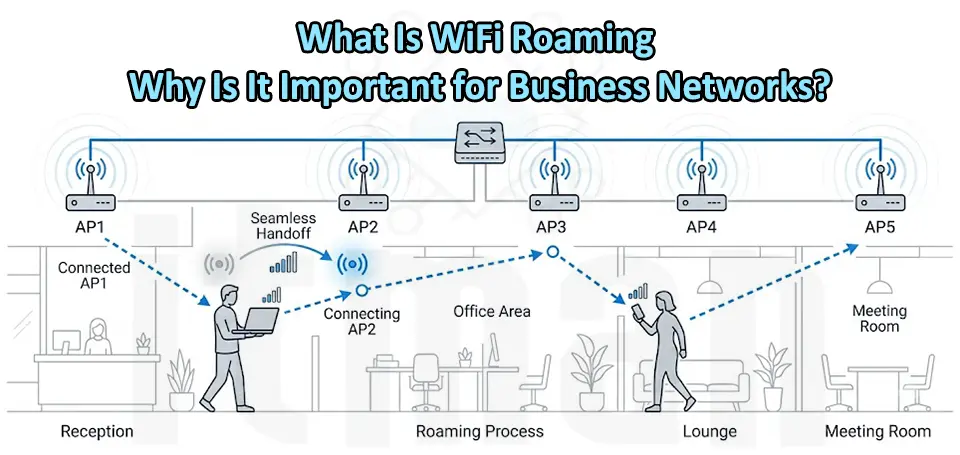
In today’s connected business environment, reliable wireless connectivity is no longer an option; it is a necessity. Companies rely on WiFi networks for communication, cloud applications, video conferencing, VoIP calls, security systems, and daily operations. However, as business spaces become larger and more complex, a single wireless access point is often not enough to provide stable coverage everywhere. This is where WiFi Roaming becomes an essential technology for professional wireless networks.
WiFi Roaming allows wireless devices such as laptops, smartphones, tablets, and IP phones to automatically switch between multiple access points while staying connected to the same network. This process happens without requiring users to manually disconnect and reconnect to another WiFi signal. For businesses with large offices, warehouses, hotels, schools, and commercial buildings, WiFi Roaming improves mobility, performance, and user experience.
What Is WiFi Roaming?
WiFi Roaming is a networking feature that enables a wireless client device to move from one access point (AP) to another while maintaining an active network connection. When a user walks through a building, the device continuously evaluates available wireless signals and connects to the access point that provides the best connection quality.
For example, imagine an employee walking from a meeting room on the first floor to an office area on the second floor. Without proper roaming technology, the laptop or smartphone may remain connected to the weaker signal from the original access point, causing slow speeds, unstable connections, or dropped video calls.
With properly configured WiFi Roaming, the device automatically transfers its connection to the stronger access point, providing continuous connectivity throughout the entire building. This technology is especially important in environments where employees and customers frequently move around while using wireless services.
How Does WiFi Roaming Work?
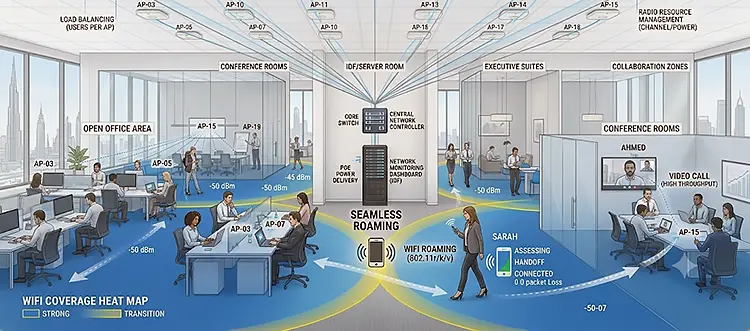
WiFi Roaming works through communication between wireless devices and multiple access points installed across a network. Each access point broadcasts the same wireless network name (SSID), allowing devices to recognize them as part of the same network. The roaming process usually involves three main steps:
1. Signal Monitoring
Wireless devices constantly monitor the strength and quality of their current connection. When the signal becomes weak, the device searches for better available access points. Factors considered include:
- Signal strength (RSSI)
- Network congestion
- Connection speed
- Latency
- Access point availability
2. Roaming Decision
The device decides when to move from one access point to another. Modern WiFi systems use technologies such as band steering and roaming assistance to encourage devices to connect to the best available access point.
3. Connection Transfer
The device disconnects from the old access point and connects to the new one. Advanced roaming technologies minimize the interruption time, allowing applications such as voice calls and video meetings to continue without noticeable disruption.
Why Is WiFi Roaming Important for Business Networks?
1. Provides Seamless Wireless Connectivity
One of the biggest advantages of WiFi Roaming is seamless connectivity. In large business environments, employees are constantly moving between different areas while using wireless devices. Without roaming, users may experience:
- Lost connections
- Slow internet speeds
- Manual network switching
- Interrupted applications
A professional WiFi roaming setup ensures users remain connected throughout the workplace.
2. Improves Employee Productivity
Modern businesses depend on wireless technology for everyday tasks. Employees use cloud platforms, collaboration tools, wireless printers, and mobile applications that require stable connectivity. Poor WiFi coverage can reduce productivity because employees spend time dealing with connection problems instead of focusing on their work. With properly implemented WiFi Roaming, employees can move freely around the office while maintaining reliable access to company resources.
3. Supports VoIP and Video Conferencing
Many companies use Voice over IP (VoIP) phones and video conferencing platforms such as Microsoft Teams and Zoom. These applications require low latency and stable connections. Traditional wireless networks without proper roaming can cause:
- Dropped voice calls
- Audio delays
- Frozen video meetings
- Poor communication quality
WiFi Roaming helps maintain stable connections while users move between different wireless coverage areas.
4. Better Coverage for Large Buildings
Large business locations often require multiple access points to provide complete wireless coverage. Examples include:
- Corporate offices
- Hotels
- Schools and universities
- Warehouses
- Shopping centers
- Healthcare facilities
Installing multiple access points without proper roaming configuration can create a poor user experience. Devices may stay connected to distant access points instead of switching automatically. A well-designed WiFi Roaming network ensures every area has strong and reliable wireless coverage.
WiFi Roaming vs Traditional WiFi Networks
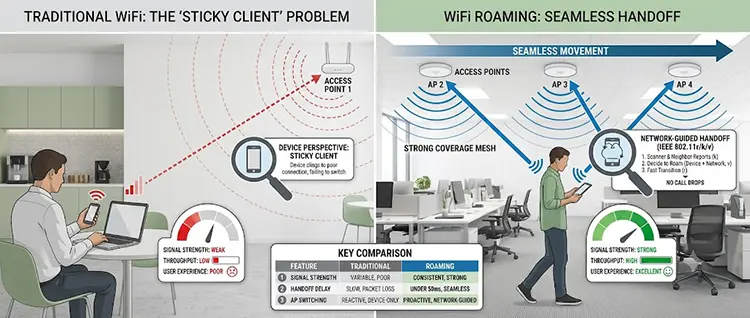
In a traditional WiFi network, multiple access points may operate independently. Although users can connect to different access points, the switching process is often manual and inconvenient.
For example:
A company installs three access points:
- Office Area AP
- Meeting Room AP
- Warehouse AP
Without roaming, an employee moving between these areas may remain connected to the first access point even when another access point provides a much stronger signal. In a professional WiFi roaming environment, all access points work together through centralized management. The network intelligently guides devices toward the best connection.
What Technologies Improve WiFi Roaming?
Several wireless standards and features help improve roaming performance:
- IEEE 802.11k – Neighbor Reports: 802.11k helps wireless clients discover nearby access points faster. Instead of scanning all available networks, the device receives information about nearby access points, making roaming decisions quicker.
- IEEE 802.11r – Fast BSS Transition: 802.11r reduces the authentication time when moving between access points. This is especially useful for applications that cannot tolerate interruptions, such as VoIP calls.
- IEEE 802.11v – Wireless Network Management: 802.11v allows access points to provide recommendations to clients about better connection options, improving network efficiency.
- Centralized Wireless Controllers: Enterprise solutions from brands such as Cisco, Aruba, and Ubiquiti use centralized management systems to control multiple access points and optimize roaming behavior.
WiFi Roaming Challenges and Common Problems
Although WiFi Roaming provides many benefits, incorrect network design can create problems.
Poor Access Point Placement: If access points are installed too far apart, devices may lose connection before finding a new signal. A professional wireless site survey helps determine the correct number and location of access points.
Incorrect Transmit Power Settings: If access points transmit too much power, devices may continue using a weak connection instead of roaming to a closer access point. Proper power adjustment is necessary for smooth roaming.
Client Device Limitations: Not all wireless devices support advanced roaming features equally. Older smartphones, laptops, or IoT devices may not handle roaming efficiently.
Incorrect SSID Configuration: For effective roaming, access points should usually share:
- Same SSID
- Same security settings
- Same authentication method
Incorrect configuration can prevent seamless roaming.
Best Practices for Implementing WiFi Roaming in Business Networks
To achieve reliable WiFi Roaming, businesses should follow these practices:
Use Enterprise-Grade Access Points
Consumer routers are usually not designed for large environments. Business networks require professional access points that support advanced roaming features.
Perform a Wireless Site Survey
Before installation, analyze:
- Building layout
- Signal coverage
- Interference sources
- User density
This helps determine the ideal AP placement.
Use Centralized Network Management
A centralized controller allows administrators to monitor, configure, and optimize multiple access points from one platform.
Configure Proper Security
Business WiFi networks should use secure authentication methods such as WPA2-Enterprise or WPA3-Enterprise to protect company data.
Monitor Network Performance
Regular monitoring helps identify:
- Weak coverage areas
- High interference
- Overloaded access points
- Roaming issues
WiFi Roaming for Offices in Dubai and UAE Businesses
Dubai businesses often operate in modern offices, villas converted into workplaces, warehouses, and commercial buildings where strong wireless coverage is critical. With increasing demand for cloud services, smart devices, CCTV systems, and remote collaboration tools, a properly designed WiFi network has become an important part of business infrastructure.
A professional WiFi Roaming solution ensures employees, visitors, and business devices can stay connected across the entire location without experiencing interruptions. Whether you need a small office WiFi installation or a complete enterprise wireless network with multiple access points, proper planning and configuration are essential for achieving reliable performance.
Professional WiFi Roaming and Access Point Installation Services in Dubai
Setting up a reliable wireless network requires more than simply installing several access points. Proper placement, configuration, channel planning, security settings, and roaming optimization are necessary to achieve the best performance. At ITMan, we have professional network technicians in Dubai who can visit your location and help with complete WiFi installation, access point setup, network configuration, and wireless optimization. Our team can assist businesses with designing and deploying reliable WiFi Roaming solutions using professional networking equipment to provide stable coverage and seamless connectivity throughout your workplace.


















