











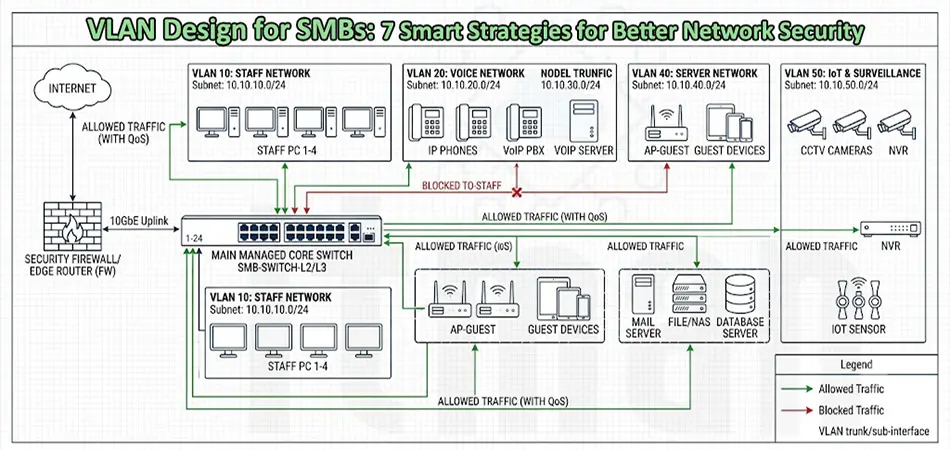
A growing business does not necessarily need a huge enterprise network, but it does need a network that can grow without becoming difficult to manage. This is where VLAN Design for Small and Medium Businesses becomes especially important. Instead of placing every computer, printer, access point, IP phone, server, and IoT device on the same network, VLANs allow a business to divide its physical network into logical segments.
A properly planned VLAN structure can improve security, reduce unnecessary broadcast traffic, simplify troubleshooting, and make future network expansion much easier. More importantly, VLAN design does not have to be complicated or expensive. A small office with 20 users may benefit from VLAN segmentation just as much as a company with several hundred employees.
The key is designing VLANs around the actual requirements of the business rather than creating unnecessary network segments simply because the switch supports them.
What Is VLAN Design?
A VLAN, or Virtual Local Area Network, logically separates devices at Layer 2 even when those devices are connected to the same physical switch. Devices in different VLANs normally cannot communicate directly without a Layer 3 device such as a router, Layer 3 switch, or firewall. For example, an office could use:
- VLAN 10 for employees
- VLAN 20 for voice devices
- VLAN 30 for guest Wi-Fi
- VLAN 40 for servers
- VLAN 50 for printers
- VLAN 60 for network management
- VLAN 70 for cameras and IoT devices
This basic structure already provides much better control than putting everything into one flat LAN. The purpose of VLAN Design for Small and Medium Businesses is therefore not simply to create more VLAN numbers. The objective is to create logical boundaries that reflect how the business actually operates.
Why SMBs Need a VLAN Strategy
A common mistake in smaller companies is assuming that VLANs are only necessary for large enterprises. In reality, SMB networks often have a mixture of devices that should not all have unrestricted access to each other. Consider a typical office. Employees may use laptops, VoIP phones, printers, wireless access points, CCTV cameras, NAS storage, servers, and smart devices. If all of these devices share the same subnet, a compromised device can potentially communicate with many other systems without meaningful network-level restrictions.
With an appropriate VLAN Design for Small and Medium Businesses, traffic can be separated according to function. For example, guest users may receive Internet access while being prevented from reaching internal servers. CCTV cameras may communicate with their recording system without having access to employee computers. Printers can remain accessible to authorized users without becoming part of the general management network.
This segmentation creates an additional security layer without requiring a completely separate physical network for every department.
A Practical VLAN Design for a Small Business
A small business does not need dozens of VLANs. A simple and practical design could look like this:
| VLAN | Purpose | Example Subnet |
|---|---|---|
| VLAN 10 | Staff | 192.168.10.0/24 |
| VLAN 20 | Voice | 192.168.20.0/24 |
| VLAN 30 | Guest Wi-Fi | 192.168.30.0/24 |
| VLAN 40 | Servers | 192.168.40.0/24 |
| VLAN 50 | Printers | 192.168.50.0/24 |
| VLAN 60 | Management | 192.168.60.0/24 |
| VLAN 70 | CCTV/IoT | 192.168.70.0/24 |
This is only an example. The exact VLAN structure should depend on the number of users, applications, security requirements, wireless architecture, and available network equipment. For a very small office, combining some functions may be reasonable. For example, a company with no local servers may not need a dedicated server VLAN.
VLAN Design for Small and Medium Businesses: Staff Network
The employee VLAN is usually the primary internal network. Workstations, laptops, and other trusted business devices can be placed here. However, “trusted” should not mean that every device automatically has access to every resource. Access between the staff VLAN and other networks should be controlled at Layer 3. For example, employees may need access to file servers, printers, DNS, DHCP, and selected applications, while access to network management interfaces should remain restricted.
A common addressing scheme might be:
VLAN 10 — 192.168.10.0/24
This provides up to 254 usable IPv4 addresses, which is more than enough for many small offices. For larger environments, the subnet can be adjusted rather than automatically using /24 everywhere.
Separate the Guest Network
Guest Wi-Fi is one of the most important VLANs in an SMB environment. Guest devices should generally have Internet access without being able to access internal business resources. A dedicated guest VLAN makes this separation straightforward.
For example:
VLAN 30 — Guest Wi-Fi — 192.168.30.0/24
Firewall rules can then allow traffic from VLAN 30 toward the Internet while blocking connections toward internal VLANs. This is particularly useful in offices, hotels, clinics, retail businesses, and other environments where visitors regularly connect personal devices. When implementing VLAN Design for Small and Medium Businesses, guest isolation should be considered from the beginning rather than added after a security problem occurs.
Voice VLAN for VoIP Phones
If a business uses IP phones, placing voice traffic in a dedicated VLAN is often a good design choice.
For example:
VLAN 20 — Voice — 192.168.20.0/24
A dedicated voice VLAN allows administrators to apply appropriate Quality of Service policies and separate voice traffic from ordinary workstation traffic. Many managed switches, including Cisco switches, support voice VLAN functionality. A typical access port can connect an IP phone while also allowing a PC connected through the phone to use the employee VLAN. This makes VLAN planning particularly important when deploying PoE switches and IP telephony together.
Server and Storage VLANs
Servers usually deserve their own network segment because they contain resources that are more sensitive than ordinary endpoints. A server VLAN might contain:
- File servers
- Application servers
- Domain controllers
- NAS systems
- Virtualization hosts
- Backup servers
For example:
VLAN 40 — Servers — 192.168.40.0/24
However, simply placing servers into a separate VLAN does not automatically make them secure. Firewall and Layer 3 access-control rules should determine which users and devices can reach specific server services. For example, employees might be allowed to access SMB file shares but denied access to server management interfaces.
Management VLAN: Often Forgotten, Always Important
One of the most overlooked elements of VLAN Design for Small and Medium Businesses is the management VLAN. Switches, routers, firewalls, wireless access points, controllers, and other infrastructure devices should ideally have management interfaces separated from ordinary user traffic. A dedicated management VLAN could be:
VLAN 60 — Network Management — 192.168.60.0/24
Only authorized administrators or management systems should be able to reach this network. This reduces the exposure of administrative interfaces and makes it easier to control who can access devices using protocols such as HTTPS, SSH, SNMP, or other management services.
CCTV and IoT Devices Need Segmentation
Modern businesses increasingly deploy cameras, smart displays, access-control systems, sensors, printers, and other IoT devices. These devices should not automatically have unrestricted access to the same network as employee computers. A dedicated IoT or CCTV VLAN can limit communication to only the systems that actually need it.
For example:
VLAN 70 — CCTV/IoT — 192.168.70.0/24
Cameras may be allowed to communicate with an NVR while being blocked from initiating connections to employee workstations. This is one of the strongest practical reasons to implement VLAN Design for Small and Medium Businesses.
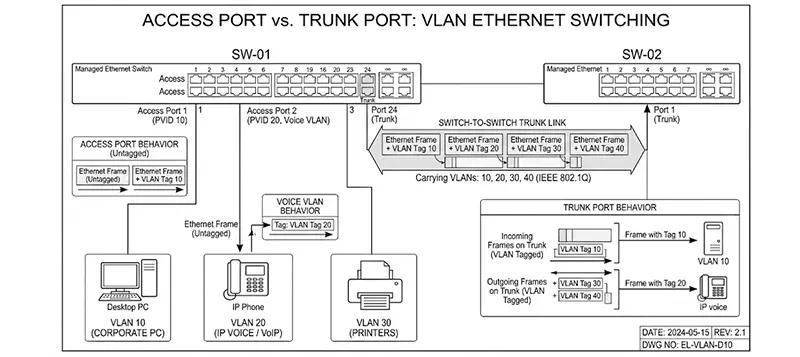
Access Ports vs Trunk Ports
A good VLAN design also requires understanding the difference between access and trunk ports. An access port normally carries traffic for one VLAN. A workstation connected to a switch would typically use an access port assigned to the appropriate employee VLAN. A trunk port can carry traffic from multiple VLANs between network devices. For example, a trunk may connect:
- A switch to another switch
- A switch to a firewall
- A switch to a wireless access point
- A switch to a Layer 3 switch
Incorrect trunk configuration can result in VLAN connectivity problems, unexpected traffic leakage, or devices receiving the wrong network configuration. Therefore, VLAN IDs, native VLAN configuration, allowed VLAN lists, and tagging should be documented carefully.
Inter-VLAN Routing and Firewall Rules
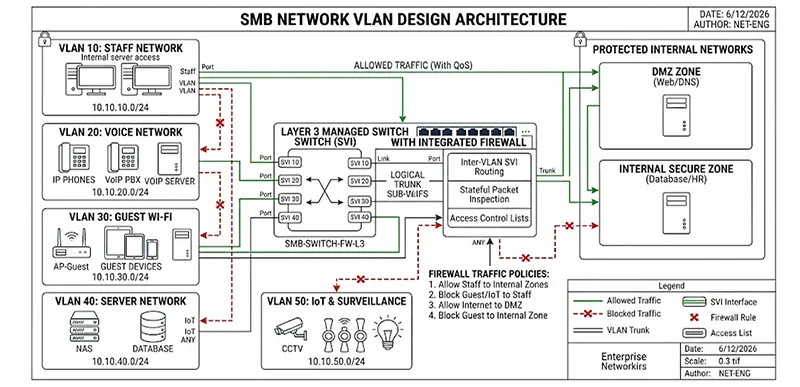
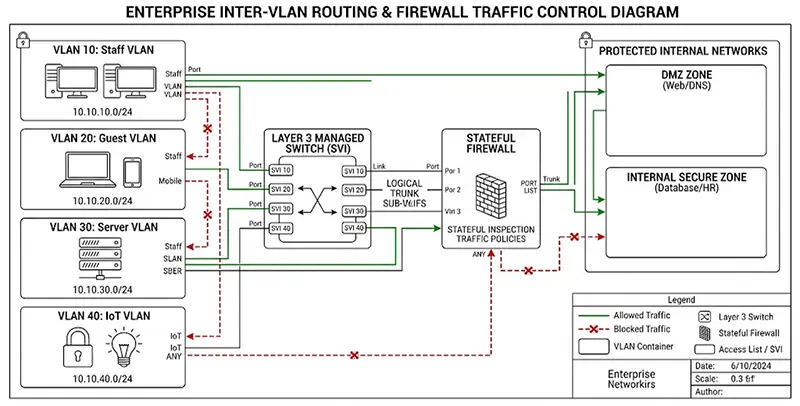
Creating VLANs is only half of the design. If users in VLAN 10 need to access servers in VLAN 40, the network requires inter-VLAN routing. This can be performed by a Layer 3 switch or a firewall/router. The important question is not simply whether routing is enabled, but what traffic should be allowed between VLANs.
For example:
Staff → Servers: Allowed for required applications
Staff → Management: Restricted
Guest → Servers: Blocked
Guest → Internet: Allowed
CCTV → NVR: Allowed
CCTV → Staff: Blocked
This policy-based approach turns VLAN segmentation into a meaningful security control rather than simply an organizational method.
Avoid Creating Too Many VLANs
More VLANs do not automatically mean a better network. A business with 30 employees probably does not need a separate VLAN for every department unless there is a clear security or operational reason. Excessive segmentation increases administrative overhead and can make troubleshooting unnecessarily complicated. A better approach to VLAN Design for Small and Medium Businesses is to create VLANs based on actual security boundaries, traffic requirements, device roles, and management needs. If two groups have identical security requirements and communication policies, separating them may provide little practical benefit.
Plan the IP Addressing Alongside VLANs
Every VLAN should have a clear IP subnet and documented gateway. For example:
- VLAN 10 → 192.168.10.0/24 → Gateway 192.168.10.1
- VLAN 20 → 192.168.20.0/24 → Gateway 192.168.20.1
- VLAN 30 → 192.168.30.0/24 → Gateway 192.168.30.1
- VLAN 40 → 192.168.40.0/24 → Gateway 192.168.40.1
A consistent addressing strategy makes troubleshooting significantly easier. It also helps administrators identify where an IP address belongs simply by looking at the subnet. For growing businesses, it is worth leaving room for expansion instead of designing an addressing scheme that becomes restrictive after a few months.
VLANs and Wireless Access Points
Wireless networks should be included in the VLAN plan from the beginning. For example, an access point might broadcast:
- Corporate Wi-Fi → VLAN 10
- Guest Wi-Fi → VLAN 30
- IoT Wi-Fi → VLAN 70
The AP-to-switch connection may therefore operate as a trunk carrying the required VLANs. This design is particularly useful for modern Wi-Fi deployments using managed platforms such as UniFi, Cisco, Aruba, or similar enterprise-oriented solutions.
Common VLAN Design Mistakes
Several mistakes appear repeatedly in SMB networks.
- The first is using one flat network for everything.
- The second is creating VLANs but allowing unrestricted communication between them. In that situation, the segmentation provides organization but limited security.
- Another common problem is forgetting infrastructure devices. Switches, access points, controllers, and firewalls should have a clearly defined management strategy.
- Using inconsistent VLAN IDs across switches can also cause configuration errors.
- Finally, undocumented VLANs become difficult to maintain when the original network administrator leaves or when another technician needs to troubleshoot the environment.
- Documentation is therefore part of the network design, not an optional extra.
How to Build a Scalable SMB VLAN Design
A reliable VLAN Design for Small and Medium Businesses should answer five basic questions:
- Which devices need to communicate with each other?
- Which devices should never communicate directly?
- Which networks require Internet access?
- Which systems require higher security?
- How might the business network grow over the next few years?
Start with the business requirements, create logical security zones, assign VLAN IDs and subnets, configure switching and routing, and then implement firewall policies. Before deployment, test connectivity between every required network and verify that prohibited traffic is actually blocked.
Final Thoughts
A well-designed VLAN structure can transform a basic SMB network into a much more organized, secure, and manageable infrastructure. The goal of VLAN Design for Small and Medium Businesses is not to make the network unnecessarily complicated. It is to create clear boundaries between users, guests, servers, voice systems, IoT devices, and network infrastructure.
For a small office, a handful of carefully selected VLANs may be enough. For a medium-sized company, additional segmentation and more detailed firewall policies may be appropriate. The most effective design is the one that matches the organization’s real requirements, remains easy to troubleshoot, and provides enough flexibility for future growth. When VLANs, IP addressing, routing, firewall policies, wireless networks, and documentation are planned together, even a relatively small business can have a network architecture that is both secure and ready to scale.
Professional VLAN Design and Network Installation in Dubai
If you are planning to implement a VLAN-based network for your office, choosing the right VLAN structure is only the first step. ITMan provides professional network installation and VLAN configuration services in Dubai, with experienced technicians who can assess your existing infrastructure, design the appropriate VLAN architecture, configure managed switches, routers, firewalls, and wireless access points, and test connectivity between different network segments. Whether you are setting up a new office or upgrading an existing network, a properly planned VLAN Design for Small and Medium Businesses can improve security, simplify network management, and provide a scalable foundation for future growth.


















