











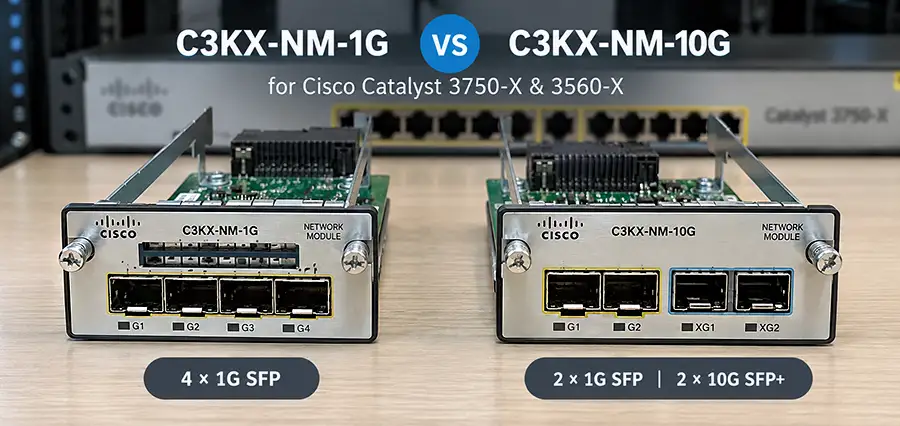
If you are using a Cisco Catalyst 3750-X or 3560-X switch and need to add fiber or high-speed uplink connectivity, choosing the correct network module is important. Two of the most common options for these switches are the Cisco C3KX-NM-1G and Cisco C3KX-NM-10G. Although they look similar and are designed for the same switch families, their port configuration and supported uplink speeds are different.
In this C3KX-NM-1G vs C3KX-NM-10G comparison, we explain their specifications, port configurations, SFP/SFP+ support, compatibility, applications, and the main differences you should consider before buying a network module for a Cisco Catalyst 3750-X or 3560-X.
What Is the Cisco C3KX-NM-1G?
The Cisco C3KX-NM-1G is an uplink network module designed primarily to provide Gigabit Ethernet connectivity for Cisco Catalyst 3750-X and 3560-X Series switches. It features four 1 Gigabit Ethernet SFP slots, allowing administrators to connect the switch to other switches, routers, distribution layers, or fiber infrastructure using compatible Cisco SFP transceivers.
The module is particularly useful in networks where 1Gbps uplinks are sufficient and there is no immediate requirement for 10 Gigabit Ethernet. Common compatible transceiver types include Gigabit Ethernet SFP modules for multimode fiber, single-mode fiber, and copper connections, depending on the exact transceiver selected.
Key Features of C3KX-NM-1G
The main characteristics of the C3KX-NM-1G include:
- 4 × 1G SFP uplink ports
- Designed for Catalyst 3750-X and 3560-X switches
- Supports Gigabit Ethernet fiber uplinks
- Suitable for access-layer deployments
- Multiple uplink connections can be used for redundancy or aggregation
- Modular design for compatible Catalyst switches
For organizations operating primarily at Gigabit Ethernet speeds, the C3KX-NM-1G remains a practical option.
What Is the Cisco C3KX-NM-10G?
The Cisco C3KX-NM-10G is a more flexible uplink module designed for networks that require higher bandwidth. Unlike the C3KX-NM-1G, this module includes four physical uplink slots with two SFP slots and two SFP+ slots.
The two SFP+ ports can support 10 Gigabit Ethernet, making the module particularly useful when connecting an access switch to a high-speed distribution or core switch.
The module can therefore provide substantially greater uplink bandwidth than the C3KX-NM-1G.
Key Features of C3KX-NM-10G
Important features include:
- 4 physical uplink slots
- 2 × SFP ports
- 2 × SFP+ ports
- Up to 10Gbps connectivity on SFP+ ports
- Designed for Cisco Catalyst 3750-X and 3560-X
- Suitable for higher-bandwidth uplinks
- Supports both Gigabit and 10 Gigabit deployment scenarios
This makes the C3KX-NM-10G particularly attractive for networks where the access layer is still based on 1GbE but higher-speed uplinks are needed.
C3KX-NM-1G vs C3KX-NM-10G: Main Differences
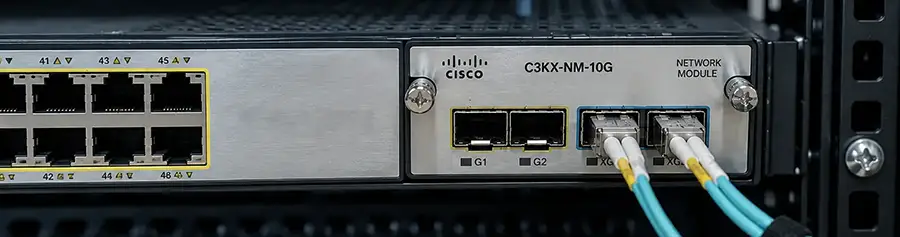
The most important difference in the C3KX-NM-1G vs C3KX-NM-10G comparison is uplink speed. The C3KX-NM-1G is designed around Gigabit Ethernet connectivity, while the C3KX-NM-10G adds support for 10 Gigabit Ethernet through its SFP+ interfaces. Here is a quick comparison:
| Specification | C3KX-NM-1G | C3KX-NM-10G |
|---|---|---|
| Module Type | Network/Uplink Module | Network/Uplink Module |
| Physical Ports | 4 | 4 |
| 1G SFP Slots | 4 | 2 dedicated SFP + SFP+ capability depending on configuration |
| SFP+ Slots | No | 2 |
| Maximum Port Speed | 1Gbps | 10Gbps |
| 10 Gigabit Ethernet | No | Yes |
| Fiber Connectivity | Yes | Yes |
| Cisco Catalyst 3750-X | Compatible | Compatible |
| Cisco Catalyst 3560-X | Compatible | Compatible |
| Best Use | Standard Gigabit uplinks | High-bandwidth 10G uplinks |
Therefore, if your network requires only standard Gigabit Ethernet uplinks, the C3KX-NM-1G may be sufficient. If 10GbE is required, the C3KX-NM-10G is the appropriate module.
C3KX-NM-1G vs C3KX-NM-10G Port Configuration
Port configuration is one of the most important technical points when comparing C3KX-NM-1G vs C3KX-NM-10G. The C3KX-NM-1G provides four SFP ports, with each port intended for Gigabit Ethernet operation. The C3KX-NM-10G, however, provides a combination of SFP and SFP+ interfaces. Its two SFP+ interfaces enable 10GbE connectivity, while its other interfaces can be used for Gigabit uplinks.
This flexibility is valuable when upgrading an existing network. For example, an organization may initially operate its uplinks at 1Gbps and later introduce 10Gbps connections between access and distribution switches. Instead of replacing the entire switch, the appropriate uplink module and transceivers can provide the required connectivity.
SFP vs SFP+ Support
Another major difference between C3KX-NM-1G vs C3KX-NM-10G is the type of transceiver interface available.
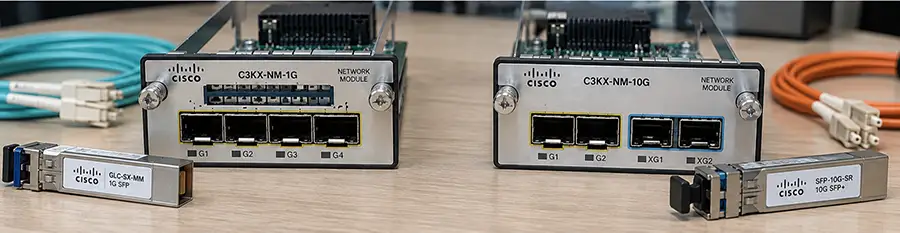
- SFP is commonly associated with Gigabit Ethernet connectivity. Depending on the selected transceiver, it can be used with multimode fiber, single-mode fiber, or copper cabling.
- SFP+ is commonly used for 10 Gigabit Ethernet.
This distinction is especially important when purchasing optical transceivers. A 10G SFP+ transceiver cannot simply turn a C3KX-NM-1G port into a 10Gbps interface. If you need 10GbE connectivity, you need hardware that supports SFP+ operation, such as the C3KX-NM-10G.
C3KX-NM-1G vs C3KX-NM-10G for Cisco Catalyst 3750X
The Catalyst 3750X Series was widely deployed in enterprise access and distribution environments. When configuring a 3750X, the choice between C3KX-NM-1G vs C3KX-NM-10G depends primarily on the required uplink bandwidth. For a standard access-layer switch connecting endpoints at 1Gbps, multiple 1G uplinks may be sufficient. In this situation, the C3KX-NM-1G can provide the required fiber connectivity.
However, consider a 48-port switch where many users, IP phones, access points, cameras, or other devices are simultaneously generating traffic. A 1Gbps uplink can become a bottleneck. Using the C3KX-NM-10G allows the switch to connect upstream at 10Gbps, significantly increasing available uplink capacity.
C3KX-NM-1G vs C3KX-NM-10G for Cisco Catalyst 3560-X
The same basic considerations apply to the Catalyst 3560-X Series. Both modules were designed for use with supported Catalyst 3K-X platforms, but the required uplink speed determines which option makes more sense. The C3KX-NM-1G works well for traditional Gigabit Ethernet environments.
The C3KX-NM-10G is more appropriate when the 3560-X needs to connect to a distribution or core switch through a 10GbE fiber connection. Before purchasing a module or optical transceiver, you should always verify the exact switch model, software configuration, transceiver type, fiber type, and required link distance.
When Should You Choose C3KX-NM-1G?
Choose the C3KX-NM-1G when your network only requires Gigabit Ethernet uplinks. Typical scenarios include small and medium-sized office networks, low-to-moderate traffic access switches, legacy network infrastructure, and deployments where existing fiber links already operate at 1Gbps. It can also be useful when having four individual Gigabit uplink interfaces is more important than having 10Gbps capability.
When Should You Choose C3KX-NM-10G?
The C3KX-NM-10G is better suited to environments requiring higher uplink capacity. Common applications include connecting access switches to distribution switches, server environments, high-traffic VLANs, IP camera networks, wireless networks with multiple access points, and networks transferring large amounts of data between switches.
A 10GbE uplink can also help reduce oversubscription when many Gigabit Ethernet access ports are active simultaneously.
Can You Upgrade from C3KX-NM-1G to C3KX-NM-10G?
One advantage of the modular uplink architecture of the Catalyst 3750-X and 3560-X is the ability to select an uplink module based on network requirements. If a compatible switch currently uses a C3KX-NM-1G and the network later requires 10 Gigabit Ethernet uplinks, it may be possible to replace the uplink module with a C3KX-NM-10G.
However, the replacement should be performed according to Cisco’s installation procedures, and compatibility of the switch, IOS version, transceiver, fiber cabling, and remote device should be verified.
Does C3KX-NM-10G Automatically Make the Network Faster?
Not necessarily. Installing a 10G module only provides the capability to establish higher-speed uplinks. Actual network performance still depends on several factors, including the transceiver modules, fiber cabling, remote switch interfaces, traffic patterns, network configuration, and potential bottlenecks elsewhere in the infrastructure.
For example, installing a C3KX-NM-10G while continuing to use only 1Gbps connections will not automatically increase network performance. To benefit from 10GbE, the entire link must support the required speed.
C3KX-NM-1G vs C3KX-NM-10G: Which One Do You Need?
The decision between C3KX-NM-1G vs C3KX-NM-10G is primarily a question of required uplink bandwidth. If your Catalyst 3750-X or 3560-X only needs 1GbE fiber uplinks, the C3KX-NM-1G provides four Gigabit SFP interfaces and can be a simple and cost-effective solution.
If you need 10 Gigabit Ethernet, the C3KX-NM-10G provides SFP+ connectivity and gives you significantly more uplink bandwidth. For existing networks, you should also consider future requirements. If traffic is increasing or you plan to connect the switch to a 10G-capable core or distribution layer, choosing the 10G module can provide more flexibility.
Buy Cisco C3KX-NM-1G and C3KX-NM-10G from ITMan.ae
If you are looking for C3KX-NM-1G or C3KX-NM-10G in Dubai or the UAE, both network modules are available from ITMan.ae. At ITMan.ae, we supply Cisco switches, network modules, SFP and SFP+ transceivers, and other enterprise networking equipment.
If you are unsure which module or SFP/SFP+ transceiver is compatible with your Cisco Catalyst 3750-X or 3560-X, our team can also help you select the correct hardware for your network.
For availability and current pricing of C3KX-NM-1G vs C3KX-NM-10G, contact ITMan.ae.


















