











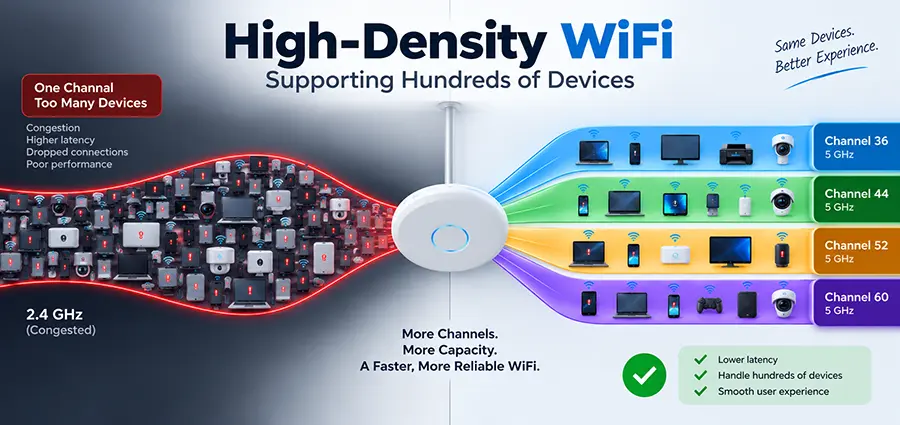
Providing WiFi for a small office with 20 or 30 devices is relatively straightforward. Supporting hundreds of smartphones, laptops, tablets, POS terminals, cameras, and other wireless devices in the same building is a completely different challenge. This is where High-Density WiFi design becomes important.
A successful High-Density WiFi network is not simply a normal wireless network with more access points. Adding APs without proper planning can actually make performance worse by increasing interference and consuming valuable airtime. High-density environments require careful capacity planning, RF design, channel management, access point placement, and continuous monitoring.
Whether the network is being designed for a large office, school, hotel, warehouse, conference venue, retail environment, or commercial building, the objective is the same: provide stable connectivity when many devices are competing for the same wireless spectrum.
What Is High-Density WiFi?
High-Density WiFi refers to a wireless network designed to support a large concentration of connected devices within a limited physical area. The important factor is not necessarily the total number of devices in the building. Device concentration matters much more.
For example, 400 devices distributed across a large warehouse may be easier to support than 150 devices concentrated inside a conference room. When many clients share the same radio channel, they compete for airtime. Even if the access point has a fast Ethernet or fiber uplink, the wireless medium itself can become the bottleneck. High-Density WiFi design therefore focuses heavily on how efficiently available radio spectrum is used.
Why High-Density WiFi Networks Become Slow
WiFi is a shared medium. Devices using the same channel cannot simply transmit independently at the same time without coordination. As client density increases, several problems become more noticeable:
- Airtime utilization increases
- Co-channel interference becomes more significant
- Retransmissions may increase
- Slow clients consume excessive airtime
- Roaming problems become more visible
- Channel congestion reduces real-world throughput
- Too many SSIDs can create unnecessary management overhead
This explains why a WiFi speed test may show excellent performance when an office is empty but become extremely slow during working hours. The Internet connection may not be the problem at all. The bottleneck can exist entirely within the wireless network.
High-Density WiFi Capacity Planning
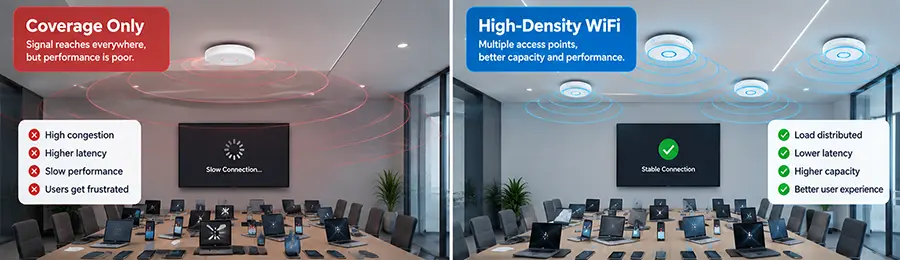
One of the biggest mistakes in wireless design is estimating the required number of access points based only on coverage. In a normal installation, the question may be:
“Can every room receive a strong WiFi signal?”
For High-Density WiFi, another question is equally important:
“Can the wireless infrastructure handle the number of devices and traffic expected in each area?”
Suppose an office has 300 employees and each employee regularly connects a laptop and smartphone. The network may already need to accommodate around 600 wireless clients before considering printers, meeting-room systems, IoT equipment, guest devices, and other endpoints.
Not every client will generate heavy traffic simultaneously, but the design must consider peak usage rather than just the average. A proper capacity assessment should examine the expected number of concurrent clients, application requirements, traffic patterns, physical layout, available spectrum, AP capabilities, and wired uplink capacity.
More Access Points Do Not Automatically Mean Better WiFi
Installing additional access points is often necessary in High-Density WiFi environments, but simply placing APs close together can create additional problems. Neighboring access points may interfere with each other if channel planning and transmit power are poorly configured. For example, if several nearby APs operate on the same channel at high transmit power, clients may hear multiple cells using the same airtime. Instead of increasing capacity, the additional APs can increase contention.
High-density deployments usually require smaller, carefully controlled RF cells rather than maximum transmit power everywhere. This is why AP quantity should be determined as part of an RF and capacity design rather than by the assumption that “more APs equal faster WiFi.”
Channel Planning Is Critical for High-Density WiFi
Channel allocation is one of the most important parts of High-Density WiFi design. In the 2.4 GHz band, available non-overlapping channel capacity is limited. For this reason, 5 GHz—and where supported, 6 GHz—becomes especially valuable in dense environments. Channel width also matters. Using 80 MHz channels can provide impressive peak throughput to individual clients, but wide channels consume much more spectrum. In a dense office, hotel, school, or conference environment, narrower 20 MHz or 40 MHz channels can sometimes provide better overall network capacity because they allow more channel reuse.
The correct configuration depends on the environment. Maximum theoretical speed per client is not always the correct design goal. For High-Density WiFi, total usable capacity across all clients is often more important.
Access Point Placement Matters
AP placement should be based on both RF coverage and user density. Areas such as meeting rooms, classrooms, auditoriums, cafeterias, training rooms, hotel conference areas, and shared workspaces can experience much higher client concentration than corridors or storage areas.
Installing access points only according to floor area can therefore produce an unbalanced network. Physical obstacles also matter. Concrete walls, metal structures, glass, shelving, elevators, equipment rooms, and even furniture can affect signal propagation. Professional High-Density WiFi planning should identify where users actually gather instead of simply placing APs at equal distances on a floor plan.
Control Transmit Power
Running every access point at maximum transmit power is rarely the best approach in a dense deployment. A client may be able to hear a powerful AP from a long distance, but the client’s own radio may not be able to communicate back as effectively. Excessive AP power can also create oversized cells and make roaming less predictable.
Reducing transmit power appropriately can help create smaller cells, improve frequency reuse, and encourage clients to associate with closer access points. However, power should not simply be reduced everywhere. Changes should be based on RF conditions and verified through testing.
Design High-Density WiFi for Modern Client Devices
Whenever possible, modern High-Density WiFi networks should encourage capable devices to use 5 GHz or 6 GHz instead of relying heavily on 2.4 GHz. The 2.4 GHz band still has legitimate uses, particularly for older clients and IoT equipment, but its limited spectrum makes it difficult to use efficiently in very dense environments.
Modern WiFi standards such as WiFi 6 and WiFi 6E also include technologies that can improve efficiency in environments with many connected devices. Features such as OFDMA and improved multi-user operation can make better use of available airtime when supported by both infrastructure and clients. However, upgrading AP hardware alone does not fix a poorly designed RF environment. Good design remains essential.
Roaming Is an Important Part of High-Density WiFi
Large offices and commercial buildings usually require multiple access points, which makes roaming behavior important. Users expect video calls, VoIP calls, cloud applications, and messaging services to continue working while they move through the building. Technologies such as 802.11k, 802.11v, and 802.11r can help improve roaming in compatible environments, but roaming is ultimately influenced heavily by the client device itself. Proper AP placement, transmit power, minimum data rates, RF cell design, and controller configuration can all help clients make better roaming decisions.
A device that remains connected to a distant AP despite having a much closer AP available is commonly described as a “sticky client.” Poor RF design can make this problem considerably worse.
Do Not Create Too Many SSIDs
Creating a separate SSID for every department or device category may appear organized, but excessive SSIDs create additional wireless management traffic. Every SSID generates management overhead, including beacon transmissions.
In High-Density WiFi environments, it is usually better to keep the number of SSIDs reasonably low and use VLANs, authentication policies, network access control, or other segmentation mechanisms where appropriate. This helps preserve airtime for actual user traffic.
The Wired Network Behind High-Density WiFi Also Matters
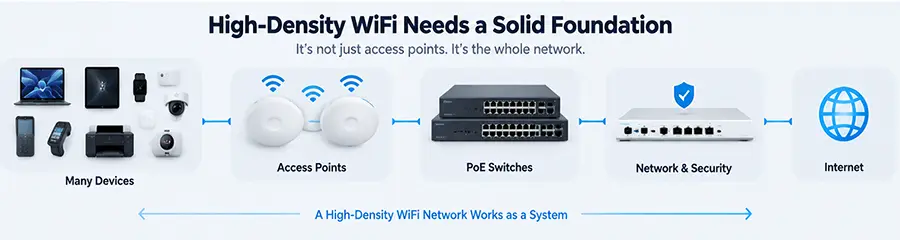
High-Density WiFi is only one part of the infrastructure. Access points still depend on the wired network behind them. Switches must provide sufficient PoE capacity for the installed APs, while uplinks must support the expected traffic. Modern high-performance APs may also benefit from 2.5GbE or faster Ethernet interfaces depending on their capabilities and workload.
The network should also be checked for VLAN configuration, DHCP capacity, DNS performance, firewall throughput, Internet bandwidth, and switch uplink congestion. A perfectly designed wireless layer can still perform poorly if the wired infrastructure behind it becomes the bottleneck.
Monitor Airtime, Not Just Signal Strength
Strong signal does not automatically mean good WiFi. An access point can provide excellent RSSI while its channel is heavily congested. When troubleshooting High-Density WiFi, administrators should examine metrics such as:
- Channel utilization
- Client count per AP and radio
- Retransmission rates
- Signal-to-noise ratio
- Client PHY rates
- Roaming behavior
- Interference
- Traffic distribution
- AP uplink utilization
This provides a much more accurate picture than simply checking how many WiFi bars appear on a phone.
High-Density WiFi and IT Support
High-density wireless environments require ongoing IT Support, especially when business operations depend heavily on wireless connectivity. Usage patterns change over time. A meeting room that originally served 15 people may later accommodate 50. New laptops may support newer WiFi standards, additional IoT devices may be installed, and neighboring wireless networks may introduce new interference.
IT Support teams should therefore monitor the network, review AP performance, update firmware, analyze recurring connectivity problems, and adjust RF configurations when necessary. Wireless optimization should be treated as an ongoing process rather than a one-time installation.
Practical Checklist for a High-Density WiFi Deployment
Before deploying or upgrading High-Density WiFi, check the following:
- Estimate the number of simultaneous clients in each area.
- Identify high-density zones such as meeting rooms and shared spaces.
- Perform an RF assessment where appropriate.
- Plan AP locations based on capacity as well as coverage.
- Develop a sensible channel reuse strategy.
- Select appropriate channel widths.
- Configure transmit power according to the environment.
- Reduce unnecessary SSIDs.
- Verify PoE budgets and switch uplink capacity.
- Test roaming between access points.
- Monitor airtime utilization during peak business hours.
- Reassess the network after deployment using real client data.
The most useful testing should happen when the network is under realistic load. Testing an empty office on a weekend does not accurately represent how the wireless network will perform at 10 AM on a busy working day.
High-Density WiFi Installation and Network Support in Dubai
Building reliable High-Density WiFi for hundreds of devices requires more than installing additional access points. The wireless network, switching infrastructure, RF environment, client density, PoE capacity, VLANs, roaming configuration, and Internet connection must work together as one system.
ITMan provides network and IT Support in Dubai for offices, villas, warehouses, retail environments, and other commercial locations. Our network technicians can visit your site to assess existing WiFi coverage and capacity, install and configure access points, configure switches and VLANs, optimize wireless settings, troubleshoot interference and connectivity problems, and improve the overall network infrastructure.
If your current WiFi works well with a few users but becomes unstable when dozens or hundreds of devices connect, the solution may not be simply adding more access points. A proper High-Density WiFi assessment can identify where the actual bottleneck is and determine the right way to increase wireless capacity.


















