





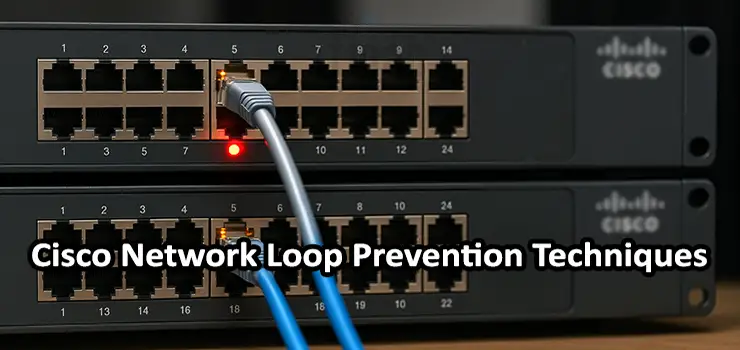
Network loops are among the most disruptive issues in enterprise networks. A single loop can saturate links, overwhelm switches, disable communication, and bring down the entire LAN in seconds. Because Cisco switches are widely used in enterprise and datacenter environments, understanding the right protection mechanisms is essential. This guide provides a complete, practical, and deeply detailed explanation of Cisco Network Loop Prevention Techniques focused on STP, BPDU Guard, Loop Guard, PortFast, and Storm Control. It explains how each mechanism works, how to configure it, where to use it, and the best operational practices to prevent real-world network failures.
Introduction to Network Loops and Their Impact
A network loop happens when there are redundant paths between Layer 2 switches without a proper mechanism to block one of the paths. Unlike routing loops, which rely on Layer 3 logic and TTL values, Layer 2 loops are dangerous because Ethernet frames do not have a TTL field. This means that a broadcast or unknown unicast frame can circulate endlessly.
The result is:
- Broadcast storms
- MAC address table instability
- High CPU usage on switches
- Complete network outage
Many enterprises experience loops due to human error, unmanaged switches, misconfigurations, or sudden topology changes. Cisco Network Loop Prevention Techniques help ensure that even if a mistake happens, the network remains stable. In this article, we review the five essential Cisco Network Loop Prevention Techniques that every engineer must master.
Understanding Cisco Network Loop Prevention Techniques
Cisco provides multiple layers of loop protection. These tools work together as a safety net to prevent outages. The core Cisco Network Loop Prevention Techniques include:
- STP (Spanning Tree Protocol)
- BPDU Guard
- Loop Guard
- PortFast
- Storm Control
Each technique addresses loops from a different angle. STP prevents loops by design, while BPDU Guard and Loop Guard protect against misbehavior or configuration mistakes. PortFast accelerates convergence and reduces risk on edge ports, and Storm Control limits the blast radius in case of a failure.
The following sections break down each method thoroughly.
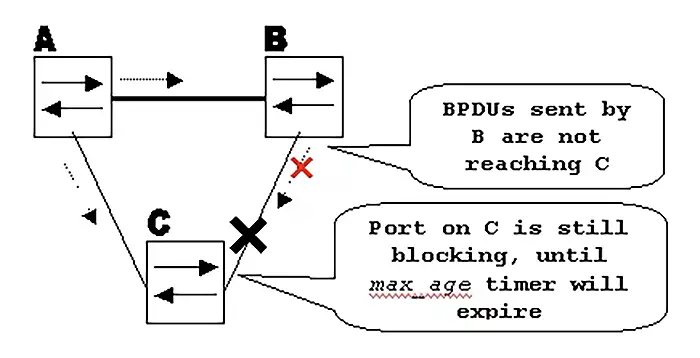
Cisco Network Loop Prevention Techniques with STP
Spanning Tree Protocol (STP) is the foundation of Cisco Network Loop Prevention Techniques. It ensures a loop-free topology by blocking redundant paths in real time.
STP works by:
• Selecting a root bridge
• Calculating the shortest path to the root
• Assigning port roles (Root, Designated, or Alternate)
• Blocking any redundant ports that may form loops
Cisco switches support multiple STP variants:
• PVST and PVST+
• Rapid Spanning Tree Protocol (RSTP / 802.1w)
• Multiple Spanning Tree Protocol (MSTP / 802.1s)
RSTP is the most commonly used today because of its fast convergence.
Why STP Matters
Even in environments where all ports appear controlled, unmanaged switches, accidental patching between adjacent ports, or connecting two wall jacks together can instantly create a loop. STP provides the first line of defense.
Best Practices for Using STP
• Set a Root Primary and Root Secondary switch manually
• Enforce bridge priority values instead of using defaults
• Use RSTP for faster convergence
• Ensure that redundant uplinks exist to allow STP to work properly
• Avoid disabling STP unless absolutely required
A properly tuned STP environment drastically reduces the chances of a catastrophic loop.
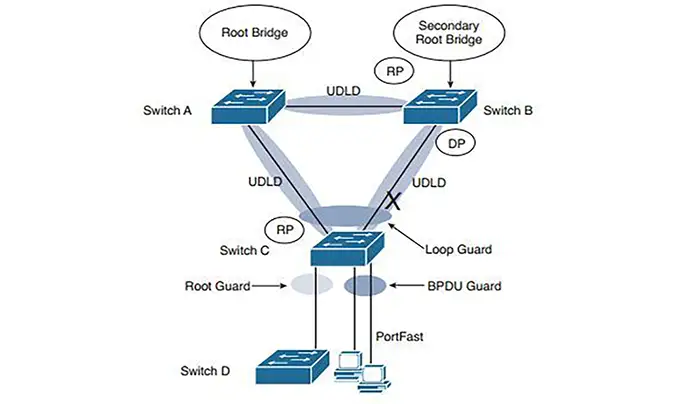
Cisco Network Loop Prevention Techniques with BPDU Guard
BPDU Guard is one of the most powerful and practical Cisco Network Loop Prevention Techniques. It protects the network from accidental loops caused by unmanaged or misbehaving switches.
What BPDU Guard Does
BPDU Guard disables a port immediately if it receives a BPDU. This ensures that edge ports connected to end devices cannot accidentally become part of the STP topology.
BPDU Guard is used on:
• User access ports
• Ports connected to printers, PCs, IP phones
• Ports connected to non-managed switches
Example Scenario
An employee brings a cheap unmanaged switch to their desk and plugs it into the network. They accidentally create a loop behind that switch. Without BPDU Guard, this loop could flood the LAN. With BPDU Guard, the port shuts down instantly.
Configuration Example
Operational Tips
• Always combine BPDU Guard with PortFast
• Inspect logs regularly for err-disable events
• Use errdisable recovery cautiously
BPDU Guard is simple but extremely effective.
Cisco Network Loop Prevention Techniques with Loop Guard
Loop Guard protects against a different type of risk: unidirectional links or missing BPDUs on non-edge ports. This is especially important on trunk links, uplinks, and distribution layer connections.
How Loop Guard Works
If a nondesignated port stops receiving BPDUs but stays in a forwarding state, a loop can form. Loop Guard places such a port into a loop-inconsistent (blocked) state instead of forwarding traffic blindly.
When to Use Loop Guard
Deploy Loop Guard on:
• Trunk ports
• Uplink ports
• Any port connected to another Cisco switch
• Ports participating in STP but not considered edge ports
Real-World Failure Example
A fiber connection becomes unidirectional due to a faulty transceiver. One side stops sending BPDUs, causing the far-end switch to assume the path is available. Without Loop Guard, a bridging loop can occur. With Loop Guard, the port is blocked safely.
Configuration Example
Loop Guard strengthens STP significantly and is essential in multi-switch environments.
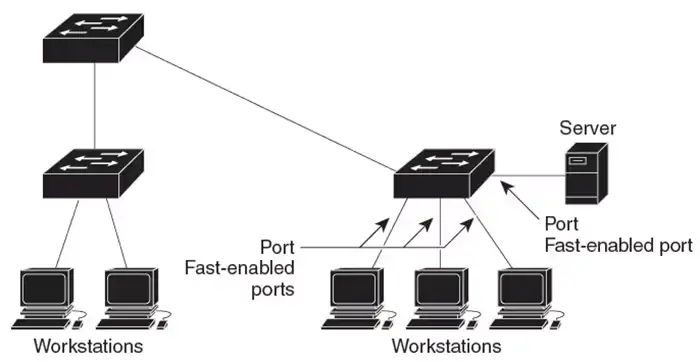
Cisco Network Loop Prevention Techniques with PortFast
PortFast is another crucial component of Cisco Network Loop Prevention Techniques, designed to accelerate network convergence on edge ports.
What PortFast Does
PortFast allows an access port to bypass STP listening and learning states and immediately transition to forwarding. This improves boot-up time for end devices, especially VoIP phones and PCs.
Why PortFast Helps Prevent Loops
Without PortFast:
• A port may temporarily forward traffic during topology changes
• Rapid reconvergence delays can cause temporary loops
• Devices may experience DHCP failures
PortFast ensures stable behavior on user-facing ports.
Configuration Example
Cisco recommends enabling PortFast on every access port that connects to an end device.
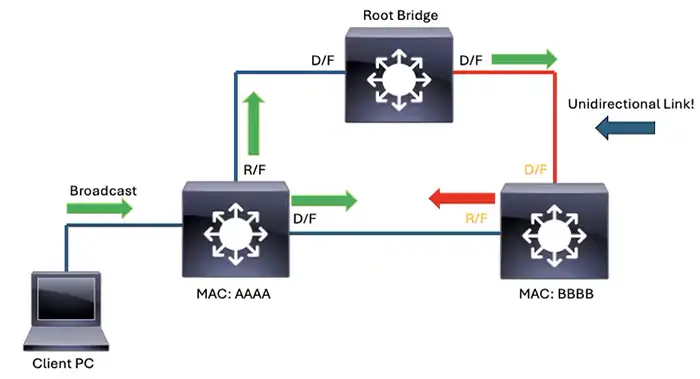
Cisco Network Loop Prevention Techniques with Storm Control
Storm Control is not an STP-specific feature, but it dramatically reduces the effect of a broadcast, multicast, or unknown unicast storm. If a loop occurs, Storm Control limits the amount of traffic that can be forwarded, preventing total network failure.
How Storm Control Works
Storm Control monitors traffic levels per port and throttles traffic if it exceeds a configured threshold. The switch can:
• Drop excess packets
• Send SNMP traps
• Log events
Types of Storms It Protects Against
• Broadcast storms
• Multicast storms
• Unknown unicast storms
These storms commonly occur during loops or misconfigurations.
Configuration Example
Storm Control gives administrators time to detect and fix a loop before it spreads.
How These Cisco Network Loop Prevention Techniques Work Together
Cisco Network Loop Prevention Techniques are most effective when used in combination.
• STP provides the core loop-free framework
• BPDU Guard protects edge ports
• Loop Guard protects uplinks
• PortFast speeds up access layer convergence
• Storm Control minimizes the blast radius
A common recommended template for enterprise networks is:
This ensures comprehensive protection.
Practical Scenarios Where Cisco Network Loop Prevention Techniques Save the Network
- Scenario 1: Accidental Patch Loop in an Office: Two wall jacks are mistakenly patched together. BPDU Guard prevents the access port from forwarding the loop traffic.
- Scenario 2: Faulty Fiber Transceiver: A unidirectional link causes STP inconsistency. Loop Guard detects missing BPDUs and blocks the port.
- Scenario 3: A Small Unmanaged Switch Creates Chaos: Storm Control limits broadcast storms caused by loops behind unmanaged switches.
- Scenario 4: VoIP Phones Boot Slowly Due to STP Delays: PortFast helps phones register instantly and prevents temporary topology loops during boot sequences.
Most Common Misconfigurations That Cause Loops
• Disabling STP entirely
• Connecting unmanaged switches without protection
• Incorrect EtherChannel configurations
• Using PortFast on trunk ports
• No Loop Guard on uplinks
• Wrong STP root placement
Avoiding these pitfalls is an essential part of Cisco Network Loop Prevention Techniques.
Best Practices for Cisco Network Loop Prevention Techniques
• Always define a primary and secondary STP root
• Use Rapid-PVST or MST instead of legacy STP
• Enable BPDU Guard globally
• Use PortFast only for access ports
• Apply Loop Guard to every trunk/uplink
• Install Storm Control thresholds everywhere
• Monitor ports for err-disable events
• Run periodic assessments of cabling and topology
Consistent design ensures loop protection remains reliable.
Need Help with Your Cisco Switch? Our Technicians Are Ready
If you ever run into problems with your Cisco switch – whether it is a network loop, an STP issue, a misconfigured VLAN, or a hardware fault – our technicians can assist you quickly. We have experienced network engineers who can troubleshoot, repair, reconfigure, or completely recover your switch on-site or remotely. From fixing port shutdowns and loop protection events to restoring full connectivity after a network outage, our team is ready to help and ensure your network returns to stable operation as fast as possible.
Frequently Asked Questions (FAQ)
These FAQs cover topics not mentioned directly in the article but are highly searched.
1. Can a Cisco switch run without STP at all?
It can, but disabling STP is strongly discouraged unless the environment is extremely controlled. Without STP, any loop will crash the network.
2. Does PortFast increase the risk of loops?
Only if applied incorrectly. PortFast should never be used on trunk links.
3. What happens when BPDU Guard triggers?
The port moves to an err-disable state. You must manually re-enable it unless automatic recovery is configured.
4. Does Loop Guard replace Root Guard?
No. Loop Guard prevents unidirectional-link issues on non-edge ports. Root Guard prevents another switch from becoming the root bridge.
5. Can Storm Control stop every broadcast storm?
Storm Control limits the impact but is not a full replacement for STP protection.
6. Should I use Loop Guard on access ports?
No, Loop Guard is only for non-edge STP ports such as trunks and uplinks.
7. How do I detect a loop in real time on a Cisco switch?
High CPU usage, excessive broadcast traffic, MAC flapping, and logs showing STP topology changes are common symptoms.
8. What is the difference between BPDU Guard and BPDU Filter?
BPDU Guard disables the port when BPDUs are received. BPDU Filter suppresses BPDUs. BPDU Guard is much safer and highly recommended.
9. Does EtherChannel help prevent loops?
Yes, a properly configured LACP EtherChannel prevents accidental parallel links from causing loops.
10. Is Storm Control needed if STP is already enabled?
Yes, Storm Control minimizes damage if a loop still forms due to misconfiguration, unmanaged switches, or physical wiring errors.
Conclusion
Cisco Network Loop Prevention Techniques provide multilayer protection against one of the most dangerous issues in enterprise switching. STP acts as the foundation, while BPDU Guard and Loop Guard protect against misconfigurations and failures. PortFast improves access port behavior, and Storm Control limits the damage caused by storms. Together, these techniques create a robust, resilient switching environment capable of withstanding both human mistakes and unexpected failures.
By applying these Cisco Network Loop Prevention Techniques consistently across your access, distribution, and core layers, you build a stable network that remains protected under all conditions.