











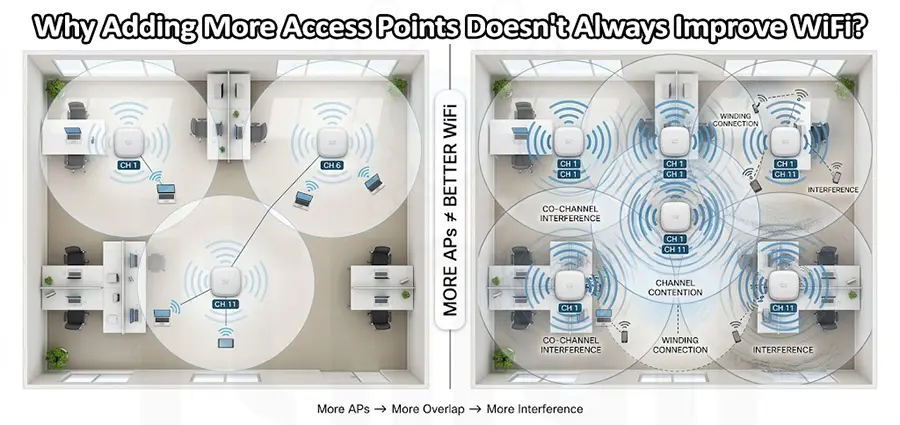
When business WiFi becomes slow, unstable, or unreliable, adding more access points often seems like the obvious solution. If one access point cannot provide enough coverage, why not install two, three, or four more? The problem is that Adding More Access Points does not automatically mean better WiFi. In some environments, installing additional APs without proper planning can actually make wireless performance worse. More access points can increase radio congestion, create co-channel interference, cause excessive coverage overlap, and make roaming more complicated.
A reliable WiFi network is not simply about having enough access points. It is about having the right number of APs in the right locations, using appropriate channels and transmit power for the environment. Before Adding More Access Points, you need to identify what is actually causing the WiFi problem.
Why Doesn’t Adding More Access Points Always Improve WiFi?
WiFi is a shared radio technology. Access points and client devices communicate over a limited amount of wireless spectrum. When additional APs are installed, they also need channels and airtime. If several APs are placed too close together and operate on the same or overlapping channels, they may compete for the same wireless resources. Cisco documentation specifically identifies adjacent APs using the same channel as a potential source of contention and interference. This means Adding More Access Points can solve a coverage problem while simultaneously creating a capacity or interference problem. The important question is therefore not:
“How many access points should we add?”
It is:
“What is actually limiting the WiFi network right now?”
That distinction can save a business from buying unnecessary equipment and still having the same WiFi problems afterward.
1. Adding More Access Points Can Increase Interference
One of the biggest risks of Adding More Access Points is increased RF interference. Every AP uses wireless channels to communicate with clients. If neighboring APs are using the same channel and their coverage areas overlap significantly, they have to share the available airtime. This is particularly important in high-density deployments.
For example, imagine an office with four access points. Users complain that WiFi is slow, so four more APs are installed. The number of APs has doubled, but the available spectrum has not doubled. If the new APs are not given an appropriate channel plan, the result can be more contention rather than more capacity. Cisco recommends considering channel assignment, channel utilization, interference, and transmit power when designing wireless networks. So before Adding More Access Points, the existing RF environment should be evaluated.
2. More Coverage Does Not Always Mean More Capacity
This is one of the most important concepts in WiFi design. An access point can have excellent signal coverage while still being overloaded. For example, an office may have a meeting room where 40 employees connect their laptops and phones to a single AP. The signal might show as strong on every device, but users still experience slow speeds.
The problem is not necessarily coverage. It may be capacity. Adding another appropriately positioned AP can help distribute clients and airtime. But simply installing another AP next to the existing one may not solve the problem if both APs are competing for the same channels.
In high-density environments, AP density, channel width, client distribution, and RF planning need to be considered together. Cisco Meraki, for example, notes that increasing channel width can reduce the number of unique channels available and increase co-channel interference in larger deployments.
3. Adding More Access Points Can Create Excessive Coverage Overlap
Some overlap between AP coverage areas is useful, particularly when users need to move around a building. However, excessive overlap can create problems. Imagine three APs installed in three small offices, all transmitting at maximum power. Their signals may extend far beyond the rooms where they are actually needed. Now add three more APs. Instead of creating six efficient wireless cells, you may end up with several APs hearing one another very strongly and competing for airtime.
This is why Adding More Access Points should usually be accompanied by appropriate transmit-power planning. Cisco’s wireless documentation explains that transmit power can be reduced to help mitigate co-channel interference between nearby APs. More APs with lower, properly controlled cell sizes can sometimes perform better than fewer APs transmitting at unnecessarily high power.
4. Adding More Access Points Does Not Automatically Improve Roaming
Another common misconception is that installing more APs will automatically make roaming smoother. It doesn’t. Roaming depends on the relationship between AP coverage, RF configuration, client behavior, authentication, and wireless features. If APs are positioned incorrectly or transmit power is poorly configured, a client may remain connected to an AP that is no longer the best choice.
This is commonly associated with sticky clients. For example, an employee walks from one side of an office to another. The phone remains connected to the original AP even though another AP is much closer. Adding even more APs will not necessarily fix that behavior. The wireless environment needs to be designed so that clients can transition between APs appropriately.
5. The 2.4 GHz Band Can Become Congested
The 2.4 GHz band has good range and penetration characteristics, but it has fewer usable non-overlapping channels than 5 GHz. That makes it particularly sensitive to congestion and co-channel interference. If a business responds to a WiFi problem by Adding More Access Points but continues operating many nearby radios heavily on 2.4 GHz, performance may not improve. Instead, a proper wireless design should evaluate:
- 2.4 GHz usage
- 5 GHz usage
- 6 GHz availability
- Channel width
- Channel utilization
- Client capabilities
- Nearby wireless networks
- Sources of non-WiFi interference
The goal is not simply to increase the number of radios. The goal is to use the available spectrum efficiently.
6. Access Point Placement Is More Important Than AP Quantity
Where you install an access point can be just as important as how many APs you install. An AP hidden behind furniture, inside a cabinet, close to large metal objects, or separated from users by multiple concrete walls may not perform as expected. Consider an office with a weak WiFi area. One approach is:
Weak signal → Add AP → Still weak → Add another AP
A better approach is:
Weak signal → Perform WiFi assessment → Identify the cause → Optimize AP placement/configuration → Add AP only if required
This second approach avoids treating every WiFi problem as a hardware problem. A professional wireless survey can identify signal strength, SNR, interference, channel utilization, coverage gaps, and areas where APs are excessively overlapping.
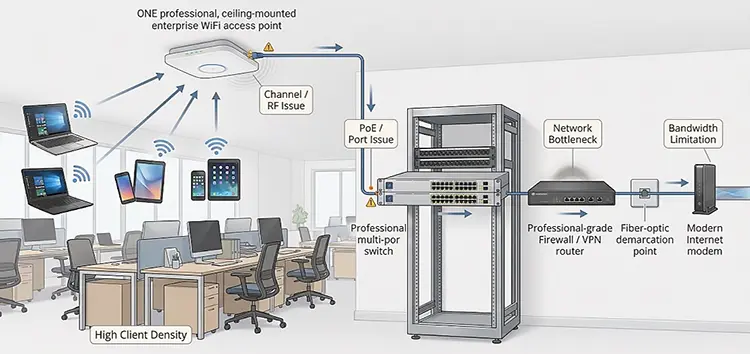
7. Your Internet Connection May Be the Real Problem
Sometimes the WiFi is working perfectly, but users still complain that “the WiFi is slow.” This can happen when the actual bottleneck is somewhere else. Before Adding More Access Points, IT support should check:
- Internet bandwidth
- Firewall performance
- Router utilization
- Switch uplinks
- VLAN configuration
- DHCP
- DNS
- Packet loss
- Latency
- AP Ethernet uplinks
- PoE availability
For example, if a company has a 500 Mbps internet connection that is already saturated, adding five more APs will not create additional internet bandwidth. The same applies if an AP has a poor Ethernet connection to the switch. More wireless hardware cannot fix a bottleneck that exists elsewhere in the network.
8. Poor Ethernet or PoE Can Make New APs Ineffective
Every wireless access point ultimately connects back to the wired network. If you are Adding More Access Points, the switching infrastructure needs to support them. Before installing additional APs, check for:
- Faulty Ethernet cables
- Incorrect cable termination
- 100 Mbps instead of Gigabit or higher links
- Packet errors
- Switch port problems
- Insufficient PoE budget
- Incorrect VLAN configuration
- Overloaded uplinks
A high-performance WiFi 6 or WiFi 6E access point cannot deliver its expected performance if its wired connection is the bottleneck. This is why a proper WiFi assessment should include both the wireless and wired network.
A Real-World Example: When Adding More Access Points Makes WiFi Worse
Consider a 1,500-square-foot office with four access points. Employees complain about slow WiFi in the afternoon. The company assumes that there are not enough APs and installs four additional units. After the installation, coverage looks excellent everywhere. However, users still report slow connections, and some devices now experience inconsistent roaming.
What happened?
The original problem may have been high client density and channel utilization, not insufficient coverage. The additional APs increased RF density without a proper channel and power plan. The network now has more radios competing for the same spectrum. A wireless assessment might reveal that the better solution is to:
- Adjust AP placement.
- Optimize channel assignments.
- Reduce unnecessary transmit power.
- Improve channel width planning.
- Distribute clients more effectively.
- Upgrade overloaded APs where necessary.
- Add APs only in areas where capacity actually requires them.
This is a good example of why Adding More Access Points should be the result of network analysis, not the starting point.
How Do You Know If You Actually Need More Access Points?
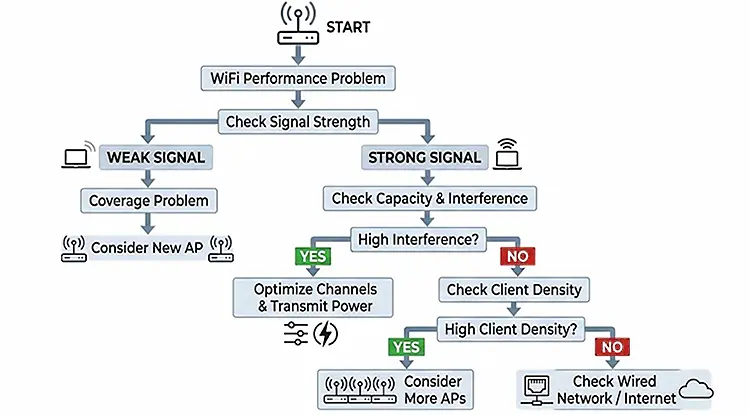
Before Adding More Access Points, determine which of these problems you are experiencing.
Weak Signal in Specific Areas
If users consistently have poor signal in a particular location, you may have a genuine coverage problem. An additional AP—or repositioning an existing AP—could be appropriate.
Strong Signal but Slow WiFi
If signal strength is good but performance is poor, investigate capacity, channel utilization, interference, client density, and the wired network before buying additional APs.
WiFi Gets Worse During Busy Hours
This often points toward capacity or congestion. Look at how many clients are connected to each AP and how much airtime is being consumed.
Users Disconnect While Moving
Investigate roaming behavior, AP placement, transmit power, authentication, and client behavior. Adding more APs alone may not solve the issue.
WiFi Signal Is Strong but Internet Is Slow
Test the internet connection, firewall, router, switch infrastructure, and WAN performance. The problem may not be wireless.
What Should You Check Before Adding More Access Points?
A proper assessment should answer several questions:
- Where are the coverage gaps?
- How many clients are connected to each AP?
- Which channels are being used?
- How much channel utilization exists?
- Are there sources of RF interference?
- How strongly can neighboring APs hear each other?
- Are AP transmit-power levels appropriate?
- Are clients roaming correctly?
- Are AP Ethernet links operating at the expected speed?
- Does the switch provide sufficient PoE?
- Is the internet connection actually the bottleneck?
- Would repositioning an existing AP solve the problem?
Only after answering these questions should you decide whether Adding More Access Points is necessary. Cisco also recommends establishing a baseline of client counts, AP distribution, channel assignments, and channel utilization before deploying additional wireless devices.
When Adding More Access Points Is the Right Solution
It is important to make one thing clear: Adding More Access Points is not bad. It is often exactly the right solution. You may need additional APs when:
- The building has genuine coverage gaps.
- The number of wireless clients has increased.
- Certain areas have consistently high client density.
- Existing APs are overloaded.
- A new floor or office area has been added.
- A business has expanded its wireless requirements.
- Higher capacity is required in meeting rooms or other busy areas.
The key is how the additional APs are deployed. Adding two properly positioned and configured APs can produce a significant improvement. Adding five poorly planned APs can make the RF environment more congested.
Adding More Access Points vs. Optimizing Existing APs
Before purchasing new hardware, compare these two approaches:
| Problem | Better First Step |
|---|---|
| Weak signal | Check AP placement and coverage |
| High client density | Analyze capacity and client distribution |
| Channel congestion | Optimize channel plan |
| Excessive overlap | Adjust AP placement or transmit power |
| Poor roaming | Review cell design and roaming configuration |
| Slow internet | Test WAN, router and firewall |
| AP disconnects | Check Ethernet and PoE |
| Genuine coverage gap | Consider adding an AP |
| New high-density area | Design additional AP capacity |
This approach is more cost-effective because it prevents businesses from buying access points that do not address the actual problem.
Professional WiFi and IT Support in Dubai
If your business WiFi is slow, unstable, frequently disconnecting, or has dead zones, Adding More Access Points may not be the first thing you should do. Our IT support team can assess your wireless network and determine whether the problem is related to coverage, interference, channel utilization, roaming, access point placement, client density, cabling, PoE, or the wider network infrastructure.
We have technicians who can visit your location in Dubai and evaluate your WiFi environment on-site. They can identify the cause of the problem, assess your existing access points, and recommend whether you need additional APs, better placement, configuration changes, or other network improvements.
If Adding More Access Points is genuinely the right solution, we can also help determine the appropriate number, locations, and configuration for your environment. The objective is not simply to install more access points. The objective is to build a WiFi network that delivers reliable coverage, sufficient capacity, stable roaming, and consistent performance where your users actually need it.


















