











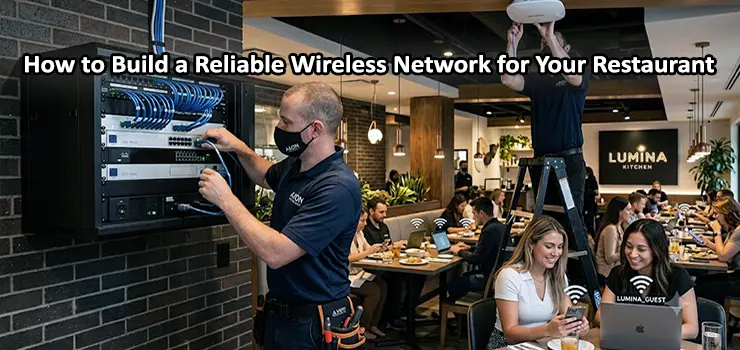
In today’s restaurant industry, a fast and reliable WiFi network is no longer an optional service; it is an essential part of daily operations. Restaurants depend on wireless connectivity for multiple purposes, including customer internet access, digital menus, online ordering systems, POS terminals, payment gateways, security cameras, kitchen management systems, and staff communication. A poorly designed WiFi network can lead to slow connections, payment failures, unhappy customers, and operational problems. A professional Restaurant WiFi Installation requires more than simply placing a few wireless routers around the building.
Restaurants have unique networking challenges because of their layout, customer density, interference from kitchen equipment, and the need to separate guest and business networks. ITMan provides professional network installation solutions designed to deliver stable, secure, and high-performance WiFi connectivity for restaurants, cafes, and hospitality businesses.
Why Restaurant WiFi Need Professional Installation
Many restaurant owners underestimate the importance of proper wireless network planning. A basic home router may work for a small office, but it cannot handle the requirements of a busy restaurant with dozens or hundreds of connected devices. A professionally installed restaurant WiFi network provides:
- Stable internet access for customers and employees
- Better coverage across dining areas, kitchens, and outdoor spaces
- Higher connection speed with multiple users
- Secure separation between guest and internal networks
- Reliable operation of POS and business applications
- Improved customer experience and brand reputation
Modern customers expect fast WiFi when they visit restaurants. Slow or unstable internet can negatively affect online reviews and customer satisfaction.
Step 1: Analyze Your Restaurant Layout and Network Requirements
The first step in a successful Restaurant WiFi Installation is understanding the physical environment and business requirements. Before installing access points, network engineers should evaluate:
- Restaurant size and floor plan
- Number of tables and customer capacity
- Indoor and outdoor areas
- Wall materials and possible signal obstacles
- Kitchen equipment that may create interference
- Number of expected connected devices
- Internet bandwidth requirements
For example, a small cafe may only require a few wireless access points, while a large restaurant, food court, or multi-floor venue may need multiple enterprise-grade access points with centralized management. A proper site survey helps determine the ideal locations for WiFi access points and prevents weak signal areas.
Step 2: Choose the Right Equipment for WiFi Restaurants
Selecting the correct networking hardware is one of the most important parts of restaurant wireless installation. Consumer-grade routers are usually not designed for high-density environments. Restaurants should use professional networking equipment that supports many simultaneous users and provides advanced management features. Important equipment includes:
Enterprise Wireless Access Points
Professional access points are designed to provide better coverage, higher capacity, and improved reliability. They support technologies such as:
- WiFi 6 and WiFi 7
- Multiple device connections
- Better signal management
- Fast roaming between access points
- Centralized monitoring
Brands such as Ubiquiti, Cisco, Aruba, and TP-Link Omada offer suitable solutions for restaurants and hospitality environments.
Managed Network Switches
Access points, security cameras, POS systems, and other network devices often require reliable wired connections. Managed switches provide:
- VLAN support
- Better network control
- PoE power for access points and cameras
- Traffic monitoring
- Improved security
Power over Ethernet (PoE) switches are especially useful because they allow access points to receive both power and data through a single network cable.
Business-Grade Router and Firewall
A professional router manages internet traffic and protects the restaurant network. Features such as firewall protection, bandwidth management, VPN support, and traffic prioritization help maintain stable performance.
Step 3: Design Separate Networks for Guests and Staff
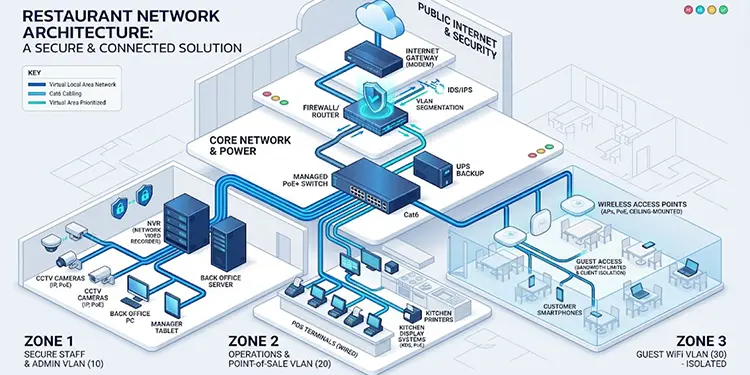
One of the biggest mistakes in restaurant WiFi installation is using a single network for customers and internal systems. A professional restaurant network should separate traffic using VLAN technology. A typical restaurant network may include:
Guest WiFi Network
Designed for customers:
- Internet-only access
- Limited bandwidth usage
- Captive portal login options
- Protection from internal systems
Staff Network
Used by employees:
- Faster access
- Secure authentication
- Access to business applications
Business Network
Used for critical systems:
- POS terminals
- Payment systems
- Inventory management
- Servers
- Security cameras
Network segmentation improves security and prevents customers from accessing sensitive business devices.
Step 4: Optimize Restaurant WiFi Coverage and Performance
Installing access points is not enough. Their placement and configuration directly affect network performance. Professional installation includes:
Correct Access Point Placement
Access points should be installed where they provide maximum coverage without unnecessary signal overlap. Common installation locations include:
- Ceiling areas above dining spaces
- Reception areas
- Outdoor seating zones
- Kitchen areas when required
Avoid placing access points behind walls, near metal objects, or close to devices that generate interference.
Channel Optimization
Restaurant WiFi networks operate on different radio channels. Incorrect channel selection can cause interference and reduce speed. Network specialists configure:
- 2.4GHz and 5GHz bands
- Channel allocation
- Transmission power
- Band steering settings
This ensures devices connect to the best available frequency.
Load Balancing
Busy restaurants may have many customers connecting at the same time. Enterprise Restaurant WiFi systems can distribute users between access points to prevent network congestion.
Step 5: Provide Secure Guest WiFi Access
Guest WiFi should be easy for customers to use but secure for the business. Popular options include:
- Password-protected WiFi
- Captive portal login pages
- Social media authentication
- Time-based access
- Bandwidth limitations
A captive portal allows restaurants to display branding, collect customer information, or promote special offers before providing internet access.
Step 6: Ensure Reliable Connectivity for POS and Restaurant Systems
Restaurants depend on network availability for many critical operations. A properly designed Restaurant WiFi and wired network supports:
- POS systems
- Online ordering platforms
- Digital menu systems
- Kitchen display systems
- Receipt printers
- Payment terminals
- CCTV systems
For important devices such as payment systems and POS terminals, wired Ethernet connections are often preferred because they provide maximum stability and lower latency.
Step 7: Use Professional Cabling and Network Infrastructure
A reliable wireless network depends on a strong wired foundation. Professional restaurant installations usually include:
- Cat6 or Cat6A network cabling
- Proper cable management
- Network racks
- Patch panels
- PoE switches
- Organized labeling
Poor cable installation can create future maintenance problems and reduce network reliability. ITMan provides complete network infrastructure solutions, including structured cabling, switch installation, access point configuration, and network troubleshooting.
Common Restaurant WiFi Installation Mistakes
Many connectivity problems happen because of incorrect planning. Common mistakes include:
- Using Home Routers: Home routers cannot handle high numbers of users and lack advanced management features.
- Installing Too Few Access Points: A single powerful access point does not always provide better coverage. Multiple properly placed access points usually deliver better performance.
- Ignoring Network Security: Without VLANs and proper firewall rules, guest devices may create security risks.
- Poor Cable Installation: Low-quality cables or incorrect installation can cause unstable connections.
- No Future Expansion Planning: Restaurants often add new devices over time. The network should be designed with scalability in mind.
Benefits of Professional Restaurant WiFi Installation by ITMan
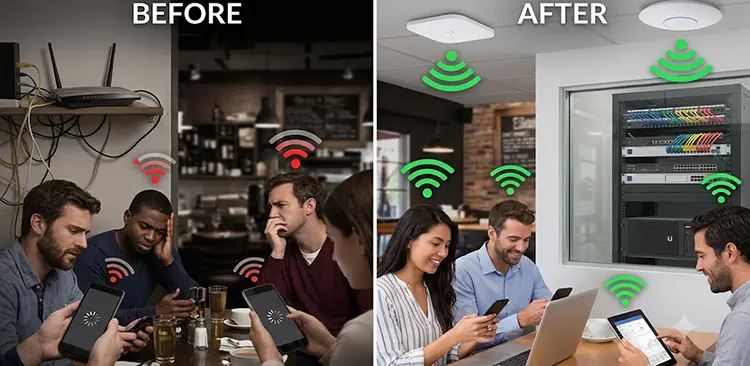
Choosing an experienced network installation company helps restaurants achieve reliable connectivity and long-term performance. ITMan provides:
- Professional WiFi site surveys
- Enterprise wireless access point installation
- Cisco, Ubiquiti, MikroTik, and managed switch configuration
- Network cabling and infrastructure setup
- VLAN and security configuration
- Troubleshooting and maintenance services
Whether you operate a small cafe or a large restaurant in Dubai, a professionally designed WiFi network improves customer experience and supports smooth business operations.
Conclusion
A successful Restaurant WiFi Installation requires careful planning, professional equipment selection, proper access point placement, network security configuration, and reliable infrastructure. Restaurants today depend on wireless connectivity for customers, employees, and essential business systems, making a strong network a critical investment.
With professional network design and installation services from ITMan, restaurants can build a fast, secure, and scalable WiFi solution that supports daily operations and future growth. A reliable restaurant network is not just about internet access; it is about creating a better customer experience and improving business efficiency.


















