











Network downtime is more than a temporary technical inconvenience. For a modern business, even a short network outage can interrupt communication, stop employees from accessing cloud applications, affect VoIP phones, disconnect servers, disrupt CCTV systems, and delay customer service. When the network is unavailable, many other business operations can come to a standstill at the same time.
This is why reliable IT Support is not simply about fixing computers when something stops working. A professional IT support team takes a proactive approach to network management, looking for signs of potential failures before they turn into serious outages. By monitoring infrastructure, maintaining network equipment, managing configurations, improving security, and responding quickly to technical problems, IT support can significantly reduce both the frequency and duration of network downtime.
For businesses in Dubai, where daily operations often depend heavily on internet connectivity, cloud platforms, digital communication, and connected devices, having reliable IT infrastructure is particularly important. The question is not whether a network will eventually experience a problem, but whether the business is prepared to identify and resolve that problem before it causes significant disruption.
Network Downtime Often Starts Before the Network Actually Goes Down
One of the biggest misconceptions about network downtime is that it happens suddenly. In reality, many network failures have warning signs that appear hours, days, or even weeks before a complete outage.
A switch interface may begin generating CRC errors. A server may gradually run out of storage. An access point may become overloaded as more employees connect to it. A network device may start operating at unusually high temperatures. Internet bandwidth may consistently approach its maximum capacity. None of these problems necessarily causes an immediate outage. However, they indicate that something is changing within the infrastructure.
This is where proactive IT support becomes valuable. Instead of waiting for employees to report that “the internet is down,” an IT support technician can monitor the infrastructure and investigate unusual behavior while the network is still operational. The difference is significant. Fixing a developing problem during normal working hours is usually much easier than troubleshooting a complete outage after the business has already stopped functioning.
1. Proactive IT Support Detects Problems Before They Become Outages
A reliable IT support strategy starts with visibility. Network monitoring allows technicians to understand what is happening across switches, routers, firewalls, servers, access points, and other infrastructure. Rather than relying entirely on user complaints, the IT team can identify abnormal behavior directly from the network.
For example, if a switch begins showing increasing interface errors, the issue could be related to a damaged Ethernet cable, faulty SFP module, poor fiber connection, or a problem with the connected device. The network may still be working, but the increasing errors indicate that the connection deserves attention.
The same principle applies to servers and other infrastructure. Increasing CPU utilization, memory consumption, storage usage, temperature, or network traffic can indicate that a device is approaching a condition where performance or availability may be affected. Professional IT support turns this information into action. The objective is not simply to collect monitoring data but to interpret it and determine whether the behavior represents a genuine risk to the business.

2. Preventive Maintenance Reduces Unexpected Hardware Failures
Network equipment operates continuously, often for years. Switches, routers, firewalls, servers, access points, UPS systems, and other devices are exposed to heat, dust, electrical fluctuations, continuous workloads, and physical wear. Without regular maintenance, small hardware problems can remain unnoticed until they become failures.
Consider a switch with a cooling problem. The device may continue operating normally for some time, but excessive temperature can eventually cause instability or shutdown. If the condition is identified during routine maintenance, the cooling system can be inspected and the problem addressed before the switch affects users.
The same applies to power supplies, fans, storage devices, network interfaces, and physical connections. IT support should therefore include more than software troubleshooting. Physical infrastructure is part of the network, and its condition directly affects network availability.
For businesses with server rooms or network racks, regular inspection can also reveal poor cable management, inadequate airflow, overloaded power connections, or other environmental issues that could eventually contribute to downtime.
Network Configuration Errors Can Be Just as Dangerous as Hardware Failures
A network does not need to have a broken device to experience downtime. A configuration change can be enough. This is especially important in networks using VLANs, trunk connections, routing, firewall policies, VPNs, DHCP, DNS, and multiple interconnected switches. A small configuration mistake can affect a large number of users.
For example, changing a trunk configuration on one switch without considering the VLANs required by downstream devices can suddenly prevent users from reaching servers or other business systems. Similarly, an incorrect firewall rule may block legitimate traffic and make an application appear to be offline even though the server itself is functioning correctly.
Professional IT support helps reduce these risks by managing network configurations systematically. Changes can be reviewed, documented, backed up, and tested instead of being applied without understanding their potential impact.
This is particularly important when different network devices are involved. A Cisco switch, MikroTik router, Ubiquiti access point, firewall, and server may all depend on one another. Troubleshooting or changing one component without understanding the overall network architecture can create new problems.
3. IT Support Identifies Network Bottlenecks Before They Cause Serious Problems
Network capacity is another factor that can gradually lead to downtime. Businesses rarely stay the same size. A company that started with 15 employees may eventually have 50, 100, or more users. At the same time, employees may use more cloud applications, video conferencing, VoIP, file sharing, backups, IP cameras, and other bandwidth-intensive services.
The original network may continue to function, but performance can deteriorate as demand increases. This often creates a frustrating situation where users report that the “network is down” even though every device is technically online. Applications become slow, video calls disconnect, file transfers take longer, and wireless connectivity becomes unreliable.
An experienced IT support team can analyze traffic patterns and determine where the bottleneck actually exists. The solution might be an upgraded switch uplink, additional access points, a faster internet connection, a different network architecture, or a more appropriate server configuration. The important point is that the business does not have to wait until performance becomes unacceptable before taking action.
4. Network Security Is Also Part of Downtime Prevention
Cybersecurity and network availability are closely connected. A ransomware infection, compromised account, malicious configuration change, or unauthorized device can cause serious operational disruption. In some cases, a security incident can make critical systems completely unavailable.
IT support can help reduce this risk by implementing appropriate network security controls and maintaining them over time. Network segmentation is one example. Separating guest Wi-Fi from internal business systems prevents visitors and unmanaged devices from having unnecessary access to corporate resources. VLANs can also be used to separate departments, servers, IP phones, cameras, and other systems according to business requirements.
Firewalls, VPNs, access controls, firmware updates, endpoint protection, and secure remote access policies also contribute to network reliability. Security should therefore not be treated as something separate from IT support. A secure network is generally easier to control, monitor, and maintain, and a well-managed network is better positioned to contain security incidents before they become business-wide disruptions.
5. Backup and Documentation Make Recovery Much Faster
Even with excellent maintenance, unexpected failures can still happen. A switch can fail. A firewall can stop working. A server can become corrupted. A configuration can be accidentally deleted.
What matters at that point is how quickly the business can recover. This is why configuration backups and accurate documentation are important components of professional IT support.
Imagine a critical router fails and there is no record of its configuration. The replacement device has to be configured from memory or rebuilt by analyzing the network. This can take hours, particularly in a complex environment. Now consider the same situation where the current configuration is securely backed up and the network topology, IP addressing, VLANs, and connected services are documented. The replacement process becomes significantly more straightforward.
Good IT support therefore reduces not only the probability of downtime but also the recovery time when an unexpected failure occurs.
6. Redundancy Reduces the Impact of Critical Failures
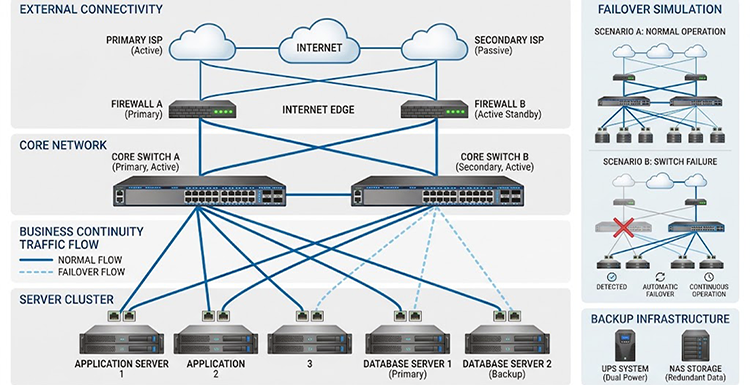
Some network components are more important than others. If a single switch connects an entire office to the network, its failure could affect every employee. If there is only one internet connection, an ISP outage could immediately interrupt cloud services and communication.
These are examples of single points of failure. IT support can identify these weaknesses and recommend redundancy where it makes financial and operational sense. Depending on the business, this could involve redundant power supplies, backup internet connections, additional network paths, redundant switches, UPS systems, backup servers, or high-availability configurations.
The goal is not to make every part of the infrastructure unnecessarily complicated. Instead, redundancy should be focused on the systems where downtime would have the greatest consequences.
For a small office, a secondary internet connection may be more valuable than an expensive high-availability network architecture. For a larger organization, redundant switches, firewalls, power supplies, and internet connections may be justified. A good IT support provider should understand this difference and recommend infrastructure based on actual business requirements rather than simply selling additional hardware.
7. Fast Troubleshooting Limits the Damage When Something Does Fail
Preventive IT support can significantly reduce network problems, but it cannot eliminate every possible failure. Internet providers can experience outages. Hardware can fail unexpectedly. Cables can become damaged. Someone can make an incorrect configuration change.
When this happens, the speed and quality of troubleshooting become critical. A professional IT support technician does not simply restart devices and hope the problem disappears. Troubleshooting starts by determining the scope of the incident.
Is one user affected or the entire office? Is the problem limited to Wi-Fi? Can users reach internal servers? Is the internet connection working? Are switches reporting interface errors? Are VLANs and routing functioning correctly? Has anything changed recently? From there, the technician can isolate the affected component and determine whether the root cause is physical, configuration-related, hardware-related, security-related, or associated with the internet service provider.
This structured approach can dramatically reduce Mean Time to Recovery (MTTR), which is one of the most important factors in minimizing the business impact of downtime.
Why Businesses Should Choose Proactive IT Support
There is a major difference between having someone available when a computer stops working and having a professional IT support strategy. Reactive support begins after a problem has already affected the business. Proactive support attempts to identify and resolve risks before they become incidents.
For example, discovering that a switch is overheating during a scheduled infrastructure review gives the business an opportunity to replace or repair it. Discovering the same issue after the switch shuts down is a completely different situation. The same principle applies to network capacity, security vulnerabilities, aging hardware, configuration problems, and inadequate Wi-Fi coverage.
A proactive approach does not mean that downtime will never happen. No IT provider can realistically guarantee that. Instead, it reduces preventable failures and gives the business a much better ability to respond when unexpected incidents occur.
A Reliable Network Requires More Than Good Hardware
Buying a high-quality Cisco switch, HPE server, MikroTik router, or Ubiquiti access point does not automatically create a reliable network. Hardware is only one part of the equation.
The infrastructure also needs to be properly designed, installed, configured, monitored, maintained, secured, and documented. As the business grows, the network must evolve with it. This is why IT support should be viewed as an ongoing process rather than an emergency service.
A good IT support provider understands how the different parts of the infrastructure work together and can help the business make technical decisions before problems become expensive.
IT Support Services in Dubai from ITMan
At ITMan, we provide IT support and network solutions for businesses in Dubai with a focus on keeping IT infrastructure stable, reliable, and easy to manage.
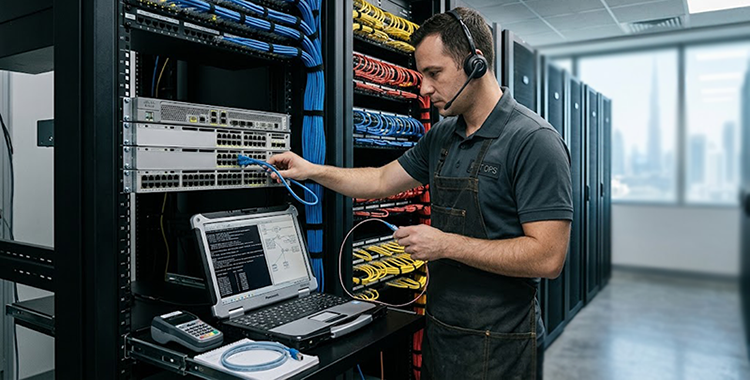
Our work goes beyond simply responding when a device stops working. We can help businesses troubleshoot network problems, configure and maintain Cisco switches, MikroTik routers and Ubiquiti equipment, diagnose connectivity issues, support servers, configure VLANs, troubleshoot Wi-Fi, inspect network infrastructure, and assist with network upgrades and installations.
When a network problem occurs, our focus is on finding the root cause rather than applying a temporary workaround. A recurring connection problem, for example, may be caused by a faulty cable, SFP module, switch port, VLAN configuration, routing issue, or another component elsewhere in the infrastructure. Identifying the actual cause is essential if the business wants to prevent the same problem from returning.
We also help businesses take a more proactive approach to IT. By reviewing network architecture, equipment condition, configurations, capacity, and potential single points of failure, we can identify areas that may put business continuity at risk.
Whether you need ongoing IT Support in Dubai, network troubleshooting, Cisco or MikroTik support, server assistance, Wi-Fi deployment, or help improving the reliability of an existing business network, ITMan can assess your infrastructure and recommend a practical solution based on your actual requirements.
A reliable network is not simply one that works today. It is a network that is properly managed, monitored, maintained, and prepared for tomorrow’s demands.


















