











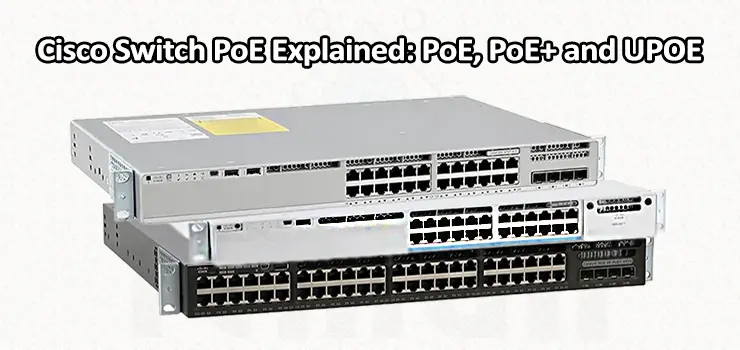
Power over Ethernet (PoE) has become an important feature in modern network infrastructure because it allows network devices to receive both data and electrical power through a single Ethernet cable. Instead of installing a separate power adapter and electrical outlet for every IP phone, wireless access point, security camera, or other compatible device, a Cisco PoE switch can deliver power directly through its network ports.
For businesses building or upgrading a network, understanding the differences between PoE, PoE+, and Cisco UPOE is essential. Choosing the wrong PoE standard can result in insufficient power, unstable devices, or unnecessary infrastructure costs. This guide explains how PoE works, how Cisco implements different PoE technologies, and how to determine which option is appropriate for your network.
What Is PoE on a Cisco Switch?
PoE stands for Power over Ethernet. It is a technology that allows electrical power to travel through the same twisted-pair Ethernet cable used for network communication. A PoE-enabled Cisco switch can therefore act as both a network switch and a power source for compatible devices.
The switch is commonly referred to as Power Sourcing Equipment (PSE), while the connected device is known as a Powered Device (PD). When a compatible device is connected, the switch determines whether the device requires PoE and, depending on the technology being used, negotiates the appropriate amount of power.
This is particularly useful in environments where devices are installed away from conventional electrical outlets. For example, a ceiling-mounted wireless access point may only need one Ethernet cable running back to the network rack. That cable can carry the network connection and electrical power simultaneously.
Cisco PoE switches are widely used for IP phones, wireless access points, surveillance cameras, access-control equipment, and various IoT devices. However, not every Cisco switch provides the same amount of PoE power, which is why understanding the difference between PoE, PoE+, and UPOE is important before selecting a switch.
How Does PoE Work?
At a basic level, PoE works by sending DC electrical power over Ethernet cabling while maintaining normal network communication. Modern PoE implementations use the Ethernet pairs in a way that allows power and data to coexist on the same cable.
When a PoE-capable device is connected, the switch does not simply send full power immediately. The switch performs a detection process to determine whether the connected device is compatible with PoE. This helps prevent power from being delivered to devices that do not support the technology.
Once the device is identified, the switch can provide the required power according to the applicable PoE standard and the device’s requirements. Cisco switches also monitor power consumption and manage their available PoE power budget across connected devices.
This last point is especially important in larger networks. A switch might have 48 PoE ports, but that does not necessarily mean all 48 ports can deliver the maximum available power simultaneously. The total amount of power supplied by the switch depends on its power supply configuration and model.
Cisco Switch PoE vs PoE+ vs UPOE
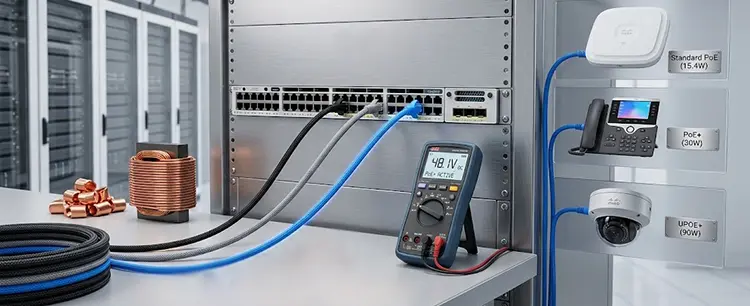
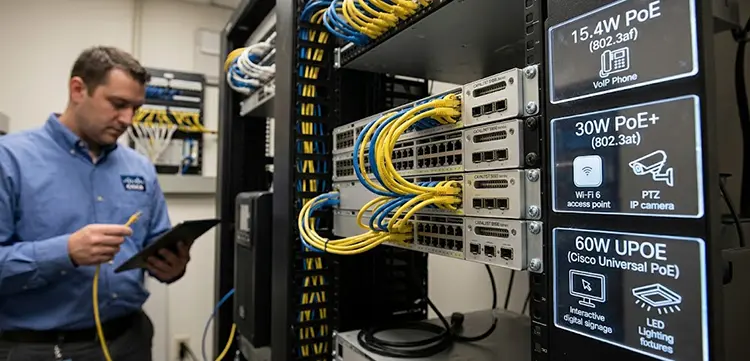
Although PoE, PoE+, and UPOE all provide power through Ethernet, they are designed for different power requirements. The main difference is the amount of power that can be delivered to the connected device. Traditional PoE is associated with IEEE 802.3af and provides up to approximately 15.4 watts of power from the switch port, with the powered device receiving up to around 12.95 watts after accounting for cable losses.
This level of power is sufficient for many basic network devices. Older IP phones, simple wireless access points, and some basic security cameras can operate comfortably within this power range. PoE+, based on IEEE 802.3at, increases the available power significantly. A PoE+ switch can provide up to approximately 30 watts at the switch port, while the powered device can receive up to around 25.5 watts.
This additional capacity makes PoE+ suitable for more demanding equipment. Dual-band and higher-performance wireless access points, video phones, PTZ-capable cameras, and other devices with higher electrical requirements may need PoE+ rather than standard PoE. Cisco also offers UPOE (Universal Power over Ethernet) for applications requiring substantially more power. UPOE is Cisco’s high-power PoE technology and can deliver up to approximately 60 watts per port under its traditional implementation. It is intended for devices that require considerably more power than conventional PoE and PoE+ can provide.
The practical difference is therefore simple: PoE is intended for lower-power devices, PoE+ supports more demanding equipment, and UPOE is designed for high-power network endpoints.
What Is Cisco UPOE?
Cisco UPOE, or Universal Power over Ethernet, was developed to extend the capabilities of conventional PoE. While standard PoE and PoE+ are sufficient for many network devices, some enterprise equipment requires significantly more electrical power.
UPOE uses all four twisted pairs of an Ethernet connection to provide higher power. This allows Cisco switches supporting UPOE to power devices such as advanced wireless access points, compact computers, thin clients, digital signage, building-management equipment, and certain high-end collaboration devices.
One of the major advantages of UPOE is that it can reduce the need for separate electrical infrastructure. For example, instead of installing a dedicated electrical outlet for a compatible endpoint, an organization can potentially power it directly from the network switch. This can simplify installations in offices, hospitals, hotels, educational facilities, and large commercial buildings where adding electrical outlets can be expensive or difficult.
It is important, however, not to assume that every Cisco PoE switch supports UPOE. UPOE capability is model-dependent, and the switch must have the appropriate hardware and power budget.
PoE Power Budget on a Cisco Switch
One of the most common misunderstandings when purchasing a Cisco PoE switch is confusing the power available on an individual port with the total power budget of the switch. Imagine a 48-port Cisco switch that supports PoE+. Even if each port can theoretically provide up to 30 watts, the switch may not have enough total power capacity to supply 30 watts to all 48 ports simultaneously.
For example, 48 devices each consuming 30 watts would require 1,440 watts of power before considering the switch’s own requirements and other factors. A particular switch configuration may have a substantially lower PoE budget. The power supply installed in the switch therefore matters. Cisco switches may support different power supply configurations, and some models allow redundant or higher-capacity power supplies to increase the available PoE budget.
When designing a network, you should calculate the expected power consumption of the connected devices rather than simply counting the number of PoE ports.
How to Choose Between PoE, PoE+ and UPOE
The correct choice depends primarily on the power requirements of the devices you intend to connect. If your network consists mostly of basic IP phones or low-power access points, standard PoE may be sufficient. There is little reason to pay for a higher-power technology if the connected devices do not require it.
PoE+ is generally a better choice when deploying modern enterprise wireless access points, advanced IP phones, security cameras, or other equipment that requires more than standard PoE can provide. It provides additional power capacity without moving to a high-power UPOE deployment. UPOE becomes relevant when the endpoints require substantially more power or when eliminating separate electrical connections provides a meaningful installation advantage.
The best approach is to check the manufacturer’s power requirement for every endpoint and then calculate the total expected consumption. It is also wise to leave some additional capacity in the PoE budget for future expansion.
Does Ethernet Cable Matter for PoE?
Yes. Ethernet cabling plays an important role in PoE installations. Cable quality, length, resistance, and the number of pairs used can affect power delivery. Standard PoE deployments commonly use twisted-pair Ethernet cabling such as Cat5e or better, depending on the requirements of the installation and the specific technology.
For higher-power implementations such as UPOE, proper cabling becomes even more important because more electrical power is being transmitted through the cable. Poor-quality, damaged, incorrectly terminated, or unsuitable cabling can cause excessive heat, voltage drop, or unreliable device operation.
For enterprise installations, using properly installed and tested structured cabling is therefore an important part of designing a reliable PoE network.
Common Cisco PoE Problems
A PoE device that does not turn on does not necessarily mean that the switch itself is defective. Several factors can cause PoE problems. The most common issue is an insufficient power budget. A switch may have available PoE ports but lack enough total power for all connected devices.
Another possibility is incompatibility between the switch and endpoint. A device requiring PoE+ or UPOE may not operate correctly when connected to a switch that only supports standard PoE. Cable problems are another frequent cause. A damaged Ethernet cable, poor termination, excessive resistance, or incorrect wiring can interfere with both data and power delivery.
Power supply configuration can also matter on modular or enterprise Cisco switches. If the installed power supplies do not provide enough capacity, the available PoE budget may be lower than expected. For troubleshooting, Cisco administrators can inspect the switch’s PoE status through the command-line interface and determine whether a port is delivering power, how much power it is consuming, and whether an error has been detected.
Why Cisco PoE Is Important for Modern Networks
PoE has changed the way organizations deploy network-connected devices. By combining power and data into a single Ethernet connection, it can simplify cabling, reduce installation complexity, and make device placement more flexible. For wireless networks in particular, PoE is extremely valuable because access points are often installed on ceilings, walls, or other locations where installing a dedicated power outlet would be inconvenient.
The same principle applies to IP cameras, phones, access-control systems, and many IoT devices. Instead of designing separate data and electrical connections for every endpoint, network infrastructure can provide both through Ethernet. As networks become more dependent on wireless connectivity, surveillance, collaboration systems, and intelligent building technologies, understanding PoE capabilities is increasingly important for network administrators and IT teams.
Final Thoughts
Understanding Cisco Switch PoE, PoE+, and UPOE helps you select the right switching infrastructure for your network instead of choosing a switch based only on port count or network speed. Standard PoE is suitable for lower-power endpoints, PoE+ provides additional capacity for modern devices, and Cisco UPOE is designed for high-power applications.
When selecting a Cisco switch, consider the required PoE standard, total power budget, power supply configuration, Ethernet cabling, and the actual power consumption of your connected devices. A correctly designed PoE infrastructure can provide a cleaner, more flexible, and easier-to-manage network while reducing the need for separate electrical connections.
If your business needs help selecting, installing, configuring, or troubleshooting a Cisco PoE switch, professional IT Support can also help evaluate your network requirements, calculate the required PoE budget, and ensure that your switches and powered devices work reliably together.


















