













 ? Message us on
 The TP-Link Deco M5 AC1300 Whole Home Mesh Wi-Fi System (2-Pack) is designed to provide reliable wireless connectivity throughout your home or small office. Using mesh networking technology, the Deco M5 works as a unified Wi-Fi system to help eliminate weak signal areas and provide more consistent coverage across multiple rooms. Instead of relying on a single router to deliver Wi-Fi to every corner, the two Deco units work together to create one wireless network.
With AC1300 dual-band Wi-Fi, intelligent mesh technology, and support for multiple connected devices, the TP-Link Deco M5 is a practical solution for households that need dependable internet access for streaming, online meetings, gaming, browsing, and smart home devices.
Whether you want to improve Wi-Fi coverage in a multi-room apartment, a villa, or a small office, the Deco M5 offers a straightforward way to extend wireless coverage without managing multiple separate Wi-Fi networks.
What Is the TP-Link Deco M5 AC1300 Mesh Wi-Fi System?
The TP-Link Deco M5 is a dual-band mesh Wi-Fi system that uses multiple interconnected units to distribute wireless connectivity throughout your space. The 2-pack includes two Deco M5 units that cooperate to provide broader coverage than a typical single-router setup.
Traditional Wi-Fi routers can struggle to deliver strong signals through thick walls, across multiple floors, or into rooms located far from the router. Wi-Fi extenders can help address these issues, but they may require separate configuration and can create additional network management challenges.
The Deco M5 takes a different approach. Both units form part of the same mesh network, allowing compatible devices to connect to the available Deco unit with the most suitable connection as you move around your home.
The system is designed to simplify wireless networking. Once configured, users can manage the network through the TP-Link Deco mobile application, including basic setup, connected-device management, and supported network security features.
AC1300 Dual-Band Wi-Fi Performance
The TP-Link Deco M5 supports AC1300-class Wi-Fi, with combined theoretical wireless speeds of up to 1,267 Mbps across its two frequency bands.
Its wireless specifications include:
- 2.4 GHz band: Up to 400 Mbps
- 5 GHz band: Up to 867 Mbps
- Wi-Fi standard: IEEE 802.11ac
- Wireless technology: Dual-band Wi-Fi
The 2.4 GHz band generally offers better reach and penetration through obstacles, making it useful for devices located farther away from a Deco unit. The 5 GHz band can provide higher wireless speeds at shorter distances and is suitable for bandwidth-intensive activities when signal conditions are good.
The AC1300 rating represents the combined theoretical capacity of both bands, not the speed available to a single device. Actual performance depends on your internet plan, interference, device capabilities, network configuration, and the quality of the wireless connection between Deco units.
For everyday activities such as browsing, video streaming, video calls, and connecting smart home devices, the Deco M5 provides a capable wireless platform for many residential and small-office environments.
Whole-Home Mesh Coverage with Two Deco Units
One of the main advantages of the TP-Link Deco M5 AC1300 Whole Home Mesh Wi-Fi System (2-Pack) is its ability to distribute Wi-Fi coverage across a larger area.
The two units can be placed in different parts of your property to help address weak signal areas. One Deco unit connects to your existing modem or internet gateway, while the second can be positioned in a suitable location to extend the mesh network.
Because the units operate as part of the same system, you can use a single Wi-Fi network name instead of manually switching between separate networks as you move around.
The best placement depends on the layout of your property. Ideally, the second unit should be placed where it can still maintain a good connection to the first unit while improving coverage in the area you want to reach.
Walls, reinforced concrete, metal objects, neighboring wireless networks, and floor construction can affect the coverage you achieve. For this reason, actual coverage may vary between apartments, villas, and office spaces.
If your property has extensive coverage requirements or several difficult signal areas, additional compatible Deco units may be needed.
Seamless Roaming Across Your Network
Moving between rooms should not require you to reconnect manually to a different Wi-Fi network. The Deco M5 mesh system is designed to support seamless roaming, helping compatible wireless devices transition between Deco units as you move around the property.
For example, you can start a video call in your living room and move toward another room without having to select a new network. The system helps your device maintain connectivity through the mesh network, although the roaming decision also depends on the connected device and its wireless behavior.
This feature is particularly useful in larger homes, multi-room apartments, and small offices where users frequently move between different areas while remaining connected.
A unified network also makes everyday use easier for family members, employees, and visitors who need consistent access to Wi-Fi throughout the covered space.
Improved Connectivity for Multiple Devices
Modern homes and offices often have many connected devices operating simultaneously. Smartphones, laptops, tablets, smart televisions, security cameras, and smart home accessories all compete for wireless network resources.
The TP-Link Deco M5 is designed to manage a connected home network with support for multiple devices and intelligent traffic management features.
Its mesh architecture helps distribute connectivity across the property, while supported Quality of Service (QoS) features can prioritize selected applications or devices according to network requirements.
For example, you may want to give greater priority to a work laptop used for video conferencing or a device used for important online meetings.
Keep in mind that the experience depends on your internet connection, the number of active devices, their bandwidth requirements, and the wireless conditions in your environment. A mesh system improves the distribution of Wi-Fi coverage, but it cannot increase the bandwidth provided by your internet service beyond the limits of your connection.
TP-Link Deco App for Easy Setup and Management
The Deco M5 is designed to make mesh networking accessible without requiring advanced networking knowledge.
The TP-Link Deco mobile application guides users through the initial setup process and provides tools for managing supported network functions.
Depending on the firmware, configuration, and region, available functions can include:
- Guided installation and network configuration
- Wi-Fi name and password management
- Connected-device monitoring
- Parental controls
- Quality of Service settings
- Guest Wi-Fi configuration
- Network status monitoring
- Supported security and troubleshooting features
The application can help users identify connected devices and manage basic network settings from a compatible smartphone.
This is useful for home users who want greater control over their Wi-Fi without navigating a complicated router administration interface. Small offices can also benefit from simpler network management for everyday connectivity needs.
Some features may require an account, an internet connection, updated firmware, or a compatible application version. Availability can vary by region and product configuration.
Built-In Network Security Features
Wireless security is an important consideration when connecting personal devices, work computers, and smart home equipment.
The TP-Link Deco M5 supports network security functions designed to help users manage and protect their home network. Depending on the firmware and service availability, these can include parental controls, access management, and HomeCare security features.
Parental controls can help families manage internet access for selected devices and apply supported filtering or scheduling rules.
The Deco M5 has also been associated with TP-Link HomeCare, which includes security and parental-control functionality on supported configurations. However, the availability of individual HomeCare services, subscriptions, updates, and features should be confirmed for the specific unit and region before purchase.
For improved security, users should also maintain a strong Wi-Fi password, use supported encryption settings, keep firmware updated, and remove unfamiliar devices from the network when appropriate.
No consumer Wi-Fi system can guarantee complete protection against every online threat, so network security should be considered part of a broader approach to protecting connected devices.
Gigabit Ethernet Ports for Wired Connections
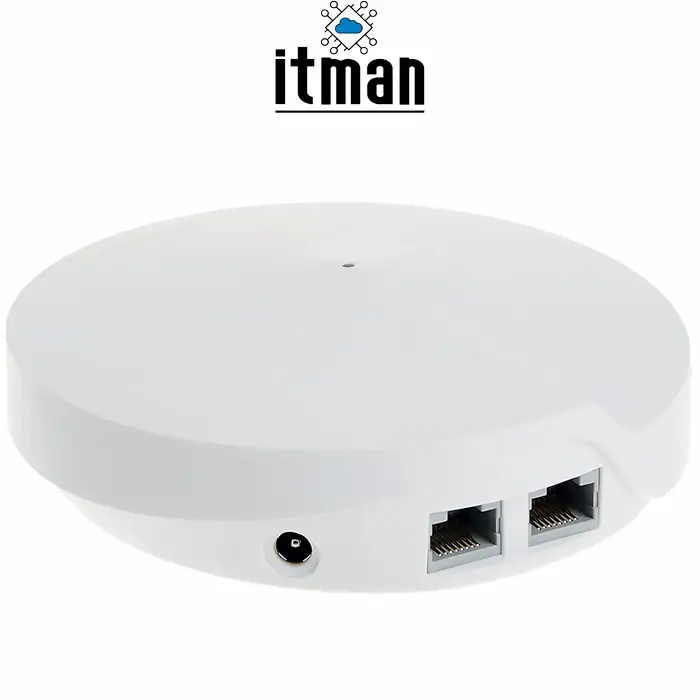
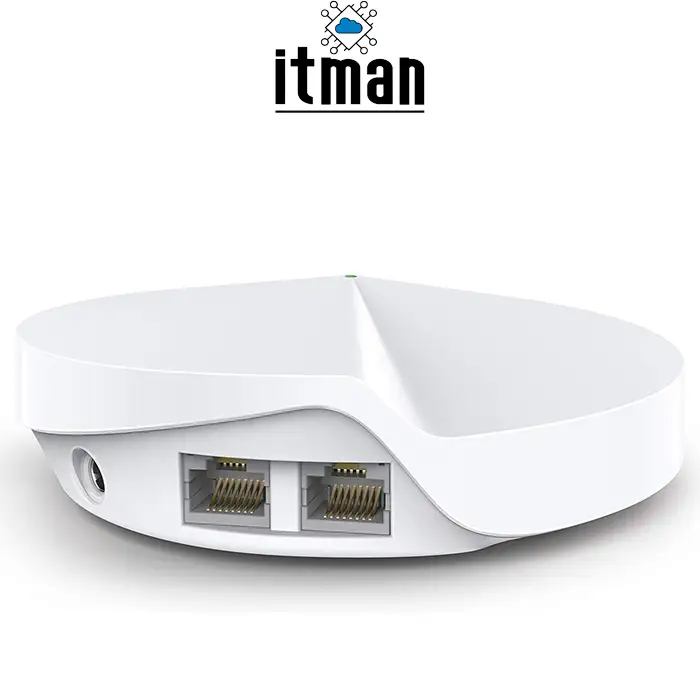
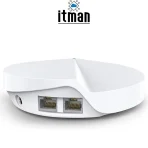
Although the Deco M5 is primarily designed to provide wireless connectivity, it also includes Gigabit Ethernet ports for compatible wired network connections.
Each Deco M5 unit has two Gigabit Ethernet ports that can be used for supported WAN or LAN connections, depending on the unit’s role and network configuration.
Wired Ethernet can be useful when connecting desktop computers, smart televisions, network equipment, or other devices that benefit from a stable physical connection.
The Ethernet ports also provide flexibility when configuring the mesh system with a modem, an existing router, or a wired network connection between suitable locations.
For users who prefer to connect stationary devices by cable while providing wireless access to mobile devices, the Deco M5 combines both options in one system.
Actual wired performance depends on the connected equipment, cabling, network configuration, and internet service.
Suitable for Streaming, Online Meetings, and Everyday Work
A reliable Wi-Fi connection is important for more than basic internet browsing. Many households depend on their wireless network for remote work, online education, entertainment, and communication.
The TP-Link Deco M5 can help improve the consistency of wireless connectivity in areas where a single router may not provide adequate coverage.
Video streaming: A better-positioned mesh network can help compatible devices maintain a more stable connection when watching online video. Streaming quality will still depend on the service, device, and available bandwidth.
Remote work: Improved coverage can be useful for laptops used for video meetings, cloud applications, file transfers, and web-based business tools.
Online education: Students can benefit from reliable wireless access in different rooms without depending on a single router’s coverage.
Smart home devices: The 2.4 GHz band can support compatible smart devices that require a longer-range wireless connection, subject to their individual Wi-Fi requirements.
General browsing and communication: Smartphones and tablets can connect through the mesh network while users move around the covered area.
For demanding gaming, large downloads, or applications that require consistently low latency, a wired Ethernet connection may still be preferable where practical.
Compact Design for Home and Office Environments
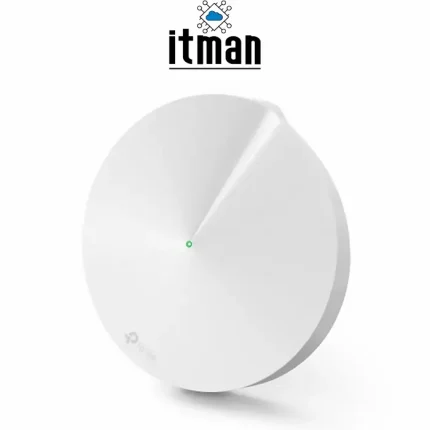
The Deco M5 features a compact design intended to fit naturally into residential and small-office environments.
Its units can be placed on suitable shelves, tables, or other locations with adequate ventilation and access to power. This gives users more flexibility when positioning the equipment to improve wireless coverage.
Unlike large networking devices designed for equipment racks, the Deco M5 is intended for straightforward placement in everyday living or working spaces.
For the best results, avoid hiding the units inside cabinets, placing them directly beside large metal objects, or positioning them near sources of significant wireless interference.
The system is suitable for users who want to improve their wireless network without introducing bulky equipment or managing a complex installation.
TP-Link Deco M5 vs. a Traditional Wi-Fi Router
A traditional router broadcasts Wi-Fi from one main location. Its performance may be sufficient for a small apartment or an open-plan property, but coverage can weaken as the distance increases or signals pass through walls.
The Deco M5 uses a mesh approach with two coordinated units.
The main differences include:
- Coverage: Two strategically positioned Deco units can improve coverage in areas that are difficult for a single router to reach.
- Network management: The system is designed to operate under one Wi-Fi network name.
- Roaming: Compatible devices can transition between Deco units as they move through the property.
- Expandability: Compatible Deco units can be added to supported mesh configurations.
- Installation: The mobile application provides a guided setup process.
A traditional router may remain the more economical option when one device already provides sufficient coverage. A mesh system becomes more attractive when the property has several rooms, signal obstructions, or areas with consistently weak Wi-Fi.
It is also important to distinguish mesh Wi-Fi from a simple range extender. Mesh systems coordinate multiple access points under a unified network, although the specific performance advantages depend on placement, wireless backhaul conditions, and the equipment being used.
TP-Link Deco M5 AC1300 (2-Pack) Specifications
The following table summarizes the main product characteristics.
| Specification | Details |
|---|---|
| Brand | TP-Link |
| Product model | Deco M5 |
| Product type | Whole-home mesh Wi-Fi system |
| Package | 2-pack |
| Wi-Fi class | AC1300 |
| Wireless standard | IEEE 802.11ac |
| Frequency bands | 2.4 GHz and 5 GHz |
| Maximum theoretical combined speed | Up to 1,267 Mbps |
| 2.4 GHz speed | Up to 400 Mbps |
| 5 GHz speed | Up to 867 Mbps |
| Ethernet ports | 2 Gigabit Ethernet ports per unit |
| Network management | TP-Link Deco mobile application |
| Mesh functionality | Unified Wi-Fi network and roaming support |
| Typical applications | Home Wi-Fi, small offices, streaming, browsing, and connected devices |
Specifications and supported features should be checked against the exact regional version and firmware. The AC1300 rating is a theoretical combined wireless rate rather than a guaranteed internet speed.
Who Should Buy the TP-Link Deco M5 2-Pack?
The TP-Link Deco M5 AC1300 Whole Home Mesh Wi-Fi System (2-Pack) is worth considering if your existing router leaves certain rooms with weak or unreliable Wi-Fi.
It may be a suitable option for:
- Families who need wireless coverage across several rooms.
- Apartment residents experiencing dead zones away from the main router.
- Villa owners who need to distribute Wi-Fi more effectively.
- Small offices that need a straightforward wireless networking solution.
- Users who want one network name throughout the covered area.
- Households with smartphones, laptops, televisions, and compatible smart home devices.
However, users who require the latest Wi-Fi standards, higher wireless capacity, or multi-gigabit connectivity should compare newer mesh systems before making a decision. The Deco M5 uses Wi-Fi 5 technology, so it is not equivalent to newer Wi-Fi 6 or Wi-Fi 7 systems.
Why Choose the TP-Link Deco M5 AC1300 Mesh Wi-Fi System (2-Pack)?
The Deco M5 combines mesh networking, dual-band Wi-Fi, Gigabit Ethernet connectivity, and app-based management in a two-unit package.
Its primary benefit is the ability to improve the distribution of Wi-Fi coverage throughout a property without requiring users to maintain several separate wireless networks. The compact units and guided setup process also make it an approachable solution for customers who want to improve their existing wireless experience.
For everyday internet use, home entertainment, remote work, and connected devices, the system offers a practical combination of coverage-focused networking and straightforward management.
Before purchasing, consider your property’s size, wall construction, internet speed, and the number of connected devices. Correct placement of the two Deco units is essential to achieving good results, and properties with extensive coverage requirements may need additional equipment.
Buy TP-Link Deco M5 AC1300 Whole Home Mesh Wi-Fi System (2-Pack)
Looking for a practical way to improve Wi-Fi coverage in your home or small office? The TP-Link Deco M5 AC1300 Whole Home Mesh Wi-Fi System (2-Pack) provides a coordinated mesh networking solution designed to help reduce weak signal areas and simplify wireless connectivity.
Explore the TP-Link Deco M5 at ITMan.ae and contact our team for product details, availability, and assistance in selecting a suitable Wi-Fi solution for your requirements.
Choose a mesh Wi-Fi system that matches your property’s layout and connectivity needs, and make everyday internet access more convenient across the spaces where you work, study, and relax.





















Reviews
There are no reviews yet.