











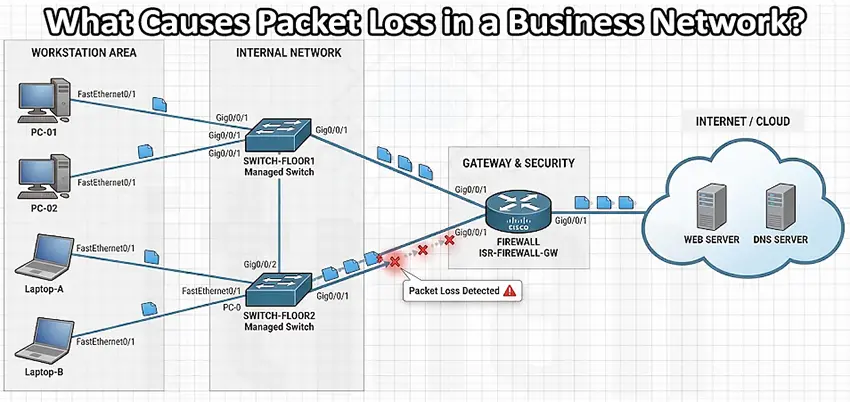
Packet loss is one of those network problems that can be difficult to diagnose because the connection may appear to be working normally. Employees can still browse websites, send emails, or access cloud applications, but everything feels slower, unstable, or unpredictable. Voice calls may become choppy, video meetings may freeze, and business applications can disconnect without an obvious reason. Packet loss in a business network occurs when data packets traveling between devices fail to reach their destination. Even a small amount of packet loss can affect network performance, especially when real-time applications depend on a stable connection.
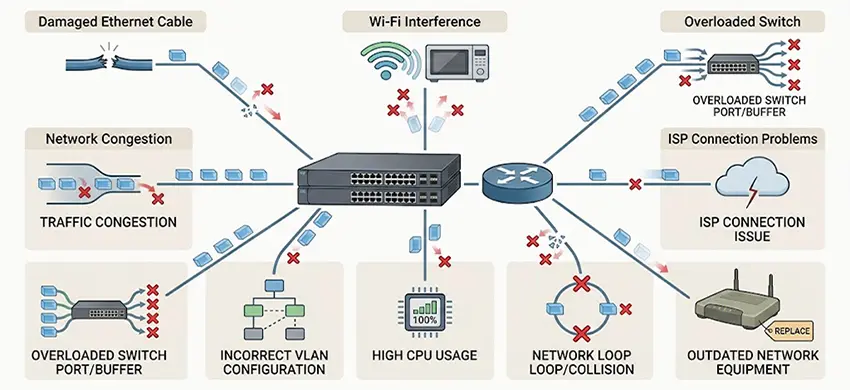
For businesses, finding the cause quickly is important. Packet loss can come from faulty cables, overloaded switches, weak Wi-Fi signals, network congestion, incorrect configurations, ISP problems, or failing hardware. This is where professional IT support becomes valuable. Instead of simply restarting the router, IT technicians can test the network layer by layer, identify where packets are being dropped, and fix the underlying problem.
What Is Packet Loss?
When a computer communicates with a server, switch, access point, or internet service, information is divided into small units called packets. These packets travel through the network and are reassembled at their destination. Packet loss happens when some of these packets never arrive.
For example, if a computer sends 1,000 packets to a server and 20 never reach it, the packet loss rate is 2%. The effect depends on what the user is doing. A few lost packets might go unnoticed while browsing a website, but the same loss can cause significant problems during a VoIP call, video conference, remote desktop session, or file transfer. Common symptoms include:
- Slow or intermittent internet access
- Websites taking longer to load
- Choppy VoIP calls
- Frozen or low-quality video meetings
- Remote desktop disconnections
- High ping and unstable latency
- Slow access to file servers
- Applications randomly disconnecting
- Network devices showing interface errors
What Causes Packet Loss in a Business Network?
1. Faulty or Damaged Ethernet Cables
One of the simplest causes of packet loss is also one of the most frequently overlooked: a bad network cable.A damaged Ethernet cable, loose connector, poor-quality patch cable, or improperly terminated cable can introduce transmission errors. Physical damage, excessive bending, electromagnetic interference, or a cable that does not meet the required category can also affect reliability.
In a business environment, technicians should inspect both ends of the cable and test the connection rather than immediately replacing network equipment. For copper Ethernet connections, tools such as cable testers and switch diagnostics can help identify wiring problems. On Cisco switches, interface statistics can also provide useful clues. Increasing CRC errors, input errors, or other physical-layer errors may indicate a cabling or connectivity problem. Professional IT support services can test suspicious network segments and determine whether the problem is actually the cable, connector, switch port, or connected device.
2. Network Congestion and Insufficient Bandwidth
A business network can also experience packet loss when too much traffic is competing for limited bandwidth. Imagine a company with dozens of employees using cloud applications while several users are transferring large files, security cameras are sending video streams, and backups are running at the same time. If the available bandwidth cannot handle the traffic efficiently, packets may be delayed or dropped.
This is particularly common when network usage grows without upgrading the infrastructure. IT support teams can analyze traffic patterns and determine whether congestion is occurring on the internet connection, firewall, switch uplink, wireless network, or server connection. Possible solutions include:
- Increasing internet bandwidth
- Upgrading switch uplinks
- Implementing Quality of Service (QoS)
- Scheduling large backups outside working hours
- Separating high-bandwidth applications
- Optimizing VLAN and network architecture
- Replacing outdated network equipment
The goal is not simply to purchase a faster internet package. IT support should first identify where the congestion occurs.
3. Wi-Fi Interference and Weak Wireless Signals
Packet loss is especially common on poorly designed or overloaded wireless networks. Wi-Fi devices share radio frequencies, so interference from neighboring networks, Bluetooth devices, wireless cameras, microwaves, and other equipment can affect communication. Physical obstacles and excessive distance from the access point can also weaken the signal.
A user may therefore report that “the internet keeps disconnecting” when the real problem is wireless packet loss between the laptop and access point. A professional IT support technician can perform a wireless survey to identify:
- Weak signal areas
- Channel interference
- Overloaded access points
- Poor access point placement
- Excessive client density
- Incorrect channel configuration
- Roaming problems
Improving access point placement, adjusting channels, reducing interference, and deploying additional enterprise-grade access points can significantly improve wireless reliability.
4. Overloaded or Failing Network Hardware
Network devices are designed to handle specific workloads. An aging switch, overloaded router, failing firewall, or malfunctioning access point may start dropping packets under heavy traffic. Hardware problems can be particularly difficult to identify because the device may continue operating instead of failing completely.
IT support should check device health, CPU and memory utilization, interface counters, temperature, logs, and error statistics. On managed switches, individual ports can be investigated to determine whether packet drops are isolated to one connection or affecting multiple devices. If only one workstation is experiencing packet loss, the issue may be local. If dozens of users experience problems simultaneously, the problem is more likely to involve shared infrastructure such as a switch, firewall, router, uplink, or internet connection.
5. Incorrect Network Configuration
Configuration errors are another major cause of business network problems. Incorrect VLAN assignments, duplex or speed mismatches, faulty trunk configuration, routing problems, STP issues, incorrect MTU settings, or poorly configured QoS can result in dropped packets or unstable connectivity.
For example, a workstation placed in the wrong VLAN may be able to reach some resources but fail to communicate correctly with others. Similarly, an incorrect trunk configuration can cause connectivity problems between switches.
This is why troubleshooting packet loss should not focus exclusively on physical hardware. Experienced IT support professionals typically review the network from the access layer toward the core and internet edge. They can compare configuration across switches, routers, firewalls, and access points to find inconsistencies.
6. ISP or Internet Connection Problems
Sometimes the business LAN is working perfectly and the packet loss is occurring outside the company’s network. An internet service provider may experience congestion, routing problems, maintenance issues, or physical line faults. In these situations, internal devices can communicate normally with each other while connections to external servers experience packet loss.
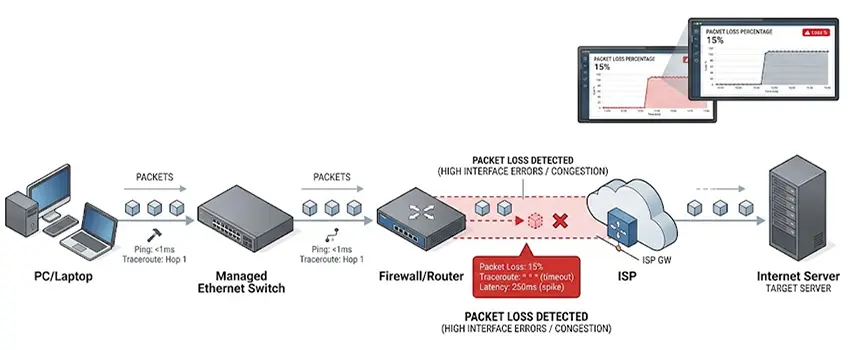
A useful troubleshooting method is to test multiple destinations. If packets are lost when communicating with the local gateway, the problem is probably inside the local network. If the gateway is stable but packet loss begins farther along the route, the issue may involve the ISP or an upstream network.
IT support can use tools such as ping, traceroute, and continuous monitoring to identify where packet loss begins. This evidence can also make it easier to provide an ISP with useful technical information instead of simply reporting that “the internet is slow.”
7. High CPU or Memory Usage on Network Devices
Routers, firewalls, switches, and wireless controllers can experience performance problems when their resources become overloaded. High CPU utilization may occur because of heavy traffic, unusual broadcast activity, security processes, software problems, or an inefficient configuration. When a network device cannot process packets quickly enough, packet drops can occur.
Monitoring CPU, memory, interface utilization, and system logs can help identify this type of problem. This is particularly important for businesses running multiple services through a single firewall or router. VPN connections, content filtering, intrusion prevention, NAT, and other services can consume significant processing resources.
Regular infrastructure monitoring allows IT support teams to identify resource problems before they become major outages.
8. Broadcast Storms and Network Loops
A network loop can create a large amount of unnecessary traffic and potentially overwhelm switches. This can happen when switches are connected incorrectly or when redundancy is configured without proper Spanning Tree Protocol settings. A broadcast storm may cause extremely slow network performance, widespread packet loss, and even complete network disruption.
In a managed network, IT support should investigate unusual broadcast traffic, interface utilization, MAC address instability, and Spanning Tree events. Network segmentation, proper switch configuration, and correctly implemented STP can help prevent these problems.
9. Outdated Firmware, Drivers, or Network Equipment
Network performance can sometimes deteriorate because devices are running outdated firmware, drivers, or operating systems. A network adapter driver on a workstation may contain a compatibility issue, while an old switch firmware version may have a known bug affecting performance. Legacy hardware may also lack the performance and security capabilities required by a modern business environment.
IT support should maintain an inventory of network equipment and establish a controlled update process. Firmware should not be upgraded randomly in a production environment, but outdated software should not be ignored either. A structured maintenance schedule can reduce the risk of compatibility problems and unexpected failures.
How IT Support Diagnoses Packet Loss
Effective packet loss troubleshooting is a process, not a single command. An IT support technician typically starts by determining where the packet loss occurs. For example:
Computer → Switch → Router/Firewall → ISP → Internet
Each section should be tested independently. Technicians may use:
- Ping tests
- Continuous ping monitoring
- Traceroute
- Switch interface statistics
- Cable testing
- Wi-Fi analysis
- Network monitoring systems
- Firewall and router logs
- CPU and memory monitoring
- Packet capture tools
- Bandwidth utilization reports
The most important question is not simply “Is there packet loss?” but “At which point does packet loss begin?” That distinction dramatically reduces troubleshooting time.
How to Prevent Packet Loss in a Business Network
Preventing packet loss is easier than repeatedly reacting to network outages. Businesses should maintain their network infrastructure, monitor performance, document configurations, and replace failing equipment before it becomes a critical problem. A good IT support strategy can include:
- Regular network performance monitoring
- Periodic cable and hardware testing
- Wi-Fi surveys and access point optimization
- Firmware and driver management
- Network configuration backups
- Bandwidth and traffic monitoring
- VLAN and network segmentation
- Proper QoS configuration for critical applications
- UPS protection for network equipment
- Proactive hardware replacement planning
Businesses should also document their network topology. Knowing which switch, uplink, firewall, or access point serves a particular area makes troubleshooting much faster.
When Should You Contact IT Support?
Occasional packet loss on the public internet is not always something a business can control. However, persistent packet loss on a business network should not be ignored. If employees regularly experience dropped VoIP calls, unstable Wi-Fi, remote desktop interruptions, slow applications, or intermittent connectivity, the problem deserves proper investigation.
An IT support provider can analyze the network systematically instead of relying on guesswork. This can be especially important for businesses that depend on cloud platforms, Microsoft 365, VoIP, VPNs, remote access, cloud backups, and other always-connected services.
Final Thoughts
Packet loss in a business network can originate from many different sources, including damaged cables, Wi-Fi interference, network congestion, overloaded hardware, configuration errors, ISP problems, and network loops. Because the symptoms can look similar, replacing equipment without proper testing can waste both time and money.
The most effective approach is to identify exactly where packets are being dropped and then address the underlying cause. With proactive monitoring, proper network design, regular maintenance, and reliable IT support, businesses can reduce packet loss, improve network stability, and keep critical applications running smoothly.
For companies experiencing recurring connectivity problems, professional IT support can turn an intermittent and frustrating network issue into a clearly identified, measurable, and fixable problem.


















