











When a Cisco switch interface repeatedly changes from up to down and then comes back online, the problem is commonly known as Cisco Switch Port Flapping. The connection may work normally for a few seconds or several minutes, suddenly drop, and then reconnect without anyone touching the switch or cable.
Cisco Switch Port Flapping should not be ignored. Every link-state change can interrupt traffic, force the switch to relearn network information, affect connected applications, and potentially trigger Layer 2 topology changes. For devices such as IP phones, wireless access points, servers, cameras, firewalls, and other switches, repeated port flapping can cause noticeable network instability.
The challenge is that Cisco Switch Port Flapping does not have a single cause. The problem may originate from a damaged Ethernet cable, fiber connection, SFP module, PoE issue, connected device, interface configuration, or the physical switch port itself. The correct approach is therefore to isolate each part of the connection systematically.
What Is Cisco Switch Port Flapping?
A healthy Ethernet interface should normally maintain a stable link state. When the connected device is operating and the physical connection is intact, the port remains up. If the device is disconnected or powered off, the interface remains down.
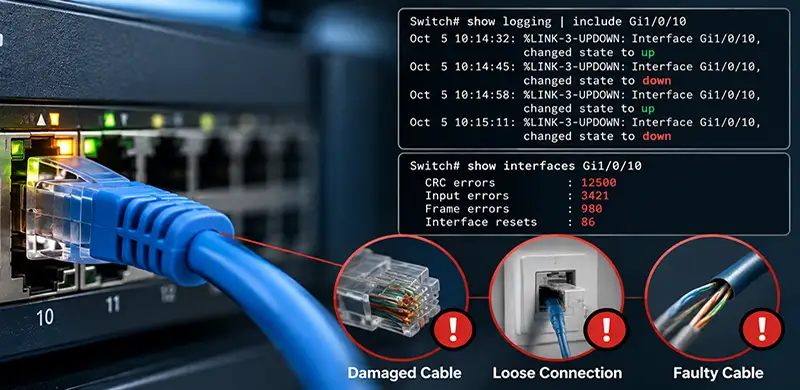
With Cisco Switch Port Flapping, the switch repeatedly detects loss and restoration of the physical link. You may see Cisco IOS log messages such as:
%LINK-3-UPDOWN: Interface GigabitEthernet1/0/10, changed state to down
followed shortly afterward by:
%LINK-3-UPDOWN: Interface GigabitEthernet1/0/10, changed state to up
If these messages repeatedly appear for the same interface, the first question should be why the physical link is disappearing.
Bad Ethernet Cabling Is a Common Cause
A damaged or poorly terminated Ethernet cable is one of the most common causes of an unstable Cisco switch port.
Ethernet requires a reliable electrical connection between both devices. A damaged twisted pair, loose RJ45 connector, poor termination, defective wall socket, damaged patch-panel connection, or bad patch cable can cause the physical link to disappear momentarily.
Even an interruption lasting only a short time can cause the switch PHY to detect loss of carrier and report the interface as down. When communication returns, the interface immediately transitions back to up.
Replacing the patch cable with a known-good cable is therefore an important first test. However, if structured cabling is involved, replacing only the short cable between the switch and patch panel may not be enough. The permanent cable run, keystone, patch panel, and endpoint cable should also be considered.
Check Interface Errors on the Cisco Switch
Cisco interface counters can provide valuable evidence when diagnosing Cisco Switch Port Flapping.
A useful starting point is:
show interfaces GigabitEthernet1/0/10
This command provides information about the interface state, traffic, errors, resets, drops, and other statistics.
Pay particular attention to counters that continue increasing while the problem occurs. CRC errors, input errors, frame errors, interface resets, and similar abnormalities can indicate problems with the physical connection.
Existing errors alone do not prove that they are related to the current problem. A switch that has been operating for months may already have historical errors. Check the counters, wait for another flap, and check them again.
Where operationally appropriate, you can clear the counters before testing:
clear counters GigabitEthernet1/0/10
This makes it easier to determine whether new errors are being generated during the fault.
Speed and Duplex Configuration Can Create Problems
Most modern Ethernet connections should negotiate their link parameters automatically. Problems can appear when one side is manually configured while the other side expects auto-negotiation, or when older equipment, media converters, or unusual network devices do not negotiate correctly.
A duplex mismatch by itself typically causes poor performance, packet loss, or interface errors rather than repeated physical link loss. However, incorrect speed configuration or negotiation problems can contribute to unstable connectivity in certain environments.
Use:
show interfaces status
to quickly inspect the interface speed and duplex.
For more detailed information, use:
show interfaces GigabitEthernet1/0/10
The important point is to check both ends of the link. Correct configuration on the Cisco switch does not guarantee that the remote device is configured correctly.
Cisco Switch Port Flapping with SFP and SFP+ Modules
When the affected port uses an SFP or SFP+ transceiver, troubleshooting should include both the module and the fiber path.
A defective transceiver can intermittently lose signal. However, replacing the SFP should not automatically be the first and only solution. Dirty LC connectors, damaged fiber, excessive attenuation, incorrect fiber type, bad patch cords, poor splices, and incompatible optics can produce similar symptoms.
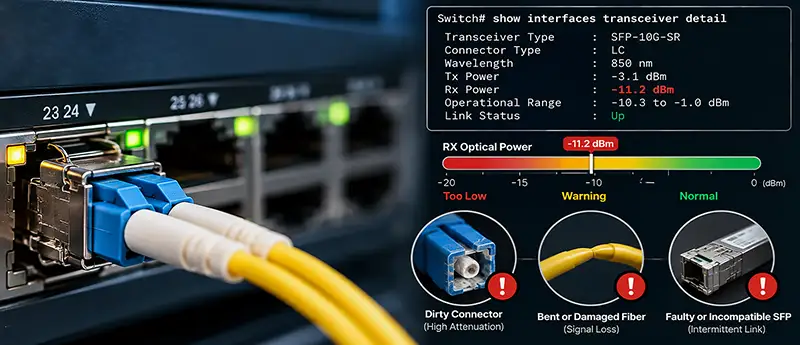
For supported Cisco switches and transceivers, optical diagnostics may be available through:
show interfaces transceiver detail
This can provide information such as transmit and receive optical power.
If the received optical power is close to the supported minimum, the link may technically work but have very little operating margin. Small changes in attenuation can then cause the receiver to lose the optical signal and bring the interface down.
This is one reason a fiber link can appear perfectly normal most of the time while still experiencing intermittent Cisco Switch Port Flapping.
Dirty or Damaged Fiber Can Cause Intermittent Flapping
Fiber connectors require particular attention because contamination can significantly affect optical performance.
Dust, oil, or debris on an LC connector can increase insertion loss. Excessively bent fiber, damaged patch cords, poor couplers, and too many intermediate connections can also weaken the received signal.
A green link LED does not necessarily mean that the optical path is healthy. It only shows that the switch currently has enough signal to establish the link.
A connection operating very close to its optical limit may remain online for hours and then suddenly drop. Cleaning the connectors, testing with known-good fiber, and checking optical levels can therefore be more useful than repeatedly restarting the interface.
Can PoE Cause Cisco Switch Port Flapping?
PoE-related problems can indirectly cause a switch interface to repeatedly go up and down.
Suppose the connected device is an IP phone, wireless access point, IP camera, or another PoE-powered endpoint. If the device does not receive stable power, it may reboot. As the device shuts down, its Ethernet interface disappears and the Cisco switch reports the port as down. When the device boots again, the port returns to up.
The cycle can easily be mistaken for an Ethernet cable problem.
The command:
show power inline
can help check PoE status and power allocation.
The total PoE budget of the switch should also be considered. Having 24 or 48 PoE-capable interfaces does not necessarily mean the switch has enough available power to supply the maximum required wattage to every connected device simultaneously.
The Connected Device May Be Causing the Problem
Not every Cisco Switch Port Flapping problem originates from the switch.
The Ethernet adapter on a server, firewall, PC, access point, camera, printer, or another network device may reset because of faulty hardware, firmware problems, driver issues, unstable power, overheating, or operating-system behavior.
A simple isolation test can provide valuable information.
Move the affected device to another known-good port while keeping as much of the original setup unchanged as possible. If the problem follows the device, the endpoint or its cabling becomes more suspicious.
You can also connect a known-good device to the suspected switch port. If multiple devices experience the same problem only on that particular interface, the switch port itself becomes a stronger suspect.
Is Spanning Tree Causing the Port to Flap?
Spanning Tree events are sometimes confused with physical port flapping, but they are not the same thing.
STP can change the forwarding state of an interface because of Layer 2 topology changes. That does not necessarily mean the physical Ethernet link has disappeared.
If Cisco logs repeatedly report that the physical interface itself has changed state from up to down, investigate the Layer 1 connection first.
However, if several ports or switches begin experiencing topology changes at approximately the same time, you may be dealing with a broader network issue such as a loop, upstream failure, switch reload, or unstable inter-switch connection.
Use Cisco Logs to Find the Pattern
The switch log can help determine exactly when Cisco Switch Port Flapping occurs.
Use:
show logging
and search for messages associated with the affected interface.
The timestamps are particularly important. If Gi1/0/10 goes down every few minutes, check whether another event appears immediately before each failure.
You may discover that the flapping coincides with PoE events, endpoint reboots, switch power problems, interface errors, or other infrastructure events.
Comparing Cisco switch timestamps with logs from firewalls, servers, wireless controllers, UPS systems, or other devices can make intermittent problems significantly easier to isolate.
Could the Physical Cisco Switch Port Be Faulty?
Although cables and connected devices should usually be tested first, a physical Cisco switch port can fail.
The interface PHY, connector, or other hardware associated with the port can become unstable. This possibility becomes more likely when the same endpoint, cable, and configuration work normally on another interface of the same switch.
For example, suppose a server continuously experiences link flapping on Gi1/0/10. You move the same server using the same cable to Gi1/0/11, and the connection remains stable for several hours. That test significantly increases suspicion of Gi1/0/10.
If several interfaces experience similar problems, investigate broader causes such as switch hardware, power supplies, software, temperature, or upstream infrastructure.
Does Shutdown and No Shutdown Fix Cisco Switch Port Flapping?
Network administrators frequently try resetting an unstable interface with:
shutdown
followed by:
no shutdown
This resets the interface and may restore connectivity temporarily. However, it does not fix the underlying cause of recurring Cisco Switch Port Flapping.
If the interface starts flapping again after the reset, something is still causing the physical link to fail.
The shutdown/no shutdown procedure is useful as a diagnostic or recovery action, but it should not replace proper troubleshooting.
How to Properly Troubleshoot Cisco Switch Port Flapping
The most reliable troubleshooting method is to isolate one variable at a time.
Start with the physical connection because it is both common and relatively easy to test. Replace the Ethernet or fiber patch cable with a known-good one and inspect intermediate connections such as patch panels, wall outlets, couplers, and fiber connectors.
Then examine the interface statistics and Cisco logs. Determine whether errors or resets increase at the same time the interface goes down.
For fiber interfaces, inspect the SFP or SFP+ module and optical signal levels. If possible, test with a known-good compatible transceiver and fiber patch cord.
For PoE devices, verify that power delivery is stable and that the switch has sufficient available PoE budget.
Next, move the endpoint to another known-good switch interface. This helps determine whether the problem follows the endpoint or remains associated with the original port.
By changing only one component at a time, you can determine whether the fault belongs to the cable, SFP, fiber path, endpoint, switch configuration, PoE system, or physical switch interface.
Final Thoughts
Cisco Switch Port Flapping is usually a symptom rather than the actual problem. A port repeatedly transitioning between up and down states indicates that something is causing the connection to become unstable, and the cause can exist on either side of the link.
Ethernet cabling, SFP modules, fiber attenuation, dirty optical connectors, PoE instability, endpoint hardware, network adapters, configuration problems, and defective switch interfaces are all realistic possibilities.
Commands such as show interfaces, show interfaces status, show logging, show power inline, and show interfaces transceiver detail can provide valuable diagnostic information, but the most effective technique is still controlled isolation.
Instead of immediately replacing the switch or repeatedly resetting the interface, change one component at a time and observe whether the problem follows the cable, transceiver, endpoint, or port. In most cases, this approach makes Cisco Switch Port Flapping much easier to identify and permanently resolve.


















