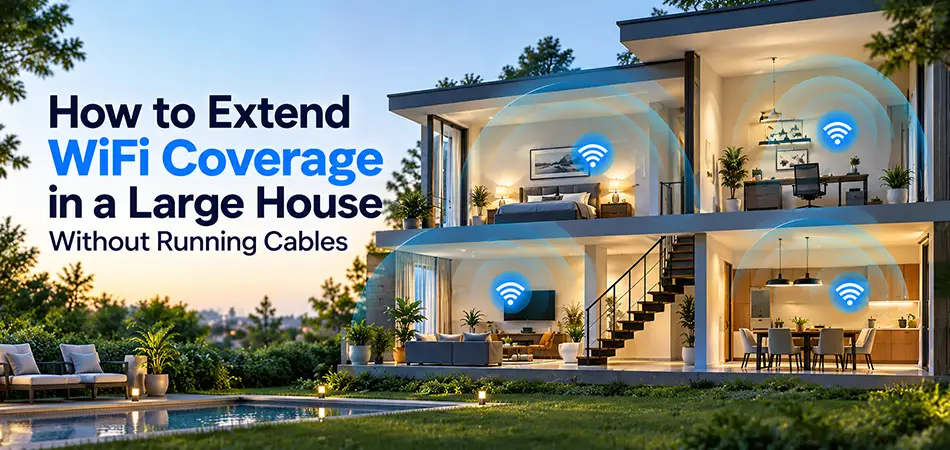
Having a large house is a great advantage, but maintaining a strong and stable WiFi connection throughout every room can be challenging. Thick walls, multiple floors, long hallways, and the distance between your router and connected devices can significantly reduce wireless performance. Fortunately, you don’t need to drill holes, install Ethernet cables, or invest in expensive networking infrastructure to solve these problems. Learning how to extend WiFi coverage in a large house without running cables can help you eliminate dead zones, improve internet stability, and enjoy reliable connectivity throughout your home.
Several practical solutions are available, including WiFi range extenders and powerline networking adapters. Whether you live in a multi-story villa, a spacious apartment, or a large family house, choosing the right networking equipment can make a significant difference without requiring new Ethernet cabling.
Why Is WiFi Coverage Weak in Large Houses?
Before choosing a WiFi extender or powerline adapter, it is important to understand why wireless signals become weaker across larger properties.
WiFi routers transmit radio signals that gradually lose strength as they travel through walls, ceilings, furniture, and other obstacles. The larger the house, the more difficult it becomes for a single router to provide consistent coverage.
Common causes of poor WiFi coverage include:
Thick concrete walls and reinforced ceilings blocking wireless signals.
Multiple floors separating devices from the main router.
Long distances between the router and bedrooms, offices, or living areas.
Interference from neighboring wireless networks and electronic equipment.
Poor router placement inside cabinets or corners.
Too many connected devices competing for available bandwidth.
In many cases, replacing your internet service provider or upgrading your internet package will not solve these problems. Instead, improving how your home network distributes connectivity is the most effective approach.

Best Ways to Extend WiFi Coverage Without Running Ethernet Cables
There are several ways to improve wireless connectivity without installing additional network cables throughout your property.
1. Use a WiFi Range Extender
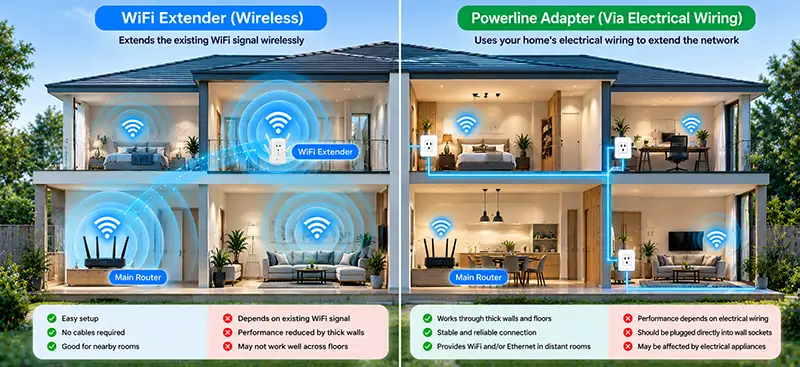
A WiFi range extender receives the existing wireless signal from your router and retransmits it to areas with limited coverage.
This solution is particularly useful for bedrooms, home offices, upstairs rooms, and areas where the original router signal is still available but too weak for reliable connectivity.
TP-Link offers several wireless extenders, including the RE650 and RE500, designed to improve coverage without requiring Ethernet wiring between the router and extender.
2. Use Powerline Adapters
Powerline networking uses your home’s existing electrical wiring to carry network data between compatible adapters.
One adapter connects to the router, while another is installed in a different room. Depending on the model, the remote adapter can provide an Ethernet connection, WiFi coverage, or both.
Powerline adapters are especially useful in houses where thick walls and reinforced concrete floors make traditional wireless extension difficult.
3. Improve Router Placement
Before purchasing additional equipment, consider relocating your existing router.
Positioning the router in a central, elevated, and open location can improve signal distribution. Avoid placing it behind televisions, inside metal cabinets, or close to large electrical appliances.
However, router placement alone may not provide sufficient coverage in very large houses, making WiFi extenders or powerline networking a practical next step.
TP-Link RE650: High-Performance WiFi Extender for Large Houses
The TP-Link RE650 AC2600 WiFi Range Extender is an excellent option for homeowners who want to improve wireless coverage without installing additional Ethernet cables.
This dual-band extender supports theoretical wireless speeds of up to 800 Mbps on the 2.4 GHz band and 1733 Mbps on the 5 GHz band, providing a combined AC2600 wireless classification.
Its four external antennas help improve wireless reception and coverage, making it suitable for extending connectivity into distant bedrooms, upstairs areas, and home entertainment spaces.
The RE650 also features MU-MIMO technology, allowing compatible devices to communicate more efficiently when multiple users are connected.
Key Features of TP-Link RE650
AC2600 dual-band WiFi technology.
Four external antennas for improved wireless coverage.
MU-MIMO support for compatible devices.
Gigabit Ethernet port for connecting wired devices.
Intelligent signal indicator for easier placement.
Wireless installation without new Ethernet cabling.
The TP-Link RE650 is particularly suitable for large houses where users need better wireless performance for streaming, remote working, and everyday internet activities.
However, its actual performance depends on the strength of the signal received from the main router.

TP-Link RE500: A Practical WiFi Extender for Home Coverage
The TP-Link RE500 AC1900 WiFi Range Extender is another effective solution for improving wireless connectivity in large homes.
Supporting theoretical speeds of up to 600 Mbps on 2.4 GHz and 1300 Mbps on 5 GHz, the RE500 provides dual-band wireless extension for compatible routers and devices.
It is designed for households experiencing weak WiFi signals in certain rooms but wanting to avoid installing additional network wiring.
The RE500 can be installed in a suitable electrical outlet between the router and the area requiring improved coverage.
Why Choose the TP-Link RE500?
The RE500 offers several advantages:
AC1900 dual-band wireless performance.
Three external antennas.
Gigabit Ethernet connectivity.
Convenient wall-plug installation.
Compatibility with standard WiFi routers.
Improved wireless availability in previously weak coverage areas.
For homeowners comparing TP-Link RE500 vs RE650, the RE650 provides a higher theoretical wireless speed classification and four external antennas, while the RE500 offers a practical AC1900 alternative.
Both devices require an adequate wireless signal from the router to perform effectively.
TP-Link TL-WPA7510 KIT: Extend WiFi Through Electrical Wiring
If your home has thick walls or multiple concrete floors, a traditional wireless extender may not always deliver the desired results.
The TP-Link TL-WPA7510 KIT AV1000 Powerline WiFi Kit offers an alternative by using existing electrical wiring to carry network data between rooms.
The kit includes a powerline adapter that connects to your router and a wireless powerline extender that creates WiFi coverage in another area of the house.
The TL-WPA7510 KIT supports an AV1000 powerline speed classification and AC750 dual-band WiFi, with theoretical wireless speeds of up to 300 Mbps on 2.4 GHz and 433 Mbps on 5 GHz.
Benefits of TP-Link TL-WPA7510 KIT
Uses existing electrical wiring for network transmission.
Creates WiFi coverage in rooms far from the router.
Supports AC750 dual-band wireless connectivity.
AV1000 powerline technology.
Includes Ethernet connectivity for compatible wired devices.
Reduces the need for additional network cabling.
This product is especially useful for extending internet access into upstairs bedrooms, home offices, and other areas where the router’s wireless signal struggles to penetrate walls.
Powerline performance depends on electrical wiring quality, circuit layout, and interference from connected appliances.
TP-Link TL-PA9020P KIT: High-Speed Powerline Networking Without New Cables
The TP-Link TL-PA9020P KIT AV2000 2-Port Gigabit Passthrough Powerline Starter Kit is designed for homeowners who need reliable wired network connectivity in distant rooms without installing new Ethernet cables through walls.
Unlike the RE650, RE500, or wireless powerline kits, the TL-PA9020P KIT does not generate a WiFi network by itself.
Instead, it transmits network data through existing electrical wiring and provides two Gigabit Ethernet ports on each adapter.
This makes it suitable for connecting smart televisions, desktop computers, gaming consoles, and other Ethernet-enabled devices.
Main Features of TL-PA9020P KIT
AV2000 powerline speed classification.
Two Gigabit Ethernet ports per adapter.
Integrated electrical passthrough sockets.
HomePlug AV2 technology.
MIMO powerline technology where supported by wiring.
Plug-and-play setup with compatible electrical circuits.
Homeowners can also connect a separate wireless access point to a remote TL-PA9020P adapter to create WiFi coverage in another part of the house.
This approach is particularly useful when wireless repeaters cannot maintain a strong connection through reinforced concrete walls.
The AV2000 rating represents theoretical powerline signaling capacity, not guaranteed real-world internet throughput.
TP-Link TL-WPA8630 KIT: Powerline WiFi for Multi-Story Houses
The TP-Link TL-WPA8630 KIT AV1300 Gigabit Powerline AC WiFi Kit combines powerline networking with dual-band wireless connectivity.
It uses existing electrical wiring to transfer network data from the main router to another part of the property, where the wireless powerline extender provides additional WiFi coverage.
The kit supports an AV1300 powerline classification and AC1200 dual-band WiFi, with theoretical wireless speeds of up to 300 Mbps on 2.4 GHz and 867 Mbps on 5 GHz.
The wireless extender also includes three Gigabit Ethernet ports, allowing multiple wired devices to connect in the remote room.
Advantages of TP-Link TL-WPA8630 KIT
AV1300 powerline networking.
AC1200 dual-band WiFi.
Three Gigabit Ethernet ports on the wireless extender.
WiFi coverage without installing new Ethernet runs.
Suitable for rooms separated by thick walls or floors.
Compatible with supported TP-Link powerline equipment.
The TL-WPA8630 KIT is a particularly useful choice for large houses where users want both wireless coverage and Ethernet connectivity in areas far from the main router.
TP-Link RE650 vs RE500 vs TL-WPA7510 KIT vs TL-PA9020P KIT vs TL-WPA8630 KIT
Choosing the right product depends on your home’s layout, existing electrical wiring, wireless signal strength, and connected devices.
| Product | Technology | Speed Classification | WiFi Output | Best Application |
|---|---|---|---|---|
| TP-Link RE650 | WiFi Range Extender | AC2600 | Yes | Higher-performance wireless extension |
| TP-Link RE500 | WiFi Range Extender | AC1900 | Yes | Improving coverage in weak-signal rooms |
| TP-Link TL-WPA7510 KIT | Powerline WiFi | AV1000 / AC750 | Yes | WiFi extension through electrical wiring |
| TP-Link TL-PA9020P KIT | Powerline Ethernet | AV2000 | No | Wired connectivity without new Ethernet runs |
| TP-Link TL-WPA8630 KIT | Powerline WiFi | AV1300 / AC1200 | Yes | WiFi and Ethernet in distant rooms |
All speed classifications are theoretical and should not be interpreted as guaranteed internet speeds.
WiFi Extender vs Powerline Adapter: Which Is Better for a Large House?
A WiFi range extender is generally the simpler solution when the existing router signal can still reach the installation location.
For example, the TP-Link RE650 and RE500 can extend wireless coverage into nearby rooms without connecting directly to the router using Ethernet.
However, when thick walls or concrete floors severely weaken the wireless signal, powerline adapters may provide a more practical alternative.
The TL-WPA7510 KIT and TL-WPA8630 KIT can create WiFi coverage in remote rooms using electrical wiring as their network connection.
Meanwhile, the TL-PA9020P KIT is better suited to users who need Ethernet connectivity or want to connect a separate wireless access point.
Powerline adapters generally work best when connected directly to wall sockets rather than extension strips or surge protectors.
How to Install WiFi Extenders and Powerline Adapters Correctly
Correct installation is essential for achieving the best possible results.
For WiFi extenders such as the RE650 and RE500, place the device where it can receive a sufficiently strong signal from the main router while remaining close enough to improve coverage in the target area.
For powerline kits, connect the first adapter to the router using the supplied Ethernet cable. Plug the second adapter into a wall socket in the room requiring connectivity, then complete the pairing process according to the product instructions.
Avoid placing powerline adapters on heavily filtered power strips, and test different wall sockets if performance is inconsistent.
For multi-story houses, verify powerline performance before relying on the connection for critical applications.
Frequently Asked Questions
1. Can I extend WiFi coverage without installing Ethernet cables?
Yes. WiFi range extenders and powerline WiFi kits can improve coverage without installing new Ethernet cables throughout your house.
2. Is TP-Link RE650 suitable for a two-story house?
Yes, provided the extender can receive a sufficiently strong signal from the main router.
3. What is the difference between TP-Link RE500 and RE650?
The RE650 offers an AC2600 speed classification, while the RE500 is an AC1900 extender.
4. Can TL-WPA7510 KIT work through concrete walls?
It transfers network data through electrical wiring rather than relying on a wireless connection through the concrete wall.
5. Does TL-PA9020P KIT provide WiFi?
No. It provides Ethernet connectivity. A separate wireless access point is required to create WiFi coverage.
6. Which TP-Link powerline kit provides WiFi and Ethernet?
Both the TL-WPA7510 KIT and TL-WPA8630 KIT provide wireless and Ethernet connectivity.
7. Can powerline adapters work between different floors?
Yes, in some installations. Performance depends on the building’s electrical wiring and circuit arrangement.
8. Will a WiFi extender increase my internet package speed?
No. It improves wireless coverage but cannot increase the speed supplied by your internet provider.
9. Which solution is better for thick concrete walls?
A powerline WiFi kit may be more effective when concrete walls prevent a range extender from receiving a usable wireless signal.
10. Where can I buy TP-Link WiFi extenders and powerline adapters in Dubai?
ITMan offers TP-Link networking products in Dubai, including the RE650, RE500, TL-WPA7510 KIT, TL-PA9020P KIT, and TL-WPA8630 KIT.
Conclusion: The Best Way to Extend WiFi Coverage in a Large House Without Running Cables
Understanding how to extend WiFi coverage in a large house without running cables starts with identifying the cause of weak wireless connectivity.
The TP-Link RE650 and RE500 are practical choices when you want to extend an existing wireless network. For houses with thick walls, multiple floors, or distant rooms, the TL-WPA7510 KIT and TL-WPA8630 KIT offer alternative solutions using existing electrical wiring. The TL-PA9020P KIT is particularly useful for providing Ethernet connections without installing new network cables.
At ITMan, customers in Dubai and across the UAE can explore TP-Link WiFi extenders and powerline networking solutions designed for different home layouts and connectivity requirements. Choosing the right device can help reduce dead zones, improve network accessibility, and create a more convenient connected home.