












 ? Message us on
 The TP-Link TL-WPA7510KIT is a practical networking solution designed to extend internet connectivity throughout homes, offices, and commercial spaces without installing additional Ethernet cables. By using existing electrical wiring to transmit network data, this AV1000 Gigabit Powerline WiFi Extender helps overcome weak wireless signals, WiFi dead zones, and connectivity limitations between rooms. With dual-band AC750 WiFi, Gigabit Ethernet connectivity, and powerline transmission speeds of up to 1000 Mbps, the TP-Link TL-WPA7510KIT provides a convenient alternative to traditional wireless range extenders.
TP-Link TL-WPA7510KIT Powerline WiFi Extender
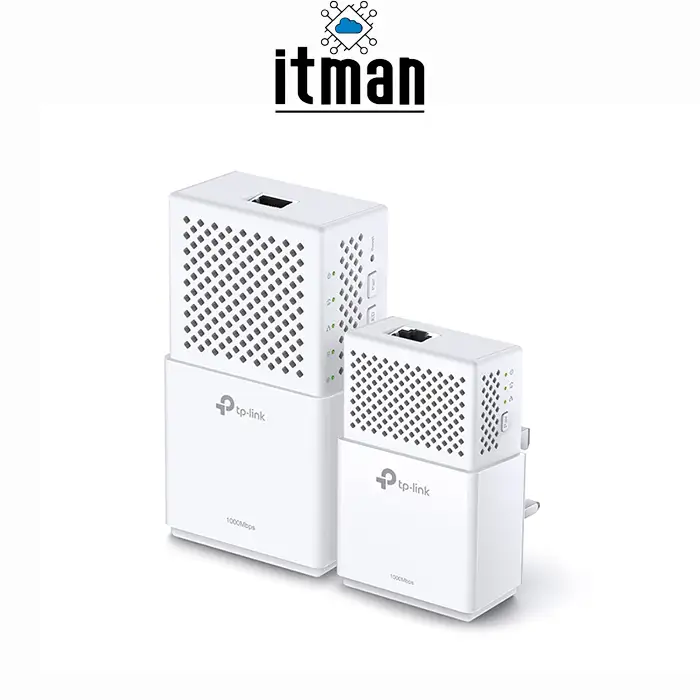
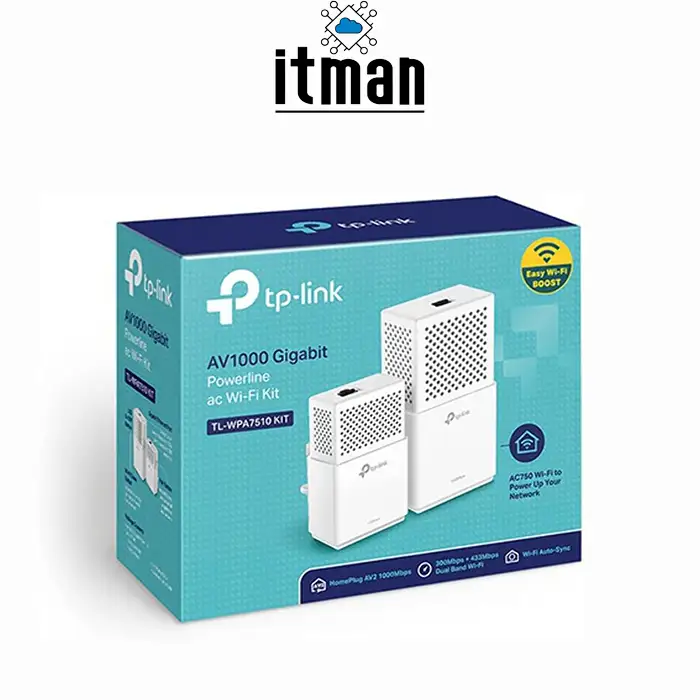
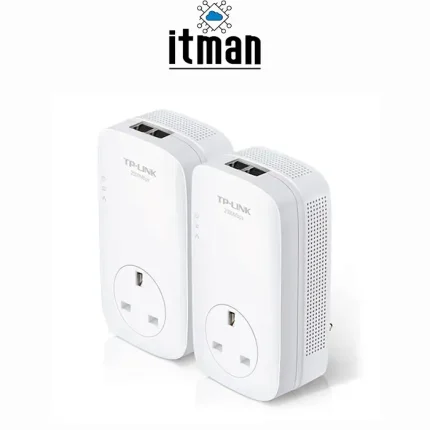
The TP-Link TL-WPA7510KIT AV1000 Gigabit AC Powerline WiFi Extender is a complete networking kit consisting of two powerline adapters: the TL-PA7010 and TL-WPA7510. The TL-PA7010 connects to your router through an Ethernet cable and transfers network data into the building’s electrical wiring. The TL-WPA7510 receives this connection through a compatible electrical outlet and creates a new dual-band wireless access point. Supporting WiFi speeds of up to 300 Mbps on 2.4 GHz and 433 Mbps on 5 GHz, the kit delivers flexible connectivity for laptops, smartphones, smart TVs, and other devices. Its plug-and-play installation, WiFi Clone functionality, and Gigabit Ethernet ports make it suitable for users seeking reliable network expansion with minimal configuration.
Processing Performance of TP-Link TL-WPA7510KIT
The TP-Link TL-WPA7510KIT uses dedicated networking chipsets to manage powerline communication, wireless transmission, and Ethernet traffic. Its HomePlug AV2 technology supports theoretical powerline rates of up to 1000 Mbps, while dual-band WiFi helps distribute wireless devices across two frequency bands. Unlike a conventional computer, this device does not require a general-purpose processor for running user applications. Its embedded hardware is optimized for continuous network operation, traffic forwarding, and connection management.
RAM and Memory Architecture
The TP-Link TL-WPA7510KIT includes internal memory resources required for firmware execution, network configuration, and communication processing. However, TP-Link does not publicly specify the exact RAM capacity for this model. Its embedded memory architecture is designed for networking functions rather than multitasking or application installation. Users do not need to upgrade or configure RAM during normal operation.
Storage and Firmware
The TP-Link TL-WPA7510KIT does not contain a traditional hard disk drive or SSD. Instead, it uses internal non-volatile flash storage for firmware and configuration settings. This design eliminates mechanical storage components and supports compact, energy-efficient operation. Firmware updates can be performed through supported TP-Link management tools, helping maintain compatibility and network stability.
Design, Dimensions, and Build Quality
The TP-Link TL-WPA7510KIT features a compact, white enclosure with a clean design suitable for residential and professional environments. The TL-WPA7510 WiFi adapter measures approximately 135.6 × 70.8 × 49 mm, while the TL-PA7010 powerline adapter measures approximately 98 × 60 × 36 mm. Both units plug directly into electrical outlets, eliminating the need for external power adapters. Their durable plastic housings, integrated status indicators, and straightforward button layouts make installation and maintenance convenient.
Applications of TP-Link TL-WPA7510KIT
The TP-Link TL-WPA7510KIT is suitable for extending connectivity to bedrooms, upstairs offices, meeting rooms, and locations where router coverage is insufficient. It can support video streaming, remote working, online learning, gaming, and everyday internet browsing. The powerline connection is especially useful when thick walls or multiple floors weaken conventional wireless signals. Performance depends on the building’s electrical wiring, interference, and outlet configuration.
Ethernet Ports and Wireless Connectivity
The TP-Link TL-WPA7510KIT includes one Gigabit Ethernet port on each adapter. The TL-PA7010 connects to the main router, while the TL-WPA7510 provides a wired connection for devices such as smart TVs, desktop computers, or gaming consoles. The wireless adapter also supports 2.4 GHz and 5 GHz WiFi using IEEE 802.11ac/n/a and 802.11n/g/b standards. This combination enables both wired and wireless network expansion.
How to Install the TP-Link TL-WPA7510KIT
Installation requires only a few steps. Connect the TL-PA7010 to the router using the supplied Ethernet cable and plug it directly into a wall outlet. Next, plug the TL-WPA7510 into an outlet in the area requiring improved coverage. Pair the adapters using their Pair buttons to establish a secure powerline connection.
The WiFi Clone feature can copy compatible router wireless settings, allowing users to maintain familiar network credentials. For optimal performance, both adapters should be connected directly to wall sockets rather than extension leads or surge protectors.
Why Choose TP-Link TL-WPA7510KIT for Office Networks?
The TP-Link TL-WPA7510KIT provides an economical networking option for small offices where installing structured Ethernet cabling is inconvenient. Its combination of powerline communication and dual-band wireless connectivity makes it useful for extending access to workstations, printers, and meeting areas.
The kit also supports 128-bit AES encryption for powerline communication, helping protect data transmitted between paired adapters. For businesses in Dubai and across the UAE, ITMan offers the TP-Link TL-WPA7510KIT as a convenient solution for improving network coverage without extensive installation work.
TP-Link TL-WPA7510KIT vs Similar TP-Link Powerline Extenders
| Feature | TL-WPA7510KIT | TL-WPA8631P KIT | TL-WPA4220 KIT |
|---|---|---|---|
| Powerline standard | HomePlug AV2 | HomePlug AV2 | HomePlug AV |
| Powerline speed | 1000 Mbps | 1300 Mbps | 600 Mbps |
| WiFi class | AC750 | AC1200 | N300 |
| 2.4 GHz WiFi | 300 Mbps | 300 Mbps | 300 Mbps |
| 5 GHz WiFi | 433 Mbps | 867 Mbps | Not supported |
| Ethernet ports on WiFi adapter | 1 Gigabit | 3 Gigabit | 2 Fast Ethernet |
| Dual-band WiFi | Yes | Yes | No |
| WiFi extension | Yes | Yes | Yes |
| Best application | Home and small office | Multiple wired devices | Basic internet coverage |
The TP-Link TL-WPA7510KIT offers a balanced combination of Gigabit powerline connectivity and dual-band WiFi, making it an attractive choice for users who do not require the additional Ethernet ports or higher wireless speeds of more advanced models.
Technical Specifications of TP-Link TL-WPA7510KIT
| Specification | Details |
|---|---|
| Brand | TP-Link |
| Model | TL-WPA7510KIT |
| Product type | Powerline WiFi Extender Kit |
| Included adapters | TL-PA7010 + TL-WPA7510 |
| Powerline standard | HomePlug AV2 |
| Maximum powerline rate | 1000 Mbps |
| Wireless standard | IEEE 802.11ac/n/a, 802.11n/g/b |
| WiFi class | AC750 |
| 2.4 GHz speed | Up to 300 Mbps |
| 5 GHz speed | Up to 433 Mbps |
| Frequency bands | 2.4 GHz and 5 GHz |
| Ethernet interfaces | 1 × Gigabit per adapter |
| Ethernet speed | 10/100/1000 Mbps |
| Powerline encryption | 128-bit AES |
| WiFi security | WPA/WPA2 security, depending on hardware version |
| WiFi Clone | Supported |
| Pair button | Supported |
| Installation | Plug and Play |
| Management | TP-Link utility / supported management interface |
| TL-WPA7510 dimensions | 135.6 × 70.8 × 49 mm |
| TL-PA7010 dimensions | 98 × 60 × 36 mm |
| Power supply | AC electrical outlet |
| Typical operating temperature | 0°C to 40°C |
| Color | White |
| Application | Home and small office networking |
Note: Specifications may vary by hardware version and regional package. Powerline and WiFi speeds are theoretical maximum link rates, not guaranteed internet throughput.
Frequently Asked Questions About TP-Link TL-WPA7510KIT
1. Does the TP-Link TL-WPA7510KIT require an internet subscription?
Yes. It extends an existing router’s network connection and does not provide internet service independently.
2. Can the TP-Link TL-WPA7510KIT work without WiFi from the main router?
Yes. The main adapter receives internet through Ethernet, while the remote adapter creates its own wireless network.
3. Does the TL-WPA7510KIT work across different floors?
Yes, provided the electrical wiring supports powerline communication between the outlets.
4. Can I connect additional powerline adapters?
Yes. Compatible TP-Link powerline adapters can be added to expand network coverage.
5. Is the TP-Link TL-WPA7510KIT suitable for gaming?
Yes. Its Gigabit Ethernet connection can provide a convenient wired option, although latency depends on electrical conditions.
6. Does this model support WiFi 6?
No. The TL-WPA7510KIT uses WiFi 5 (802.11ac) technology.
7. Can I change the WiFi network name?
Yes. Wireless settings can be customized through supported configuration tools.
8. Will the adapters work through a surge protector?
Direct wall outlet connections are recommended because surge protectors can reduce powerline performance.
9. Does the TP-Link TL-WPA7510KIT support PoE?
No. Its Ethernet ports do not provide Power over Ethernet.
10. Can I use the kit with any router brand?
Generally, yes. It connects through a standard Ethernet interface and does not require a TP-Link router.
11. Can the TP-Link TL-WPA7510KIT replace a mesh WiFi system?
It can extend coverage, but it does not provide all the coordinated roaming features of a modern mesh system.
12. Is the TL-WPA7510KIT available in Dubai?
The TP-Link TL-WPA7510KIT is offered through ITMan in Dubai, UAE. Contact ITMan to confirm current stock and delivery options.
Conclusion
The TP-Link TL-WPA7510KIT AV1000 Gigabit AC Powerline WiFi Extender is an effective solution for expanding network coverage using existing electrical wiring. Combining AV1000 powerline technology, AC750 dual-band WiFi, Gigabit Ethernet ports, and straightforward installation, it offers flexibility for homes and small businesses. Customers looking to purchase the TP-Link TL-WPA7510KIT in Dubai can choose ITMan for networking equipment and product assistance.


















Reviews
There are no reviews yet.