











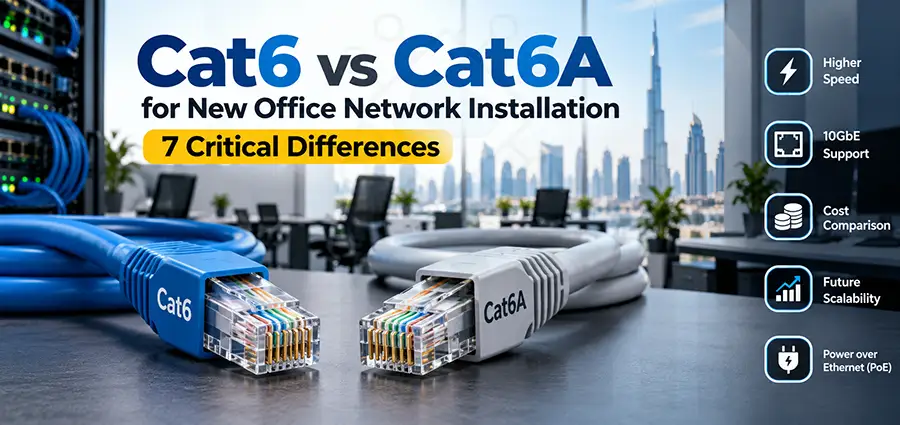
When planning a new office network installation, choosing the right Ethernet cable is one of the most important infrastructure decisions. The cabling installed today may remain inside walls, ceilings, server rooms, and cable trays for many years, while switches, access points, servers, and computers are replaced several times. This is why the Cat6 vs Cat6A decision should be based not only on current network requirements but also on future bandwidth, PoE devices, cable distances, and expansion plans.
For many modern offices, both Cat6 and Cat6A can provide excellent performance. However, they are designed for slightly different environments. Cat6 is often sufficient for standard office networks, while Cat6A becomes particularly attractive when 10 Gigabit Ethernet, high-performance Wi-Fi access points, heavy PoE deployments, or long-term network expansion are expected.
What Is Cat6 Cable?
Category 6, commonly known as Cat6, is a twisted-pair Ethernet cable widely used for office network installations. It supports Gigabit Ethernet (1GbE) up to the full 100-meter Ethernet channel distance and can also support 10 Gigabit Ethernet (10GbE) over shorter distances.
For a typical office where computers, IP phones, printers, CCTV cameras, and wireless access points primarily use 1Gbps connections, Cat6 can provide more than enough bandwidth.
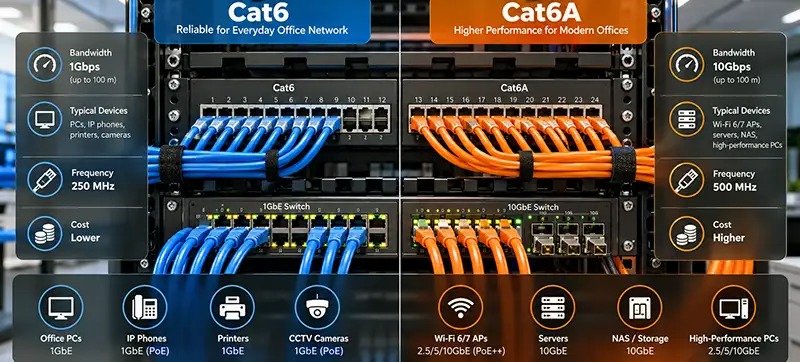
Cat6 supports frequencies up to 250 MHz and is commonly used with:
- Desktop computers and workstations
- IP phones
- Network printers
- CCTV cameras
- Wireless access points
- VoIP systems
- NAS devices
- Network switches
- Standard office servers
Because Cat6 is widely available and relatively easy to install, it remains a practical option for many small and medium-sized office networks.
What Is Cat6A Cable?
Cat6A stands for Category 6 Augmented. It was developed to improve 10 Gigabit Ethernet performance and reduce interference, particularly alien crosstalk between neighboring cables. Cat6A supports frequencies up to 500 MHz and is designed to support 10Gbps Ethernet up to 100 meters.
This makes Cat6A especially useful for new offices where the network infrastructure is expected to remain in service for many years. Typical Cat6A applications include:
- 10GbE office networks
- High-performance workstations
- Wi-Fi 6 and Wi-Fi 7 access points
- High-bandwidth uplinks
- Network storage
- Video production environments
- Engineering and design offices
- High-density PoE installations
- Enterprise office networks
If you are building an office from scratch and replacing the cabling later would be difficult or expensive, Cat6A deserves serious consideration.
Cat6 vs Cat6A: Main Differences
| Feature | Cat6 | Cat6A |
|---|---|---|
| Maximum Frequency | 250 MHz | 500 MHz |
| 1GbE | Up to 100 m | Up to 100 m |
| 10GbE | Typically up to 55 m depending on installation conditions | Up to 100 m |
| Crosstalk Protection | Good | Better |
| Cable Diameter | Usually smaller | Usually larger |
| Installation | Easier | More demanding |
| Cost | Lower | Higher |
| Future Expansion | Good | Excellent |
| Best Use | Standard office networks | High-performance and future-ready offices |
The biggest difference is therefore not whether both cables can provide a fast office network. The important question is how much bandwidth you need, over what distance, and for how many years.
Is Cat6 Enough for a New Office?
For many businesses, yes.
Consider an office where employees mainly use cloud applications, email, web browsing, ERP software, VoIP, printers, and normal file sharing. A properly designed Gigabit Ethernet network using Cat6 can easily handle these workloads.
For example, if every workstation connects at 1Gbps and the main network infrastructure uses faster uplinks between switches and servers, installing Cat6 for individual desks can be perfectly reasonable.
Using Cat6 can also reduce the overall network installation cost, particularly when hundreds of cable runs are required.
However, the decision changes when 10GbE is expected at the endpoint level or when the office is being designed for long-term growth.
When Should You Choose Cat6A?
Cat6A becomes more attractive when you want to build the network once and avoid replacing the structured cabling later.
One important scenario is 10 Gigabit Ethernet. Cat6A provides 10Gbps connectivity over the full standard Ethernet channel distance of 100 meters, making network design much simpler when longer cable runs are involved.
Another consideration is wireless infrastructure.
Modern Wi-Fi access points can provide aggregate throughput beyond a traditional 1GbE connection. Depending on the access point and network design, they may use 2.5GbE, 5GbE, or even 10GbE Ethernet interfaces.
If a new office is installing high-performance Wi-Fi 6E or Wi-Fi 7 access points, using Cat6A for AP cabling can provide additional flexibility for future upgrades.
Cat6 vs Cat6A for PoE Devices
Power over Ethernet is now an important part of office network installation. A single Ethernet cable may provide both data and electrical power to devices such as:
- Wireless access points
- IP cameras
- VoIP phones
- Access control systems
- Intercom systems
- IoT devices
Modern networks may use PoE+, PoE++ and higher-power implementations depending on the switch and endpoint. When many powered cables are grouped together in cable trays or bundles, heat management becomes an important part of the cabling design.
Cat6A cables are often physically larger and may provide advantages in demanding high-density PoE environments, although actual performance depends heavily on conductor size, cable construction, bundle size, installation method, ambient temperature, and the specific PoE standard being used.
For large PoE deployments, cable selection should therefore be part of the overall network design rather than based only on the category printed on the cable.
Don’t Forget the Switches
Installing Cat6A does not automatically create a 10Gbps network. The entire link must support the required speed. For example, if you install Cat6A but connect every cable to a standard 1GbE switch, the devices will still normally negotiate at 1Gbps.
For 2.5GbE, 5GbE, or 10GbE connectivity, you also need compatible network switches, network adapters, access points, servers, and other equipment. A good office network installation therefore considers the complete infrastructure:
Cabling → Patch Panel → Patch Cord → Network Switch → Endpoint
Every component can affect network performance.
Cat6A Installation Requires More Planning
Cat6A provides higher performance, but installation can be slightly more complicated. The cable is generally thicker and less flexible than Cat6. This can affect conduit capacity, cable trays, bends, patch panels, cable management, and the number of cables that can be routed through a particular space.
This difference becomes significant in larger offices where hundreds of Ethernet cables terminate inside the server or network room. A structured cabling plan should calculate cable pathways and rack capacity before installation begins.
UTP or Shielded Cat6A?
Another decision is whether to use unshielded or shielded cabling.
Shielded Cat6A can be useful in environments with significant electromagnetic interference, but shielding must be installed correctly. Proper termination, compatible components, and grounding/bonding practices are important.
Installing shielded cable without considering the complete cabling system can create unnecessary complexity.
For a normal office environment, the appropriate choice should be based on the building, cable routes, nearby electrical infrastructure, equipment, and applicable cabling standards rather than simply assuming that shielded cable is always better.
Consider the Network Room Before Installing Cabling
One common mistake in a new office network installation is focusing on cables while ignoring the network room.
Before pulling cables, determine where the main rack will be located and plan for:
- Network switches
- Patch panels
- Router and firewall
- Fiber connections
- UPS
- Servers or NAS systems
- Cable managers
- Power distribution
- Ventilation and cooling
- ISP equipment
The location of the rack directly affects cable distances and the overall structured cabling design.
Large offices may also require additional telecommunications rooms connected through fiber uplinks instead of running every copper cable back to a single location.
Wi-Fi Planning Should Be Done Before Cabling
Access point locations should ideally be planned before the ceiling is completed.
Randomly installing network outlets and deciding AP positions later can result in poor Wi-Fi coverage, unnecessary cabling, or difficult AP placement.
A professional office network design considers expected user density, walls and partitions, meeting rooms, open office areas, interference, ceiling height, and access point models.
The Ethernet cabling can then be installed at the correct AP locations.
For new offices, it can also be useful to install additional network drops in strategic ceiling locations for future access points.
Cat6 vs Cat6A Cost: Look Beyond Cable Price
Cat6A normally costs more than Cat6, but cable price is only one part of the total project.
A structured cabling project may include:
- Cable
- Faceplates and keystone jacks
- Patch panels
- Patch cords
- Racks
- Cable trays
- Conduits
- Installation labor
- Testing
- Labeling
- Documentation
The cost of replacing cables after an office is operational can be significantly higher than the additional cost of using a better cabling system during the initial installation.
For offices expected to remain in the same location for many years, this should be considered when comparing Cat6 and Cat6A.
Network Testing Is as Important as Cable Selection
Buying Cat6A cable does not guarantee Cat6A performance.
Poor termination, excessive untwisting, damaged cables, incorrect bend radius, low-quality connectors, or improper installation can reduce network performance.
After installation, structured cabling should be properly tested.
Every network outlet should also be labeled so that technicians can easily identify the corresponding port on the patch panel.
For example:
Office 204 – Desk 03 → Rack A – Patch Panel 01 – Port 18
Good documentation can save considerable time during future IT support and troubleshooting.
IT Support After Office Network Installation
A reliable office network requires more than structured cabling.
Once the physical infrastructure is complete, switches, routers, firewalls, VLANs, wireless access points, servers, printers, and user devices must be configured correctly.
Ongoing IT Support is also important because network requirements change as the business grows.
Typical IT Support tasks after a new office network installation may include switch configuration, VLAN creation, Wi-Fi troubleshooting, adding new users, installing additional access points, resolving network connectivity issues, monitoring network equipment, replacing failed hardware, and expanding the network.
Keeping proper documentation of switch ports, IP addresses, VLANs, access points, racks, and patch panels makes future IT Support considerably faster.
Cat6 or Cat6A: Which One Should You Install?
For a normal office primarily using 1GbE endpoints, Cat6 remains a cost-effective and capable solution.
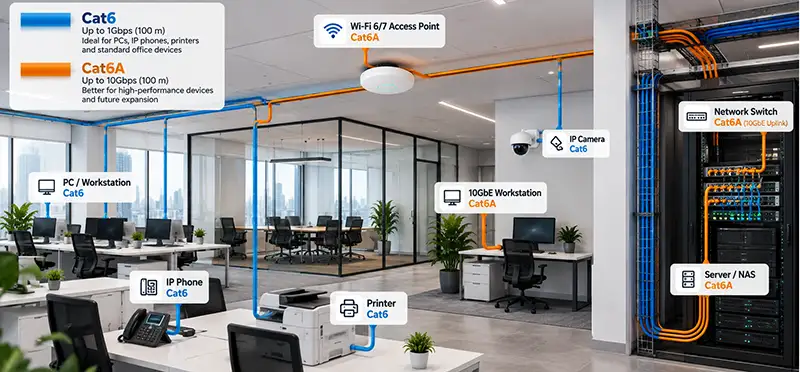
Cat6A is usually the stronger option when the project requires full-distance 10GbE, high-performance access points, significant future expansion, or an infrastructure lifecycle where replacing cables later would be difficult.
Some offices can also use a mixed approach.
For example, Cat6 can be installed for standard desks, printers, and IP phones, while Cat6A is used for wireless access points, high-performance workstations, servers, and other locations where Multi-Gigabit or 10GbE connectivity may be required.
The best solution depends on the office layout, number of users, network equipment, bandwidth requirements, budget, and expected future expansion.
Office Network Installation and IT Support in Dubai
If you are setting up a new office in Dubai, ITMan provides professional office network installation, structured cabling, network configuration, and IT Support services in Dubai.
Our services include structured network cabling, Cat6 and Cat6A installation, network rack and patch panel setup, Cisco switch installation and configuration, MikroTik configuration, Ubiquiti UniFi installation, Wi-Fi access point installation and configuration, VLAN setup, router and firewall configuration, server installation, Windows Server and VMware/ESXi setup, CCTV network cabling, network troubleshooting, maintenance, and IT Support.
Whether you are building a small office network or upgrading an existing business infrastructure, we can help with the project from cabling and rack installation to switch configuration, Wi-Fi setup, testing, troubleshooting, and ongoing IT Support in Dubai.


















