











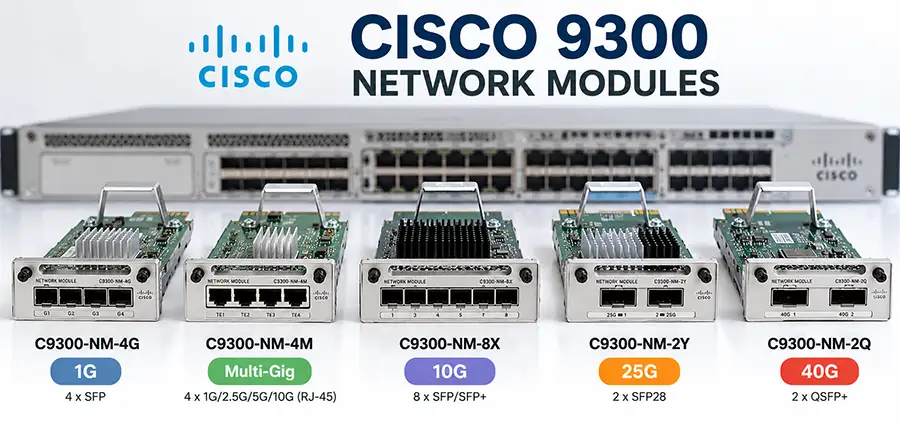
Cisco Catalyst 9300 switches support several optional network modules that allow you to choose the uplink type and speed that best fits your network. Depending on the model, these modules can provide 1G SFP, Multigigabit Ethernet, 10G SFP+, 25G SFP28, or 40G QSFP+ connectivity. This flexibility makes the Catalyst 9300 suitable for everything from standard enterprise access networks to high-bandwidth distribution and aggregation environments.
However, choosing the right Cisco Catalyst 9300 network module can be confusing. Models such as the C9300-NM-4G, C9300-NM-4M, C9300-NM-8X, C9300-NM-2Y, and C9300-NM-2Q may look similar, but they support very different interfaces and uplink speeds.
In this guide, we compare the main Cisco Catalyst 9300 network modules, explain their ports and supported speeds, and help you determine which module is appropriate for different network requirements.
What Are Cisco Catalyst 9300 Network Modules?
Cisco Catalyst 9300 network modules are optional uplink modules installed in the network-module slot on compatible Catalyst 9300 switches. Instead of forcing every switch to use the same uplink configuration, Cisco allows administrators to select an uplink module according to the required connection type and bandwidth.
For example, a network that only requires standard Gigabit fiber uplinks may use the C9300-NM-4G. A network requiring multiple 10Gbps fiber connections can instead use the C9300-NM-8X, while higher-bandwidth deployments can use 25G through the C9300-NM-2Y or 40G through the C9300-NM-2Q.
There is also the C9300-NM-4M, which is different from the fiber-oriented modules because it provides Multigigabit Ethernet connectivity over copper.
This modular architecture makes it possible to adapt a Catalyst 9300 deployment to changing bandwidth requirements without replacing the entire switch.
Cisco Catalyst 9300 Network Modules Comparison
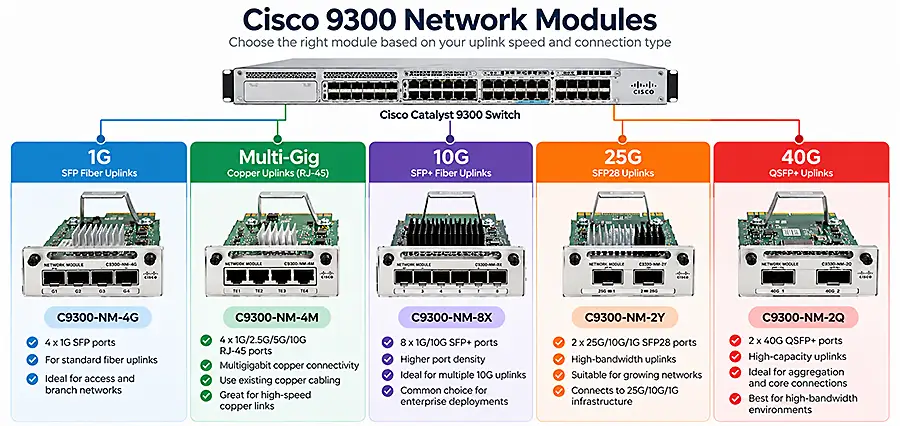
The following table shows the primary differences between the five major C9300 network modules.
| Network Module | Number of Ports | Interface | Supported Speeds | Typical Use |
|---|---|---|---|---|
| C9300-NM-4G | 4 | SFP | 1G | Standard Gigabit fiber uplinks |
| C9300-NM-4M | 4 | Multigigabit RJ-45 | Up to 10G | High-speed copper connections |
| C9300-NM-8X | 8 | SFP/SFP+ | 1G/10G | Multiple 10G fiber uplinks |
| C9300-NM-2Y | 2 | SFP28 | 1G/10G/25G | High-bandwidth 25G uplinks |
| C9300-NM-2Q | 2 | QSFP+ | 40G | High-capacity 40G uplinks |
The biggest difference is therefore not simply the number of ports. Each module is designed around a different interface and bandwidth requirement.
C9300-NM-4G: 4-Port 1G SFP Network Module
The C9300-NM-4G is one of the simplest uplink options for Cisco Catalyst 9300 switches. It provides four Gigabit Ethernet SFP ports and is primarily intended for networks that require conventional 1Gbps fiber uplinks.
This module is suitable when 10G, 25G, or 40G bandwidth is unnecessary. It can be a practical option for branch offices, smaller enterprise networks, or access-layer switches where uplink traffic remains relatively moderate.
Because it uses SFP interfaces, administrators can select appropriate supported transceivers according to fiber type, distance, and network design.
When Does C9300-NM-4G Make Sense?
The C9300-NM-4G is particularly useful when the existing network infrastructure is based around 1G fiber and there is no immediate requirement to migrate the uplink layer to 10Gbps.
Its four-port configuration also provides flexibility for redundant connections or multiple upstream links.
However, networks expecting significant traffic growth should consider whether moving directly to a higher-speed module such as the C9300-NM-8X would provide better long-term flexibility.
C9300-NM-4M: 4-Port Multigigabit Network Module
The C9300-NM-4M takes a different approach from the other Catalyst 9300 network modules. Instead of SFP-based fiber interfaces, it provides four Multigigabit Ethernet copper ports.
Multigigabit Ethernet is useful because it allows Ethernet connections to operate at speeds beyond traditional 1Gbps over compatible copper cabling and equipment.
Depending on the configuration and connected equipment, the C9300-NM-4M can support multiple Ethernet speeds up to 10Gbps.
This makes it particularly useful in environments where high-speed copper connectivity is required but installing fiber is undesirable or impractical.
C9300-NM-4M vs Fiber Network Modules
The key consideration when choosing the C9300-NM-4M is not simply bandwidth. It is also the physical medium.
If the upstream device is connected through fiber, an SFP-based module such as the C9300-NM-8X may be more appropriate. If high-speed connectivity is required over twisted-pair copper, the C9300-NM-4M becomes much more relevant.
This distinction is important because purchasing a 10G-capable module does not automatically mean it will work with the physical connections already installed in the network.
C9300-NM-8X: 8-Port 1G/10G SFP+ Network Module
For many enterprise Catalyst 9300 deployments, the C9300-NM-8X represents a significant step up from the C9300-NM-4G.
It provides eight SFP/SFP+ interfaces and supports 1 Gigabit and 10 Gigabit Ethernet connectivity. This combination provides both higher port density and significantly greater bandwidth flexibility.
A major advantage is the ability to use multiple 10G uplinks. This can be valuable when a Catalyst 9300 needs connections to distribution switches, core infrastructure, servers, or other high-bandwidth network devices.
The support for both 1G and 10G also makes the C9300-NM-8X useful during network migrations. An organization can maintain existing 1G links while gradually moving selected connections to 10G.
C9300-NM-4G vs C9300-NM-8X
The choice between these two modules usually comes down to required speed and port density. C9300-NM-4G provides four 1G SFP interfaces, while C9300-NM-8X provides eight interfaces with support for both 1G and 10G connectivity.
For a basic access-layer deployment where 1G uplinks provide sufficient bandwidth, the C9300-NM-4G may meet the requirement. If multiple 10G connections are required—or expected in the future—the C9300-NM-8X provides substantially greater expansion capability.
C9300-NM-2Y: 2-Port 25G SFP28 Network Module
The C9300-NM-2Y is designed for environments requiring higher uplink bandwidth than conventional 10G connections can provide.
It includes two SFP28 interfaces and supports 25G, 10G, and 1G operation. This multi-speed capability is one of its most important characteristics.
A 25Gbps connection provides significantly more bandwidth per port than 10Gbps while retaining the compact SFP-family form factor.
The C9300-NM-2Y can therefore be useful for connecting a Catalyst 9300 to higher-performance aggregation or core infrastructure without immediately moving to 40G interfaces.
Why Use 25G Instead of 10G?
The obvious benefit is bandwidth.
A single 25G connection offers 2.5 times the nominal bandwidth of a 10G connection. This can become important when many access devices are generating traffic through the same uplink.
It can also provide a practical migration path for networks where 10G is becoming a bottleneck but 40G connectivity is unnecessary.
The ability of the C9300-NM-2Y to support lower interface speeds also provides additional deployment flexibility compared with a fixed-speed uplink design.
C9300-NM-8X vs C9300-NM-2Y
These two modules address different requirements.
The C9300-NM-8X prioritizes port density, offering eight interfaces with speeds up to 10G. The C9300-NM-2Y provides only two interfaces but increases the maximum speed of each connection to 25G.
Therefore, the decision should not be based solely on which module offers the highest speed.
If you need several independent 10G connections, the C9300-NM-8X may better match the network topology. If you need fewer but substantially faster uplinks, the C9300-NM-2Y is designed for that scenario.
C9300-NM-2Q: 2-Port 40G QSFP+ Network Module
The C9300-NM-2Q sits at the high-bandwidth end of the Catalyst 9300 network-module range discussed here.
It provides two 40 Gigabit Ethernet QSFP+ interfaces, allowing the switch to connect to network infrastructure through high-capacity 40G links.
Unlike conventional SFP+ ports, the C9300-NM-2Q uses the larger QSFP+ interface associated with 40Gbps Ethernet connectivity.
This makes the module suitable for deployments where large amounts of traffic need to be carried between the Catalyst 9300 and upstream switching infrastructure.
Potential use cases include high-density access deployments, aggregation connections, campus networks, and environments where several lower-speed access links ultimately converge on the same uplink.
C9300-NM-2Q vs C9300-NM-2Y
Although these modules both provide two ports, they are fundamentally different.
The C9300-NM-2Y uses SFP28 interfaces and provides speeds up to 25G per port. The C9300-NM-2Q uses QSFP+ interfaces and is designed around 40G connectivity.
That means the choice also affects the required transceivers, cabling, and upstream equipment.
If the existing infrastructure uses 25G SFP28 interfaces, selecting a 40G QSFP+ module simply because it offers a higher maximum bandwidth would not necessarily make sense. The entire link must support the selected interface and speed.
Which Cisco Catalyst 9300 Network Module Should You Choose?
The easiest way to choose a module is to start with the required uplink rather than the switch itself.
For standard 1G fiber connectivity, the C9300-NM-4G provides four SFP ports.
For high-speed copper connectivity, consider the C9300-NM-4M.
For several 10G fiber connections, the C9300-NM-8X offers eight SFP/SFP+ interfaces.
For fewer but faster 25G fiber uplinks, the C9300-NM-2Y provides two SFP28 interfaces.
For 40G QSFP+ connectivity, the C9300-NM-2Q provides two 40G ports.
In practice, you should verify four factors before purchasing: required bandwidth, physical media, compatible transceiver or cable, and compatibility with the exact Catalyst 9300 switch model.
10G vs 25G vs 40G: Do You Always Need the Fastest Module?
Not necessarily.
Selecting a network module based only on its maximum bandwidth can result in unnecessary cost or an interface that does not match the rest of the network.
Consider a Catalyst 9300 connected to an upstream switch that only provides 10G SFP+ interfaces. Installing a 40G QSFP+ module does not automatically turn that existing connection into a 40G link.
Likewise, a network carrying relatively low traffic may see little practical benefit from replacing adequate 10G uplinks with 25G or 40G links.
A better approach is to examine current uplink utilization, expected growth, redundancy requirements, upstream switch capabilities, cabling, and available transceivers before selecting the module.
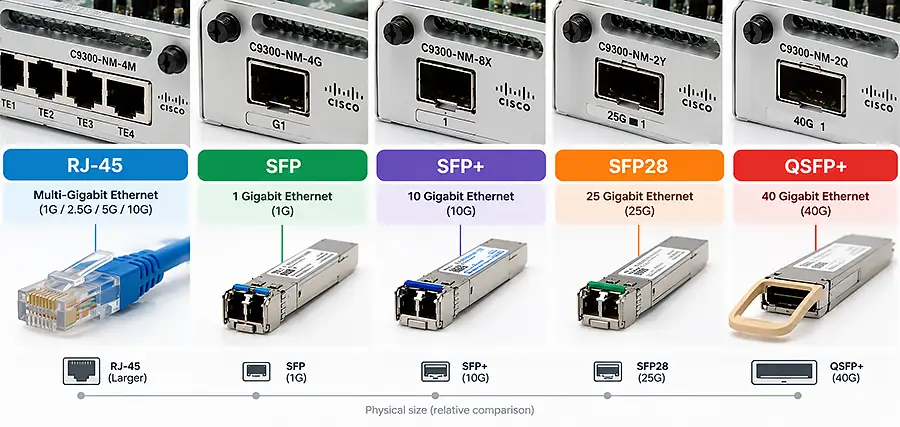
SFP, SFP+, SFP28 and QSFP+: What Is the Difference?
These interface names are particularly important when comparing Catalyst 9300 network modules.
SFP is commonly associated with 1 Gigabit Ethernet connections.
SFP+ is widely used for 10 Gigabit Ethernet.
SFP28 uses a similar compact form factor but enables 25 Gigabit Ethernet connectivity.
QSFP+ is commonly associated with 40 Gigabit Ethernet and uses a different physical form factor.
The fact that some interfaces look similar does not mean every transceiver will automatically operate in every port. Compatibility depends on the module, transceiver, operating speed, software support, and Cisco’s supported hardware combinations.
For this reason, transceiver compatibility should always be verified before ordering optics for a Catalyst 9300 network module.
Can You Upgrade a Catalyst 9300 Network Module Later?
One of the main advantages of the modular uplink architecture is flexibility.
A network may initially operate with relatively modest uplink requirements and later need additional bandwidth as the number of users, access points, servers, cameras, or other connected devices increases.
Instead of replacing the entire Catalyst 9300 solely because the uplink requirements have changed, an appropriate network-module upgrade may provide the required connectivity.
However, compatibility with the specific switch model and Cisco’s installation requirements should always be checked before replacing a module.
What Should You Check Before Buying a C9300 Network Module?
Before purchasing any Cisco Catalyst 9300 network module, confirm the exact switch model first. Do not assume that every module works identically across every member of the broader Catalyst 9300 family.
Next, determine the interface available on the device at the other end of the connection. A 25G SFP28 module is useful only when the rest of the link can operate with the intended configuration.
You should also verify the transceiver or cable. For fiber connections, factors such as single-mode versus multimode fiber, wavelength, distance, connector type, and transceiver compatibility need to be considered.
Finally, think about future bandwidth requirements. If a network is already approaching the capacity of its existing uplinks, selecting a module with room for expansion may avoid another upgrade shortly afterward.
FAQ
Is C9300-NM-4G a 10G module?
No. The C9300-NM-4G is designed around four 1G SFP interfaces. For 10G SFP+ connectivity, the C9300-NM-8X is one of the relevant Catalyst 9300 options.
What is the difference between C9300-NM-4G and C9300-NM-4M?
C9300-NM-4G provides four 1G SFP interfaces, while C9300-NM-4M provides four Multigigabit Ethernet copper interfaces capable of higher speeds.
Does C9300-NM-8X support 10G?
Yes. The C9300-NM-8X supports 10G SFP+ connectivity as well as 1G operation.
How many ports does C9300-NM-8X have?
It provides eight network-module ports.
What speed does C9300-NM-2Y support?
The C9300-NM-2Y provides two SFP28 interfaces supporting up to 25Gbps, with support for lower speeds in compatible configurations.
Is C9300-NM-2Y SFP+ or SFP28?
Its interfaces are SFP28. The module is designed for 25G/10G/1G connectivity.
What is C9300-NM-2Q used for?
The C9300-NM-2Q provides two QSFP+ interfaces for high-bandwidth 40 Gigabit Ethernet uplinks.
What is the difference between C9300-NM-2Y and C9300-NM-2Q?
The 2Y uses SFP28 and supports up to 25G per interface, while the 2Q uses QSFP+ and provides 40G interfaces.
Which C9300 network module should I use for 10G fiber?
For deployments requiring multiple 10G SFP+ fiber connections, the C9300-NM-8X is specifically designed for this type of requirement.
Which C9300 network module supports 25G?
The C9300-NM-2Y provides two SFP28 interfaces supporting 25 Gigabit Ethernet.
Which C9300 network module supports 40G?
The C9300-NM-2Q provides two 40G QSFP+ interfaces.
Are transceivers included with Cisco C9300 network modules?
Network modules and optical transceivers are generally treated as separate components. Check the exact product listing and package contents before purchasing.
Conclusion
Choosing the right Cisco Catalyst 9300 network module depends on much more than selecting the model with the highest maximum speed.
The C9300-NM-4G is intended for standard 1G SFP uplinks, while the C9300-NM-4M addresses Multigigabit copper connectivity. The C9300-NM-8X provides greater port density and 10G SFP+ connectivity, the C9300-NM-2Y extends uplink speeds to 25G through SFP28, and the C9300-NM-2Q provides high-capacity 40G QSFP+ connectivity.
Before choosing between C9300-NM-4G, C9300-NM-4M, C9300-NM-8X, C9300-NM-2Y, and C9300-NM-2Q, check the required speed, interface type, transceiver compatibility, upstream equipment, and exact Catalyst 9300 switch model.
Matching the network module to the actual topology—not simply choosing the fastest option—provides a more practical and scalable Catalyst 9300 deployment.


















