











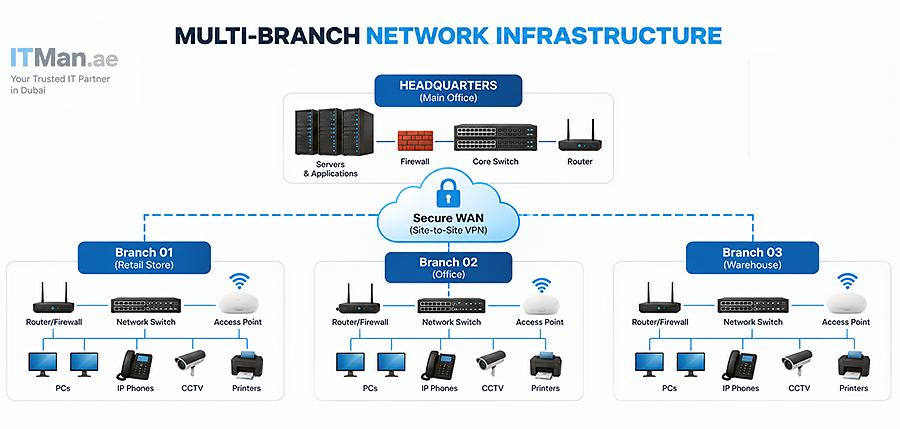
Running a business from one office is relatively straightforward from a networking perspective. Once a company expands to two, three, or ten branches, however, the network becomes much more complicated. Each location needs reliable internet access, secure communication, controlled access to company resources, WiFi coverage, monitoring, and a clear strategy for connecting with other branches. This is why it is important to properly Plan Network Infrastructure for a Multi-Branch Business before purchasing switches, routers, access points, firewalls, or servers.
A good network should not only work today; it should also be secure, manageable, scalable, and ready for future expansion. For businesses in Dubai and across the UAE, proper network planning becomes even more important when offices, warehouses, retail locations, and remote employees need to access the same business applications and resources.
How to Plan Network Infrastructure for a Multi-Branch Business
The first step when you Plan Network Infrastructure for a Multi-Branch Business is understanding how every branch actually operates. Installing similar equipment in every office without considering the number of users, applications, traffic, security requirements, and future growth can result in unnecessary costs or poor performance.
For example, a small branch with eight employees may only require a compact managed switch, firewall, and one or two access points. A larger branch with 80 employees, IP phones, CCTV cameras, servers, printers, and multiple wireless networks requires a completely different design.
Before designing the network, determine how many employees, wired devices, wireless devices, IP phones, cameras, printers, servers, and other endpoints will be connected at each location. You should also identify which services must communicate between branches. This information becomes the foundation of the network design.
Start With a Clear Network Architecture
A multi-branch network should have a defined architecture rather than a collection of independently installed devices. Many businesses operate with a headquarters or main office and several smaller branches. Depending on the organization, important services may be located at headquarters, in a data center, in the cloud, or distributed across several locations.
When you Plan Network Infrastructure for a Multi-Branch Business, create a network diagram showing every location and the connections between them. The diagram should identify internet connections, routers, firewalls, switches, access points, servers, VPN connections, VLANs, IP address ranges, and important business systems. This documentation makes troubleshooting and future expansion significantly easier.
Choose the Right Connection Between Branches
One of the biggest questions in a multi-branch environment is how different locations will communicate. Site-to-site VPN is a common solution for businesses that need secure communication between offices over standard internet connections. An encrypted VPN tunnel can allow employees at one branch to securely access servers, applications, or other resources located at another branch.
Larger organizations may use technologies such as SD-WAN, MPLS, dedicated leased lines, or other managed WAN services depending on their requirements. The right solution depends on bandwidth, reliability requirements, budget, application sensitivity, and the number of locations.
For example, a business using mainly cloud applications may have different WAN requirements from a company that constantly transfers large files between branches.
Create a Proper IP Addressing Strategy
IP addressing is easy to overlook when a company has only one location. It becomes much more important as new branches are added. When you Plan Network Infrastructure for a Multi-Branch Business, avoid using random IP ranges at different locations. A structured addressing scheme makes routing, VPN configuration, monitoring, and troubleshooting much easier.
For example, different private subnets can be assigned systematically to Branch A, Branch B, Branch C, and headquarters. Within each branch, additional subnets can separate users, VoIP phones, CCTV systems, servers, management interfaces, and guest devices. The exact addressing structure depends on the size of the organization, but it should always leave enough space for future expansion.
Use VLANs to Separate Network Traffic
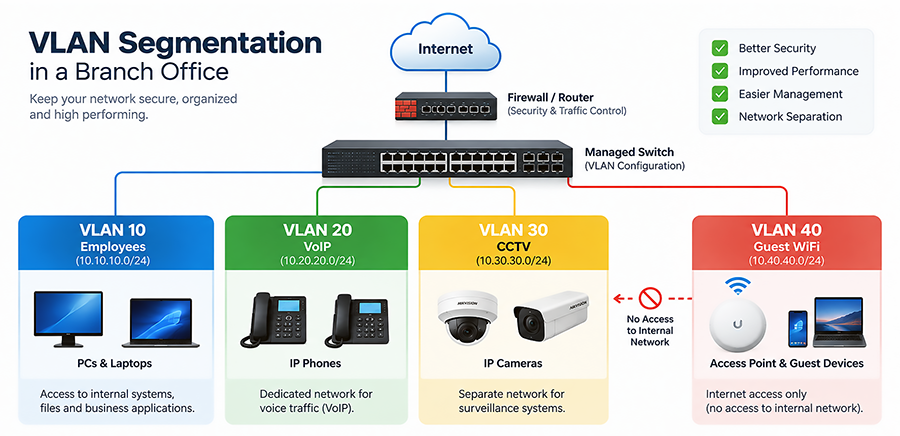
A flat network where every device belongs to the same broadcast domain is rarely a good design for a modern business. VLANs allow administrators to logically separate devices even when they are connected to the same physical switching infrastructure.
For example, a branch could have separate VLANs for employees, IP phones, CCTV cameras, servers, guest WiFi, and network management.
This separation improves security and gives administrators much better control over how traffic moves through the network. When you Plan Network Infrastructure for a Multi-Branch Business, the VLAN structure should also be reasonably consistent across locations. Standardization makes administration much easier, especially as the number of branches increases.
Select Switches Based on Actual Requirements
Not every branch needs the same network switch. The number of ports is only one consideration. You should also evaluate uplink speed, PoE requirements, switching capacity, Layer 3 capabilities, redundancy, stacking, management features, and expected future growth.
If a branch has IP phones, wireless access points, or IP cameras, PoE or PoE+ switches can simplify deployment by delivering power and data through the same Ethernet cable. Larger branches may require 10Gbps or faster uplinks between access and core switches, while smaller offices may operate perfectly well with Gigabit Ethernet access ports and suitable uplinks.
A common mistake is purchasing equipment based only on today’s requirements. If a branch currently uses 20 switch ports, installing a 24-port switch may leave very little room for expansion.
Plan WiFi for Each Branch Separately
WiFi should not be designed simply by deciding how many access points to purchase. Office size, walls, building materials, neighboring wireless networks, user density, device count, and application requirements can all affect wireless performance.
A warehouse with metal racks requires a very different wireless design from a small open-plan office.
When you Plan Network Infrastructure for a Multi-Branch Business, consider WiFi coverage and capacity at every location individually. Access point placement, channel planning, transmit power, roaming, SSIDs, VLAN assignment, and guest access should all be considered. For larger deployments, a wireless survey can help identify coverage problems before or after installation.
Build Security Into the Network Design
Security should be part of the architecture from the beginning rather than something added after installation. Every branch creates another entry point into the organization’s network. Firewalls should control inbound and outbound traffic, while site-to-site connections should use secure encryption. VLANs and firewall policies can restrict communication between different parts of the network.
For example, guest WiFi users should normally have internet access without being able to reach internal company devices. CCTV cameras may also be isolated from employee computers, while management interfaces for switches and access points should only be accessible by authorized administrators. Centralized logging and monitoring can further improve visibility across the entire infrastructure.
Consider Internet Redundancy
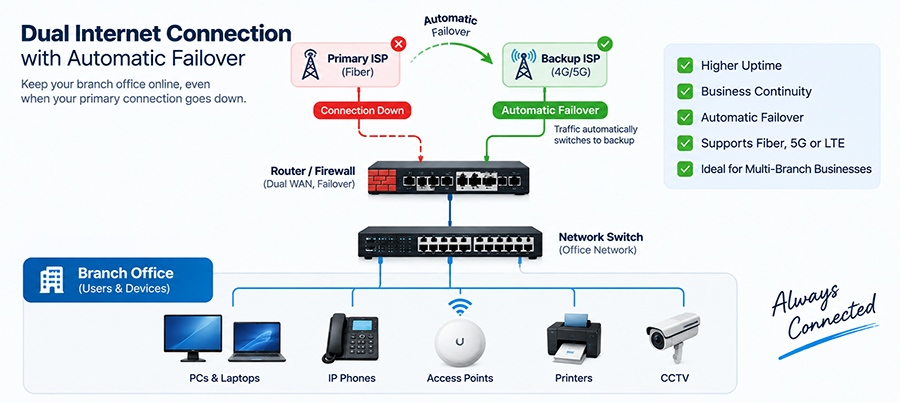
If a branch depends heavily on cloud applications, VoIP, VPN connections, or online systems, an internet outage can effectively stop operations at that location. For critical branches, consider installing a secondary internet connection. A properly configured firewall or router can automatically fail over to the backup connection when the primary ISP becomes unavailable.
The backup does not necessarily need to provide the same bandwidth as the primary connection. Its purpose may simply be to keep critical services running until the main connection returns. This is an important consideration when you Plan Network Infrastructure for a Multi-Branch Business where downtime directly affects sales or productivity.
Think About VoIP and Real-Time Applications
Voice and video traffic are more sensitive to latency, packet loss, and jitter than ordinary web browsing. If branches use IP phones, video conferencing, or other real-time applications, Quality of Service (QoS) should be considered during network design. QoS can prioritize important traffic when network links become congested.
Bandwidth planning is also important. A connection that appears fast enough for ordinary internet usage may perform poorly when dozens of simultaneous calls, cloud applications, backups, and file transfers share the same link.
Centralize Network Monitoring
Managing one router and two switches manually may be practical. Managing dozens of switches, firewalls, access points, and VPN connections across multiple branches is not. Monitoring should therefore be included when you Plan Network Infrastructure for a Multi-Branch Business.
Administrators should be able to identify whether a device is offline, an uplink is overloaded, a VPN tunnel has failed, or an interface is generating errors. SNMP-based monitoring, centralized dashboards, syslog servers, and vendor management platforms can provide better visibility into network health.
This can also make remote IT Support much more effective because technicians can identify many problems before traveling to the branch.
Standardize Equipment Across Branches
Standardization can significantly reduce the complexity of multi-branch networks. Using completely different switches, firewalls, wireless systems, and configuration methods at every branch makes maintenance more difficult. Whenever practical, use a standard architecture for similar branches.
For example, small branches could follow one predefined equipment and configuration template, medium offices another, and major locations a more advanced design. This approach simplifies configuration backups, spare equipment management, firmware updates, documentation, troubleshooting, and IT Support.
Don’t Forget the Physical Infrastructure
Network design is not only about routers and switches. Structured cabling, patch panels, racks, fiber connections, UPS systems, grounding, labeling, ventilation, and cable management all affect reliability. Poor cabling can create intermittent problems that are difficult to diagnose. Incorrectly installed racks or overloaded power connections can also create unnecessary risks.
Every cable should be properly terminated, tested, and labeled. Patch panels and switch ports should also be documented so technicians can quickly identify where each connection leads. For larger branches, fiber optic cabling may be required between network rooms, floors, or buildings.
Plan for Network Growth
A network designed exactly for today’s requirements can become a problem surprisingly quickly. New employees may join. More IP cameras may be installed. Additional access points may be required. Servers may be upgraded, or another branch may open. Therefore, when you Plan Network Infrastructure for a Multi-Branch Business, consider what the network could look like over the next few years.
Leave sufficient switch ports, rack space, IP address capacity, PoE budget, uplink bandwidth, and firewall capacity for reasonable expansion. Scalability does not mean purchasing oversized equipment everywhere. It means designing the infrastructure so expansion does not require rebuilding the network from scratch.
Centralized vs. Local Services
Another important decision is where business services should be hosted. Some organizations keep servers at headquarters and allow branches to connect remotely. Others use cloud services, while certain businesses maintain local systems at individual branches. There is no single correct approach. If all critical services are hosted at headquarters, WAN availability becomes extremely important.
If the connection between a branch and headquarters fails, employees may lose access to essential applications. Cloud-based services can reduce some of this dependency, but they increase the importance of reliable internet connectivity. These dependencies should be identified before the infrastructure is deployed.
Document Every Branch
Documentation becomes increasingly valuable as a business grows. For each location, maintain an updated record of the network topology, IP ranges, VLAN IDs, switch models, firewall configuration, WAN details, access point locations, rack layout, and cable labeling.
Configuration backups should also be maintained for important network equipment. Good documentation can dramatically reduce troubleshooting time. Instead of trying to discover the network during an outage, an IT Support technician can immediately understand how the branch is configured.
Common Mistakes When Planning a Multi-Branch Network
One of the most common mistakes is treating each new branch as an independent project. This often results in different IP schemes, inconsistent VLANs, incompatible equipment, undocumented configurations, and complicated VPN connections. Another mistake is focusing entirely on hardware specifications while ignoring physical installation, redundancy, monitoring, and documentation.
Businesses may also underestimate bandwidth requirements or deploy WiFi access points without considering interference and user density. The goal when you Plan Network Infrastructure for a Multi-Branch Business should be to create one coordinated infrastructure rather than several unrelated networks.
Why Professional IT Support Matters for Multi-Branch Networks
As the number of locations increases, network problems become harder to isolate. An internet problem at one branch could be caused by the ISP, firewall, VPN configuration, switch, VLAN, DNS settings, cabling, or wireless infrastructure.
Professional IT Support can help businesses design, install, monitor, and troubleshoot these systems as a complete environment. It is especially useful during expansion. When a new office is opened, technicians can follow the existing network standards and integrate the branch into the company’s infrastructure rather than building an isolated network.
Need Help Planning and Installing Your Business Network in Dubai?
If you need to Plan Network Infrastructure for a Multi-Branch Business in Dubai, ITMan can help with both network planning and on-site implementation. Our technicians in Dubai can visit your office, branch, warehouse, or business location to evaluate your requirements and design the appropriate network infrastructure. We can assist with structured network cabling, racks and patch panels, Cisco switches, routers, firewalls, WiFi access points, VLAN configuration, site-to-site connectivity, VPN configuration, server installation, network troubleshooting, and other IT Support requirements.
Whether you are opening a new branch, connecting several existing offices, or rebuilding an unreliable network, we can help design and install the complete infrastructure from the physical cabling to the final network configuration. The objective is not simply to make the network work on installation day. It is to build a secure, manageable, and scalable network that can support your business as it grows.


















